EasyManua.ls Logo

Valleylab CUSA EXcel-8 - Install the Machine Control PCB; Remove the Machine Control PCB

Valleylab CUSA EXcel-8
239 pages
Print Icon
To Next Page IconTo Next Page
To Previous Page IconTo Previous Page
Loading...
Ultrasonics
and
Machine
Control
Printed
Circuit
Boards
Remove
the
Machine
Control
PCB
Notice
Electrostatic
Sensitive
Devices
This
unit
contains
electrostatic
sensitive
components.
When
repairing
the
system,
work
at
a
static
control
workstation.
Wear
a
grounding
strap
when
handling
electrostatic
sensitive
components.
Handie
circuit
boards
by
their
nonconductive
edges.
Use
an
antistatic
container
for
transport
of
electrostatic
sensitive
components
and
circuit
boards.
1.
Attach
an
ESD
wrist
strap,
then
disconnect
the
50-pin
ribbon
cable
from
the
Machine
Control
PCB
(J1).
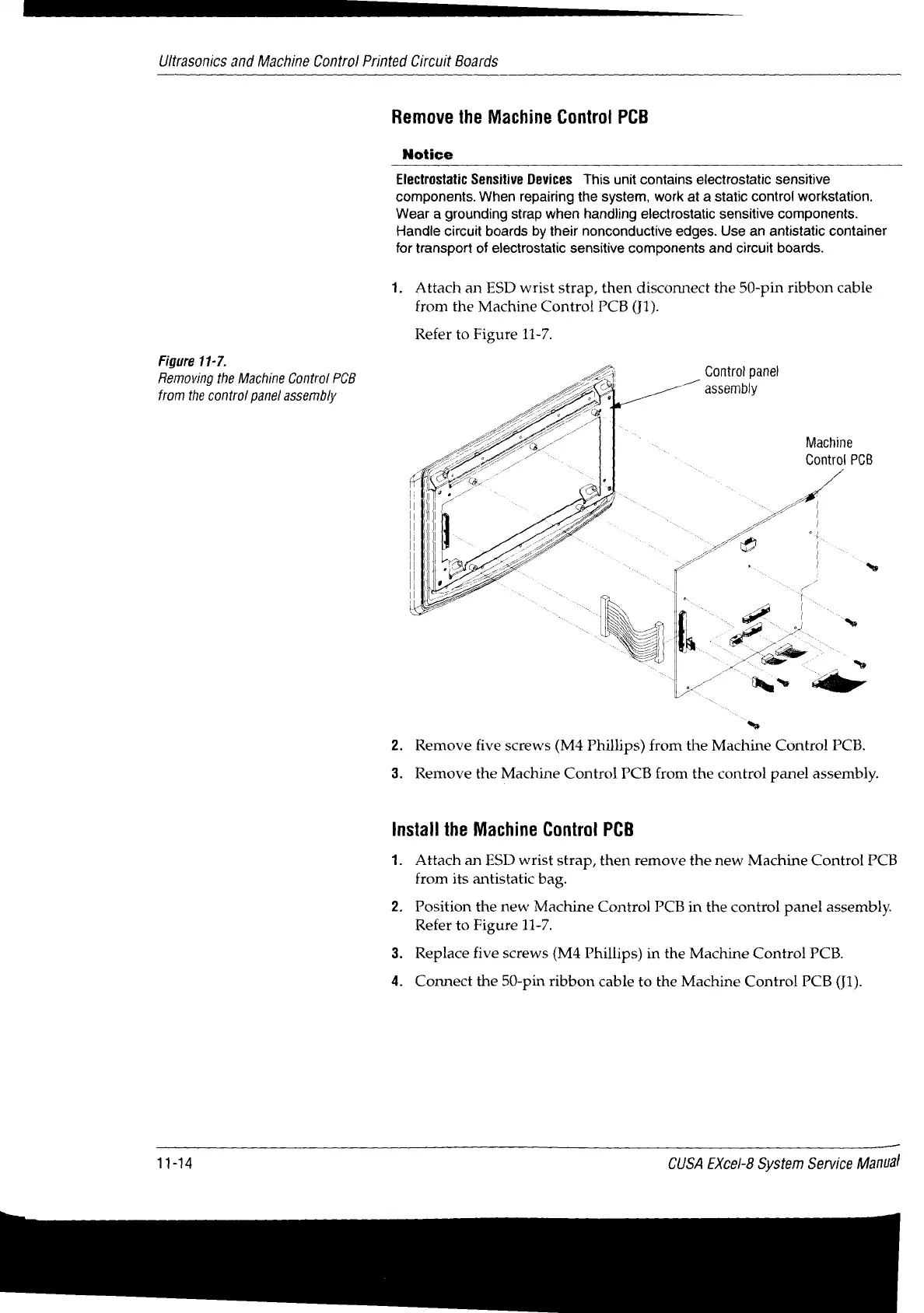
Refer
to
Figure
11-7.
Figure
11-7.
Removing
the
Machine
Control
PCB
from
the
control
panel
assembly
Gontrol
panel
<
assembly
Machine
Control
PCB
~
^"
ング
a
a
~
~
|
~
2.
Remove
five
screws
(M4
Phillips)
from
the
Machine
Control
PCB.
3.
Remove
the
Machine
Control
PCB
from
the
control
panel
assembly.
Install the
Machine
Control
PCB
1.
Attach
an
ESD
wrist
strap,
then
remove
the
new
Machine
Control
PCB
from
its
antistatic
bag.
2.
Position
the
new
Machine
Control
PCB
in
the
control
panel
assembly.
Refer
to
Figure
11-7.
3.
Replace
five
screws
(M4
Phillips)
in
the
Machine
Control
PCB.
4.
Connect
the
50-pin
ribbon
cable
to
the
Machine
Control
PCB
(J1).
11-14
CUSA
EXcel-8
System
Service
Manual

Table of Contents

Related product manuals