EasyManua.ls Logo

Valleylab CUSA EXcel-8 - Symbols on the Control Panel

Valleylab CUSA EXcel-8
239 pages
Print Icon
To Next Page IconTo Next Page
To Previous Page IconTo Previous Page
Loading...
Symbols
on
the
Control
Panel
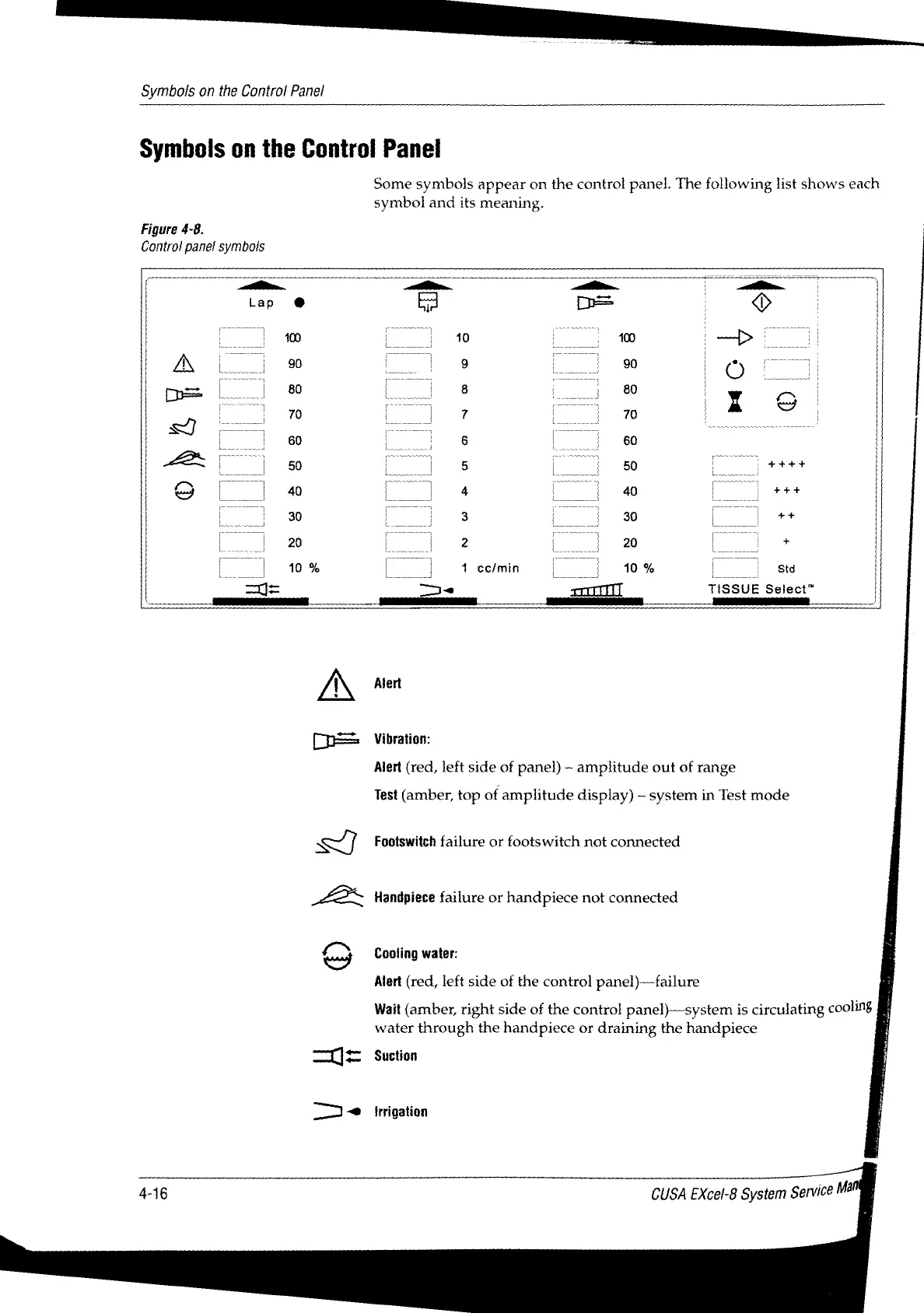
Symbols
on
the
Control
Panel
Some
symbols
appear
on
the
control
panel.
The
following
list
shows
each
symbol
and
its
meaning.
Figure
4-8.
Control
panel
symbols
= a
=
a
=
a
Lap
©
Ed
=
D
|
|
|
10
|
ーー
ジー
|
A
lo
—-
©
o
не
|
80
8
)
80
|
ro.
(77777
[一
|
Y
|
S)
o
70 Lo
J
7
|
m
|
70
) |
>
TT
PT
1
ーー
デー
デー
TE
|
60
|
6
|
|
60
Ls
os
5
(pe
SOTTO
gg
TIT
7
TT]
OT
9
|__|
4
|
4
トー
|
40
ter
|
30
_
3
41%
[|
**
|
20
|
2
|)
20
[+
[|
10%
|.)
1cemin
|
|
10%
|
sm
=
e
oil
TISSUE
Select”
A
να
OF
Vibration:
Alert
(red,
left
side
of
panel)
-
amplitude
out
of
range
Test
(amber,
top
of
amplitude
display)
system
in
Test
mode
LZ
Footswitch
failure
or
footswitch
not
connected
Handpiece
failure
or
handpiece
not
connected
fut
Cooling
water:
<
°
Alert
(red,
left
side
of
the
control
panel)—failure
Wait
(amber,
right
side
of
the
control
panel)—system
is
circulating
cooling
i
water
through
the
handpiece
or
draining
the
handpiece
|
—Ч=
Suction
TI
irrigation
4-16
CUSA
EXcel-8
System
Service
Ma

Table of Contents

Related product manuals