EasyManua.ls Logo

Valleylab CUSA EXcel-8 - General Troubleshooting

Valleylab CUSA EXcel-8
239 pages
Print Icon
To Next Page IconTo Next Page
To Previous Page IconTo Previous Page
Loading...
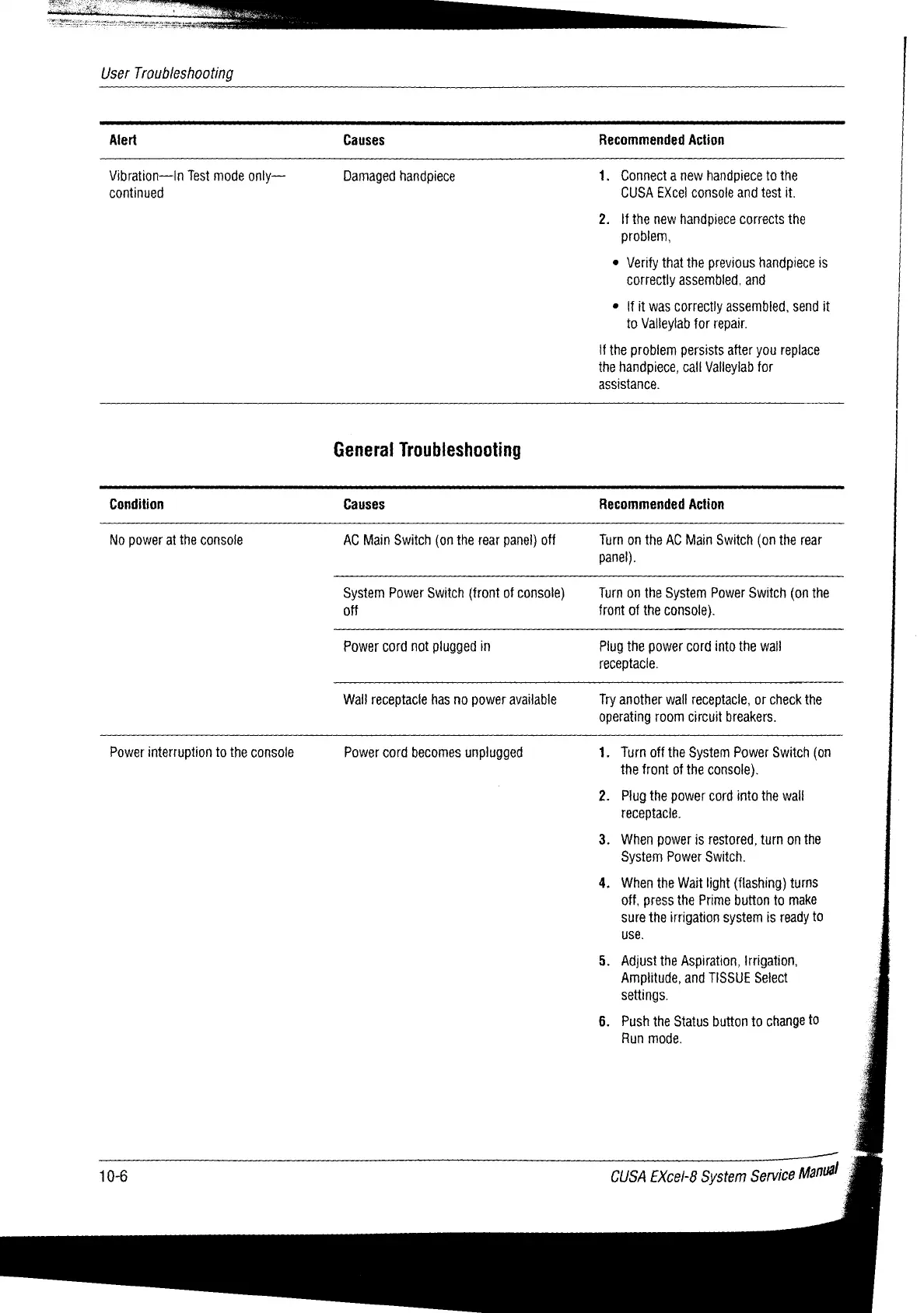
User
Troubleshooting
Alert
Causes
Recommended
Action
Vibration—In
Test
mode
onty—
continued
Damaged
handpiece
1.
Connect
a
new
handpiece
to
the
CUSA
EXcel
console
and
test
if.
2.
Ifthe
new
handpiece
corrects
the
problem,
e
Verify
that
the
previous
handpiece
is
correctly
assembled,
and
e
{fit
was
correctly
assembled,
send
it
to
Valleylab
for
repair.
Н
the
problem
persists
after
you
replace
the
handpiece,
call
Valleylab
for
assistance.
General
Troubleshooting
Condition
Causes
Recommended
Action
No
power
at
the
console
AC
Main
Switch
(on the
rear
panel)
off
Turn
on
the
AC
Main
Switch
(on
the
rear
panel).
System
Power
Switch
(front
of
console)
off
Turn
on
the
System
Power
Switch
(on
the
front
of
the
console}.
Power
cord
not
plugged
in
Plug
the
power
cord
into
the
wall
receptacle.
Wall
receptacle
has no
power
available
Try
another
wall
receptacle,
or
check
the
operating
room
circuit
breakers.
Power
interruption
to
the
console
Power
cord
becomes
unplugged
1.
Turn
off
the
System
Power
Switch
(on
the
front
of
the
console).
2.
Plug
the
power
cord
into
the wall
receptacle.
3.
When
power
is
restored,
turn
on
the
System
Power
Switch.
4.
When
the
Wait
light
(flashing)
turns
off,
press
the
Prime
button
to
make
sure
the
irrigation
system
is
ready
to
use.
5.
Adjust
the
Aspiration,
Irrigation,
Amplitude,
and
TISSUE
Select
settings.
6.
Push
the
Status button
to
change
to
Run
mode.
10-6
CUSA
EXcel-8
System
Service
Manual
À

Table of Contents

Related product manuals