EasyManua.ls Logo

Valleylab CUSA EXcel-8 - Remove the Ultrasonics PCB; Ultrasonics and Machine Control Printed Circuit Boards

Valleylab CUSA EXcel-8
239 pages
Print Icon
To Next Page IconTo Next Page
To Previous Page IconTo Previous Page
Loading...
Ultrasonics
and
Machine
Control
Printed
Circuit
Boards
mm
Ultrasonics
and
Machine
Control
Printed
Circuit
Boards
This
procedure
includes
the
steps
for
removing,
then
re-installing
the
ultrasonics
printed
circuit
board
(PCB)
and
the
Machine
Control
PCB.
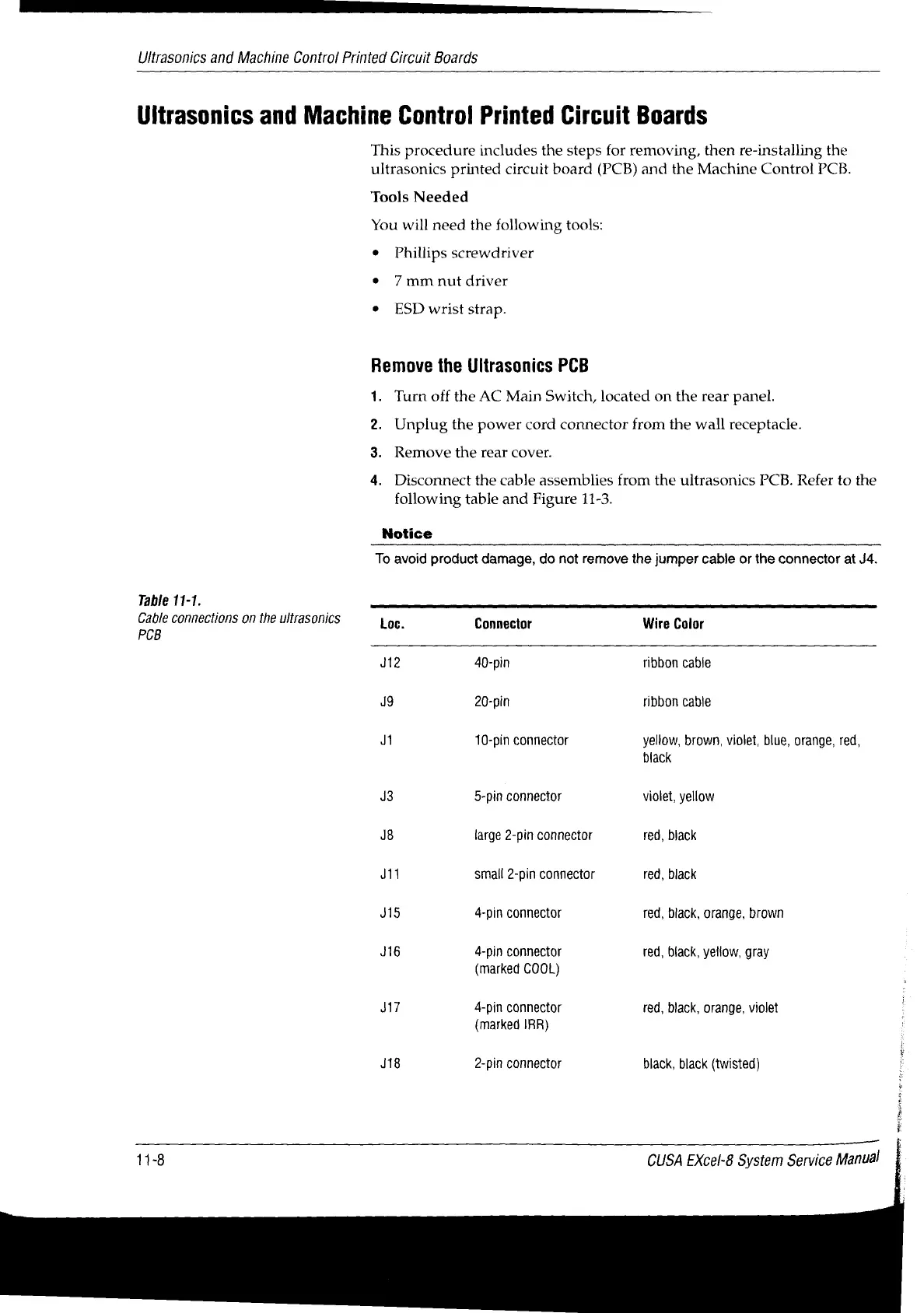
Table
11-1.
Cable
connections
on
the
ultrasonics
PCB
Tools
Needed
You
will
need
the
following
tools:
*
Phillips
screwdriver
¢
7mm
nut
driver
»
ESD
wrist
strap.
Remove
the
Ultrasonics
PCB
1.
Turn
off
the
AC
Main
Switch,
located
on
the
rear
panel.
Remove
the rear
cover.
от
Notice
Unplug
the
power
cord
connector
from
the
wall
receptacle.
Disconnect
the
cable
assemblies
from
the
ultrasonics
PCB.
Refer
to
the
following
table
and
Figure
11-3.
To
avoid
product
damage,
do
not
remove
the
jumper
cable
or
the
connector
at
J4.
Loc.
Connector
Wire
Color
J12
40-pin
ribbon
cable
J9
20-pin
ribbon
cable
Ji
10-pin
connector
yellow,
brown,
violet,
blue,
orange,
red,
black
J3
5-pin
connector
violet,
yellow
J8
large
2-pin
connector
red,
black
J11
small
2-pin
connector
red,
black
J15
4-pin
connector
red,
black,
orange,
brown
J16
4-pin
connector
red,
black,
yellow,
gray
(marked
COOL)
J17
4-pin
connector
red,
black,
orange,
violet
(marked
IRR)
J18
2-pin
connector
black,
black
(twisted)
11-8
CUSA
EXcel-8
System
Service
Manual

Table of Contents

Related product manuals