EasyManua.ls Logo

Valleylab CUSA EXcel-8 - Install the Suction Pump

Valleylab CUSA EXcel-8
239 pages
Print Icon
To Next Page IconTo Next Page
To Previous Page IconTo Previous Page
Loading...
Suction
Pump
and
Controller
Card
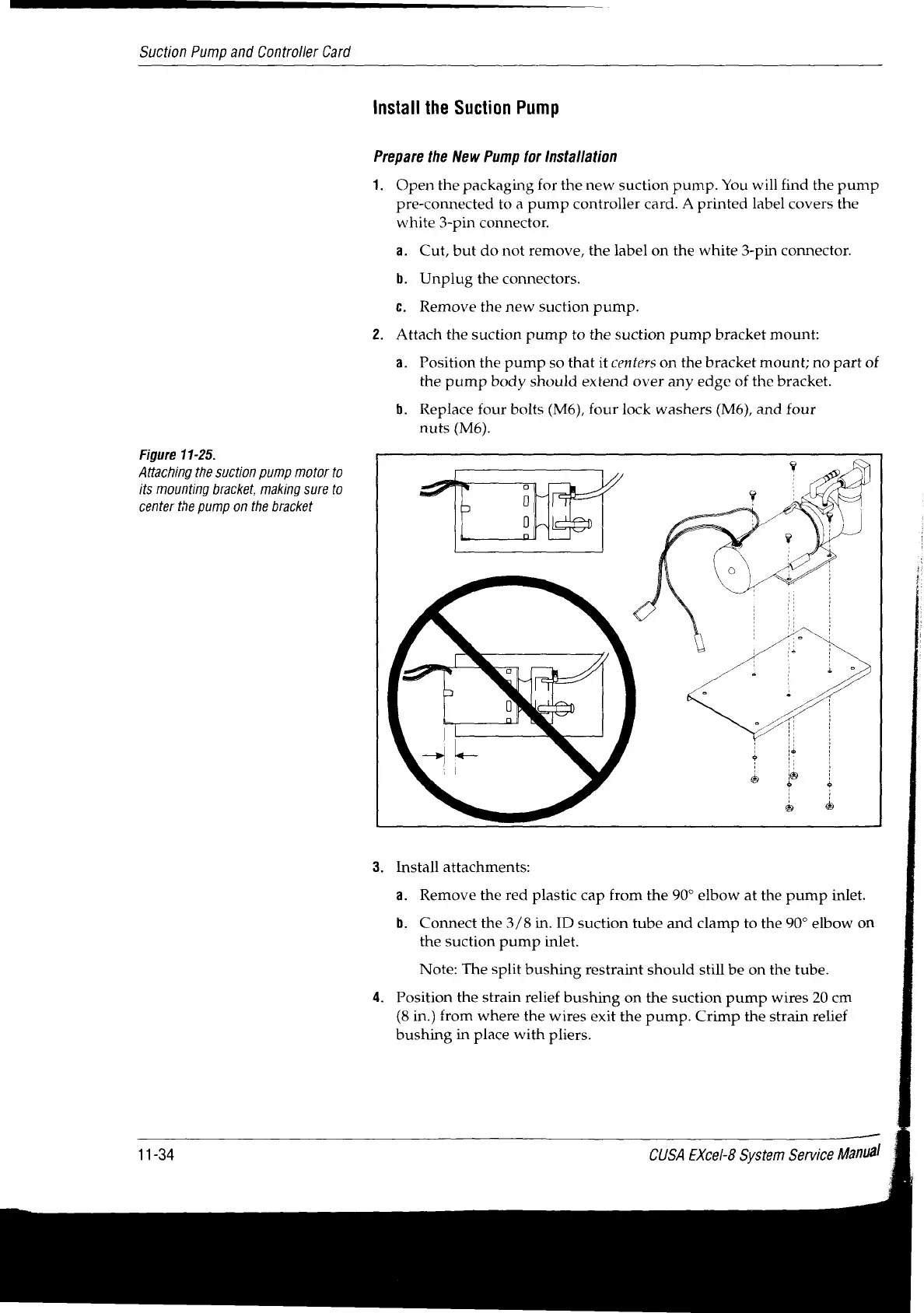
Figure
11-25.
Attaching
the
suction
pump
motor
to
its
mounting
bracket,
making
sure
to
center
the
pump
on
the
bracket
Install
the
Suction
Pump
Prepare
the
New
Pump
for
Installation
1.
Open
the
packaging
for
the
new
suction
pump.
You
will
find
the
pump
pre-connected
to
a
pump
controller
card.
A
printed
label
covers
the
white
3-pin
connector.
a.
Cut,
but
do
not
remove,
the
label
on
the
white
3-pin
connector.
b.
Unplug
the
connectors.
с.
Remove
the
new
suction
pump.
Attach
the
suction
pump
to
the
suction
pump
bracket
mount:
a.
Position
the
pump
so
that
it
centers
on
the
bracket
mount;
no
part
of
the
pump
body
should extend
over
any
edge
of
the
bracket.
b.
Replace
four
bolts
(M6),
four
lock
washers
(M6),
and
four
nuts
(M6).
Install
attachments:
a.
Remove
the
red
plastic
cap
from
the
90°
elbow
at
the
pump
inlet.
b.
Connect
the
3/8
in.
ID
suction
tube
and
clamp
to
the
90°
elbow
on
the
suction
pump
inlet.
Note:
The
split
bushing
restraint
should
still
be
on
the
tube.
Position
the
strain
relief
bushing
on
the
suction
pump
wires
20
cm
(8
in.)
from
where
the
wires
exit
the
pump.
Crimp
the
strain
relief
bushing
in
place
with
pliers.
11-34
CUSA
EXcel-8
System
Service
Manual
|

Table of Contents

Related product manuals