EasyManua.ls Logo

Valleylab CUSA EXcel-8 - Install the Display PCB

Valleylab CUSA EXcel-8
239 pages
Print Icon
To Next Page IconTo Next Page
To Previous Page IconTo Previous Page
Loading...
Control
Head
Components
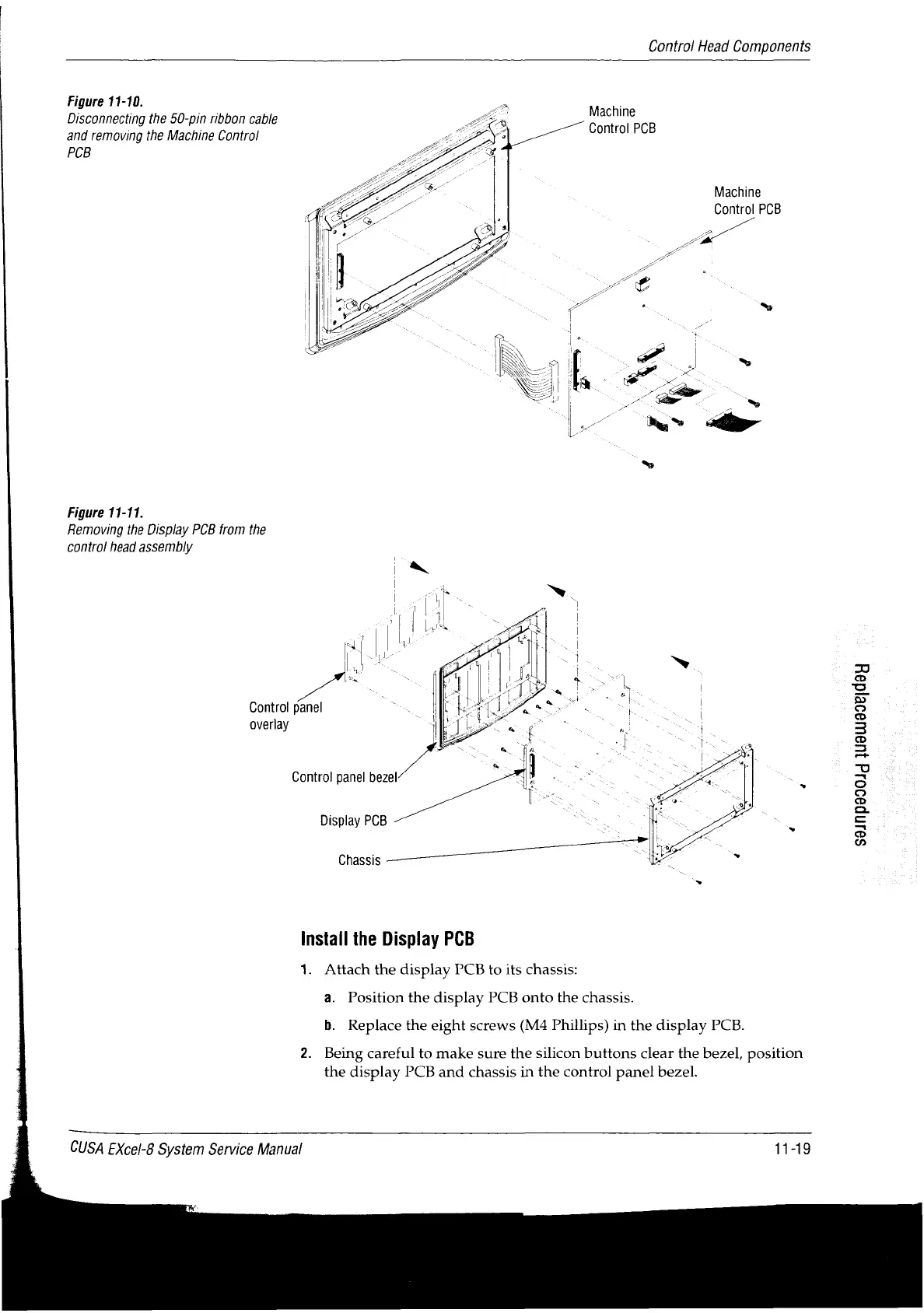
Figure
11-10.
Disconnecting
the
50-pin
ribbon
cable
and
removing
the
Machine
Control
PCB
Machine
Control
PCB
Machine
Control
PCB
Figure
11-11.
Removing
the
Display
PCB
from
the
contro!
head
assembly
Control
panel
overlay
Control
panel
bezel
Display
PCB
Chassis
Ρα
S9JnD990Jd
1U9UU996Id9J
Install
the
Display
PCB
1.
Attach
the
display
PCB
to
its
chassis:
a.
Position
the
display
PCB
onto
the
chassis.
b.
Replace
the
eight
screws
(M4
Phillips)
in
the
display
PCB.
2.
Being
careful
to
make
sure
the
silicon
buttons
clear
the
bezel,
position
the
display
PCB
and
chassis
in
the
control
panel
bezel.
CUSA
EXcel-8
System
Service
Manual
11-19

Table of Contents

Related product manuals