EasyManua.ls Logo

Valleylab CUSA EXcel-8 - Replacing a Control Panel Overlay (Optional)

Valleylab CUSA EXcel-8
239 pages
Print Icon
To Next Page IconTo Next Page
To Previous Page IconTo Previous Page
Loading...
Preparing
the
CUSA
EXcel
Console
for
Use
Replacing
a
Control
Panel
Overlay
(Optional)
On
the
control
panel,
an
overlay
identifies
buttons
and
indicators.
For
shipments
outside
the
United
States,
Valleylab
provides
an
international
overlay
on
which
symbols
identify
the
control
panel
features.
However,
Valleylab
also
makes
an
English
language
kit
available
part
of
which
is
an
overlay
showing
English
language
words
rather
than
international
symbols.
If
your
facility
has
purchased
the
English
language
kit,
the
person
who
unpacks
the
CUSA
EXcel
system
and
prepares
it
for
use
must
replace
the
international
overlay
with
the
English
language
overlay.
Tools
needed:
+
Small
pliers
*
Phillips
screwdriver.
Remove
the
Control
Panel
Assembly
1.
Swivel
the
control
head
so
that
the
front
of
the
control
panel
is
90°
from
the
front
of
the
console.
2.
Remove
four
screws
(M4
Phillips)
and
four
lock
washers
(M4),
located
at
the
rear
of
the
control
head,
that
fasten
the
control
panel
assembly
to
the
control
head.
D
Important
=
When
the
screws
are
loose,
take
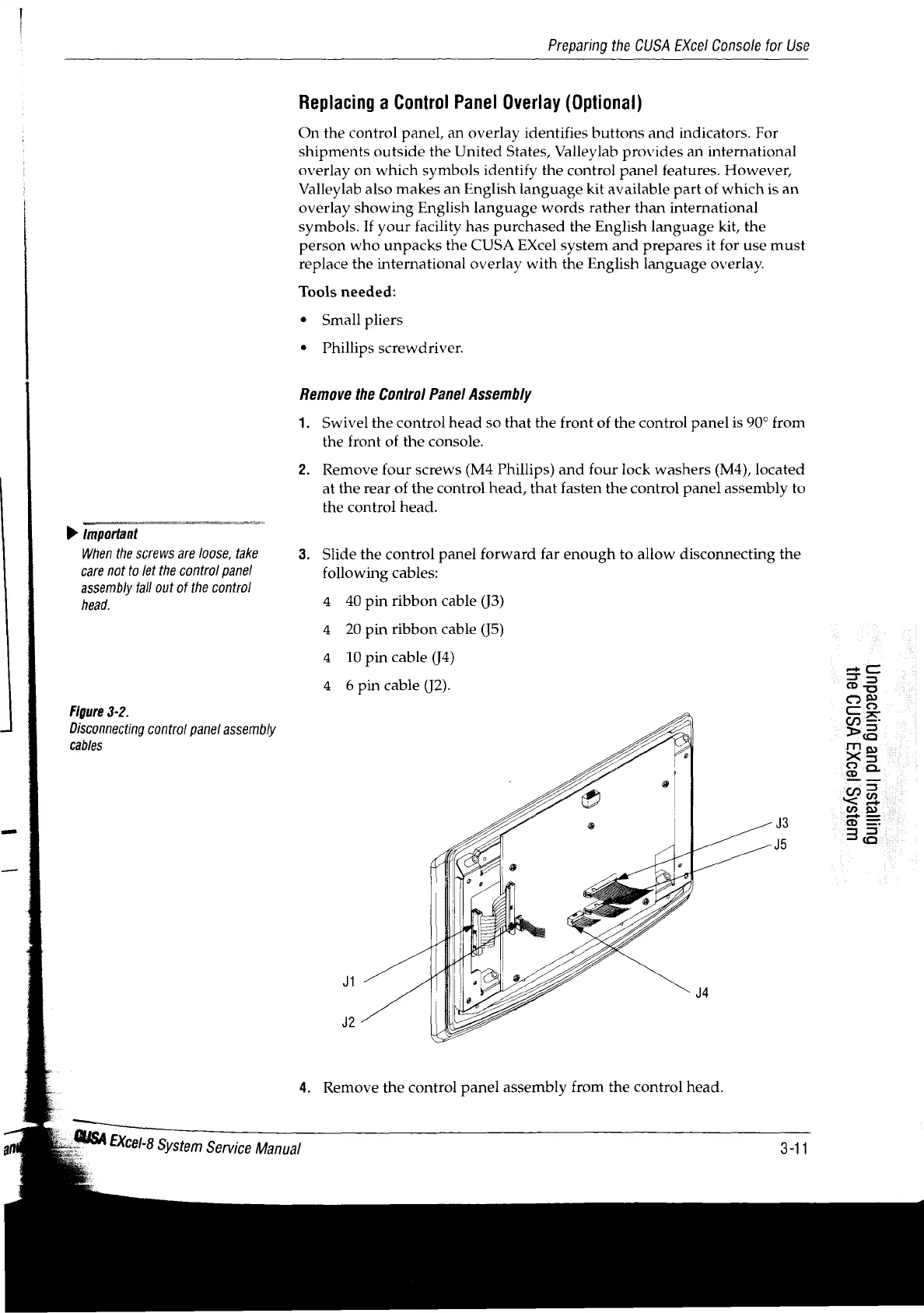
3.
Slide
the
control
panel
forward
far
enough
to
allow
disconnecting
the
care
not
to
let
the
control
panel
following
cables:
assembly
fall
out
of
the
control
head.
4
40
pin
ribbon
cable
(j3)
4
20
pin
ribbon
cable
(15)
4
10
pin
cable
(J4)
gc
4
6pin
cable
(J2).
©
3
os
Figure
3-2.
©
se
Disconnecting
control
panel
assembly
Pa
cables
Es
x5
oo
La
42
D
=
38
4.
Remove
the
control
panel
assembly
from
the
control
head.
E
_
A
2.
USA
EXcel-8
System
Service
Manual
3-11

Table of Contents

Related product manuals