EasyManua.ls Logo

Valleylab CUSA EXcel-8 - Page 29

Valleylab CUSA EXcel-8
239 pages
Print Icon
To Next Page IconTo Next Page
To Previous Page IconTo Previous Page
Loading...
Unpacking
the
CUSA
EXcel
System
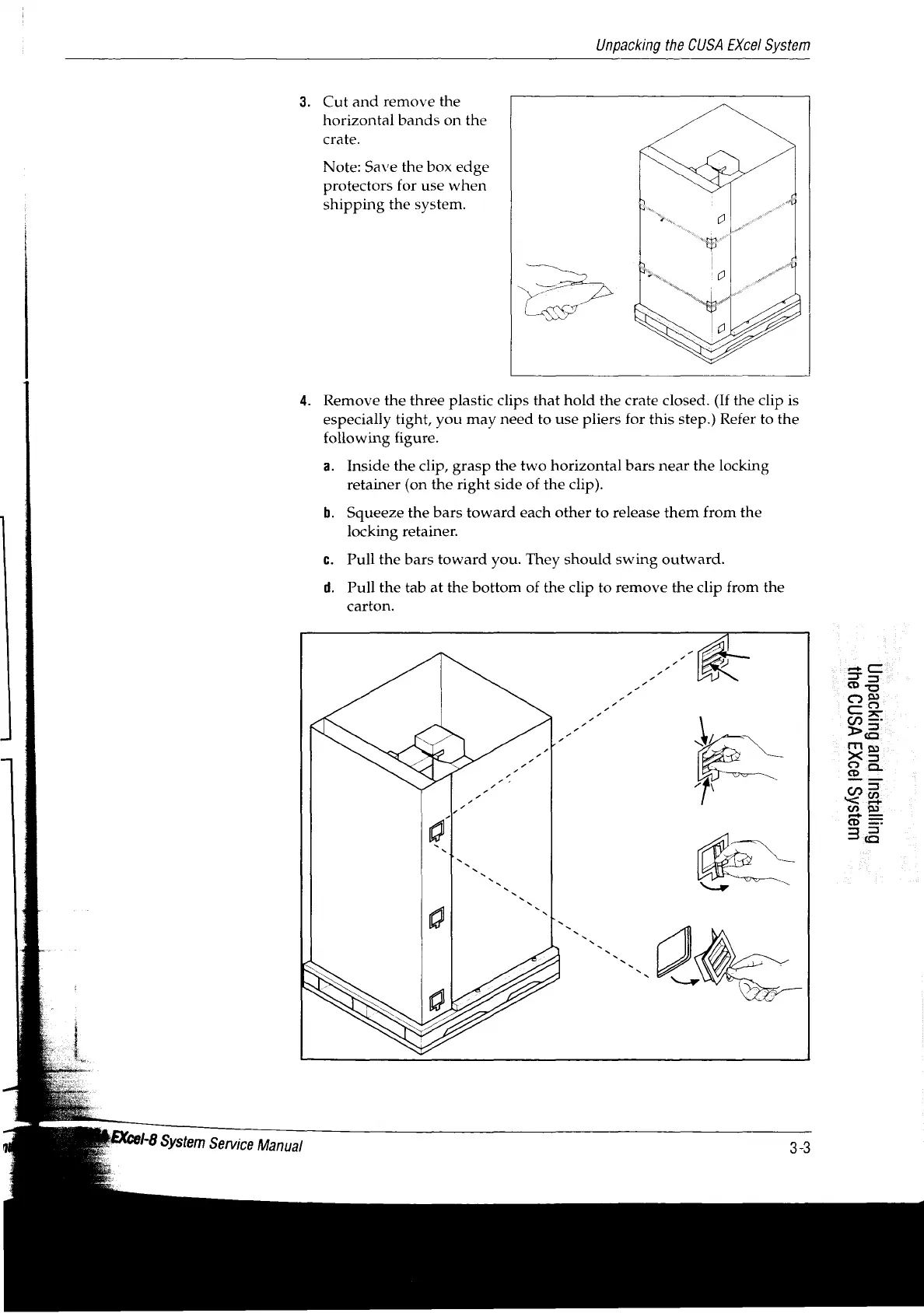
3.
Cut
and
remove
the
horizontal
bands
on
the
crate.
Note:
Save
the
box
edge
protectors
for
use
when
shipping
the
system.
4.
Remove
the
three
plastic
clips
that
hold
the
crate
closed.
(If
the
clip
is
especially
tight,
you
may
need
to
use
pliers
for
this
step.)
Refer
to
the
following
figure.
a.
Inside
the
clip,
grasp
the
two
horizontal
bars
near
the
locking
retainer
(on
the
right
side
of
the
clip).
b.
Squeeze
the
bars
toward
each
other
to
release
them
from
the
|
locking
retainer.
c.
Pull
the
bars
toward
you.
They should
swing
outward.
d.
Pull
the
tab
at
the
bottom
of
the
clip
to
remove
the
clip
from
the
carton.
UIBISÁS
[99XI
VSNO
SU)
Gurexsu]
pue
Bupjoedur)

Table of Contents

Related product manuals