EasyManua.ls Logo

Valleylab CUSA EXcel-8 - Page 33

Valleylab CUSA EXcel-8
239 pages
Print Icon
To Next Page IconTo Next Page
To Previous Page IconTo Previous Page
Loading...
Unpacking
the
CUSA
EXcel
System
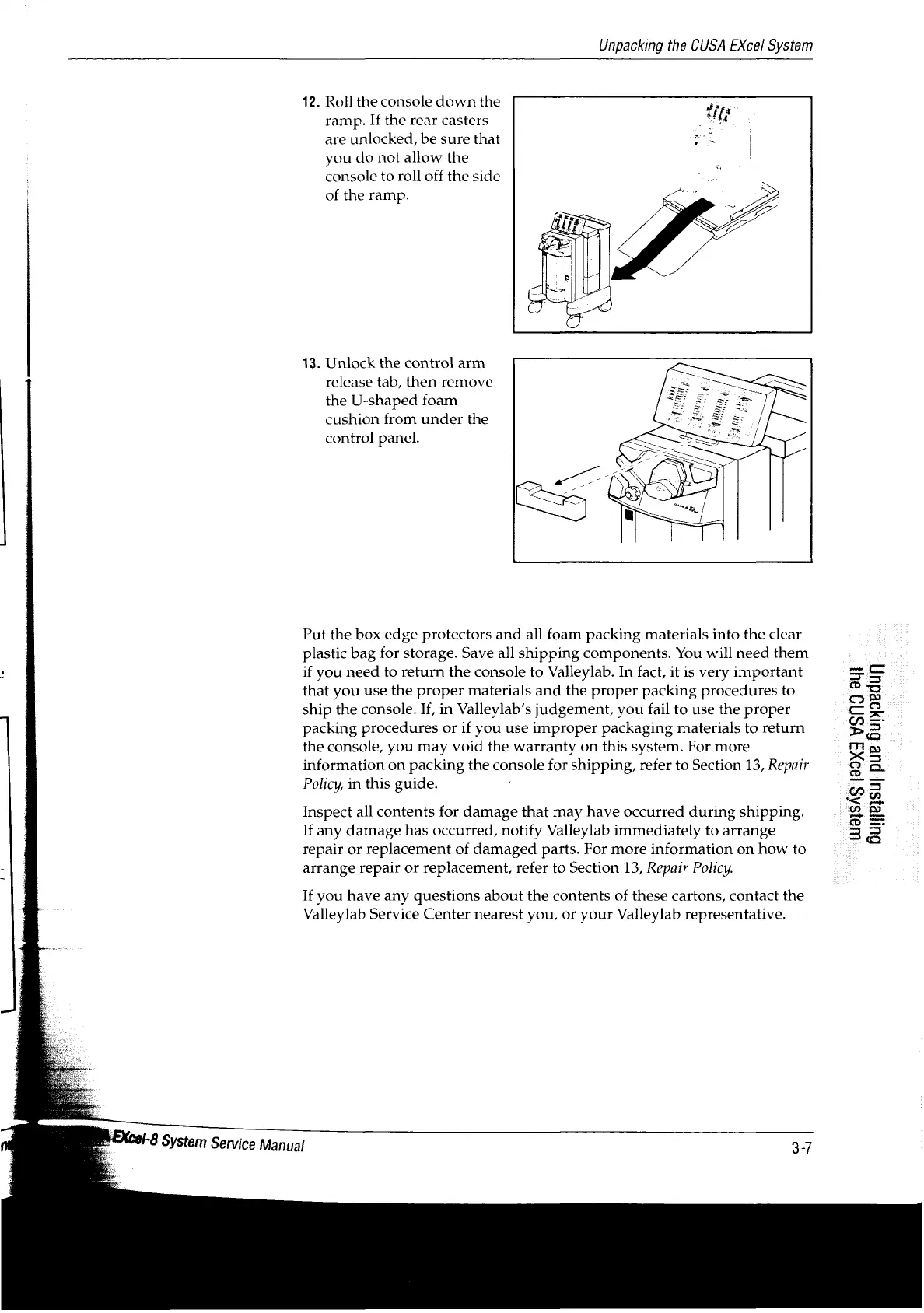
12.
Roll
the
console
down
the
;
ramp.
If
the
rear
casters
.
are
unlocked,
be
sure
that
a
|
you
do
not
allow
the
console
to
roll
off
the
side
of
the
ramp.
13.
Unlock
the
control
arm
release
tab,
then
remove
the
U-shaped
foam
cushion
from
under
the
control
panel.
Put
the
box
edge
protectors
and
all
foam
packing
materials
into the
clear
plastic
bag
for
storage.
Save
all
shipping
components.
You
will
need
them
>
if
you
need
to
return
the
console
to
Valleylab.
In
fact,
it
is
very
important
that
you
use
the
proper
materials
and
the
proper
packing
procedures
to
ship
the
console.
If,
in
Valleylab's
judgement,
you
fail
to
use
the
proper
7
packing
procedures
or
if
you
use
improper
packaging
materials
to
return
the
console,
you
may
void
the
warranty
on
this
system.
For
more
information
on
packing
the
console
for
shipping,
refer
to
Section
13,
Repair
Policy,
in
this
guide.
:
Inspect
all
contents
for
damage
that
may
have
occurred
during
shipping.
If
any
damage
has
occurred,
notify
Valleylab
immediately
to
arrange
repair
or
replacement
of
damaged
parts.
For
more
information
on
how
to
-i
arrange
repair
or
replacement,
refer
to
Section
13,
Repair
Policy.
91SAS
|99X
YSNO
041
Guyjesu]
pue
Buryoedun
If
you
have
any
questions
about
the
contents
of
these
cartons,
contact
the
Valleylab
Service
Center
nearest
you,
or
your
Valleylab
representative.
Cel-8
System
Service
Manual

Table of Contents

Related product manuals