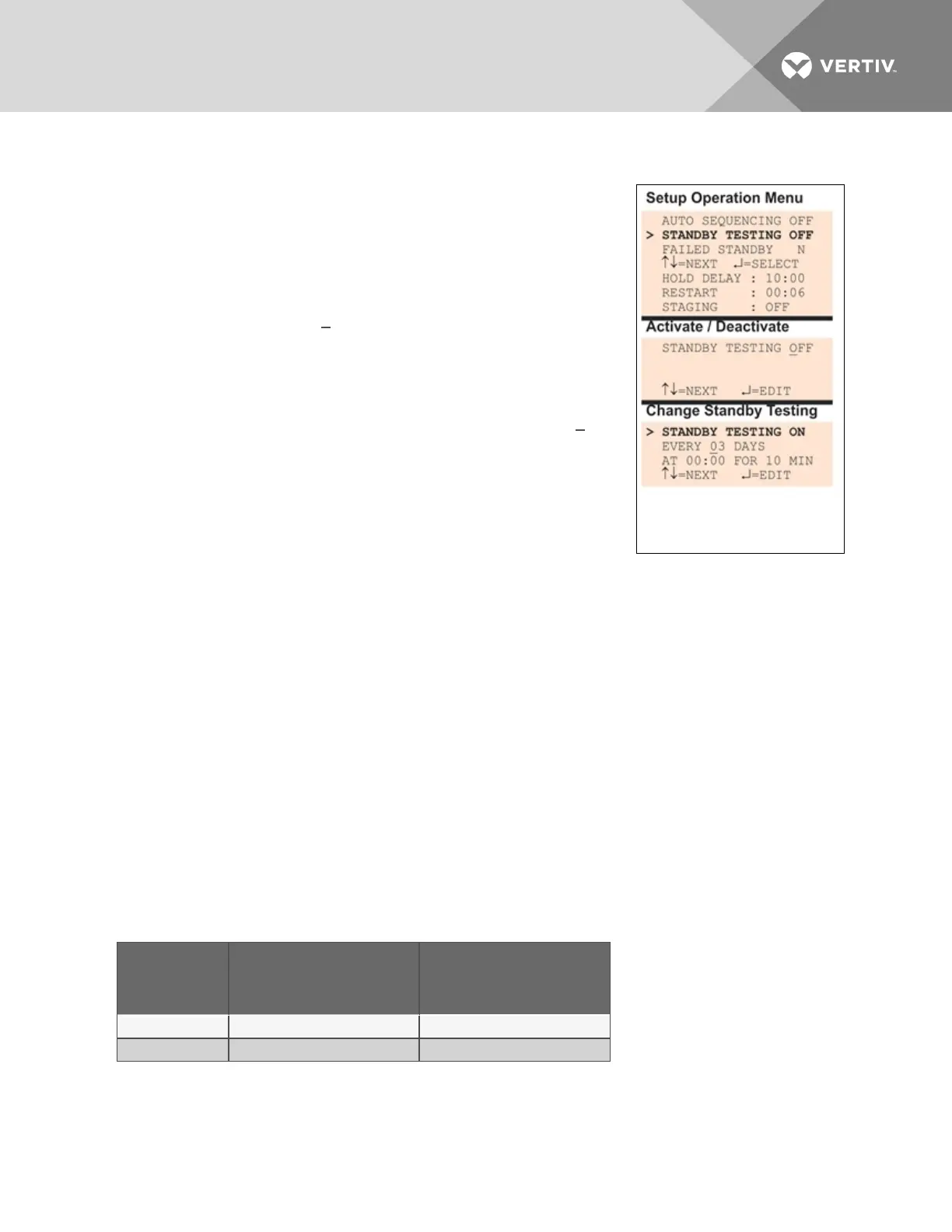
1. From the Setup System Operation Menu, use the arrows to choose Standby Testing, then
press Enter.
2. In the Activate / Deactivate screen, use the arrows to choose:
a. Choose ON to activate standby testing, then press Enter
and proceed to Step 3.
a. Choose OFF to deactivate the feature, then press Enter
and return to the previous screen.
3. Select the desired interval for how frequently testing should
occur in the Every03 Daysfield. The default is 3 days; valid
entries range from 0 to 99 days.
• For each digit, use the arrows to choose a number from 0 to
9, then press Enter to advance to the next digit.
• When finished, press Enter to configure the time of day.
4. Specify the time of day the test should begin in the At00:00
field. The format is HH:MM for hours and minutes.
• Use the arrows to choose from available entries for hours
(00-23), then press Enter to advance to minutes.
• Use the arrows to select minutes (00-59).
• When finished, press Enter again.
5. Specify the duration of the test in minutes—the length of time
the standby units will be turned On—in the For 10 Min field. Use
the arrows to choose a number from 0 to 59 minutes. The default is 10 minutes.
6. When finished, press Enter.
7.10.3 Specify Failed Standby Response
The Liebert AC8’s Failed Standby feature determines what happens when an operating device fails and a
standby device then becomes an operating unit. A subsequent alarm in the newly operating unit
(previously the standby device) results in either restarting the previously operating device that was
alarmed or not. This feature specifies whether each device remains in its current state or returns to its
previous state of operation.
When this feature is activated (Y), each device returns to its previous state, as Table 7.16 below shows.
The newly enabled Standby device is disabled; the previously operating device returns to Operating
mode.
The default setting is N (deactivated), meaning that each device remains in its current state: the Standby
device remains enabled and the previously operating unit remains disabled.
Failed
Standby
Setting
Previous Standby Device
(alarm after being
enabled)
Previously Operating
Device
Activated (Y) Disabled Returns to Operating mode
Deactivated (N) Remains enabled Remains disabled
Table 7.16
Failed Standby response
Vertiv | Liebert® AC8 User Manual | 98



 To Next Page