7 SYSTEM AND CONTROL OPTIONS
NOTE: For ease of understanding, this section uses the LCD interface to illustrate most instructions,
except for features that are available only through the Service Terminal Interface. All Service Terminal
Interface screens appear in Service Terminal Interface on page109.
The System and Control menu allows you to configure the Liebert AC8—setting up inputs and outputs
and an input/output matrix to trigger actions, the modem and pagers, and system features such as date
and time. This menu also provides a vehicle for manually changing the state of an output to ON or OFF,
clearing active alarms and deleting records from the Liebert AC8’s alarm log, event log and trend logs.
The arrows are used to scroll through the menu. The Enter key is used to select the menu item and enter
new information. Table 7.1 below shows characters that may be entered in labels and values.
Alphanumeric Special characters
A-Z, 0-9 space [ ] ^ _ ! " # $ % & ( ) * + - / , . ; < = > @
Table 7.1
Valid characters for data entry
The System and Control options require a password to prevent unauthorized users from making changes
to the system.
This section presents step-by-step instructions for each of the following:
• Login - enter the password
• Setup System - configure inputs, outputs, modem, pagers, system features
• Override Output - manually override automatic control of outputs; release the override
• Clear Alarms & Logs - clear active alarms; delete records from the alarm, event and trend logs
NOTE: If an alarm occurs while a user is logged on, the LCD backlight will flash and the audible alarm
will sound. To obtain specific information about the alarm, you must access the Active Alarm screen
(see View Active Alarms on page37) or the Alarm Log (see View Alarm Log on page38).
7.1 Login
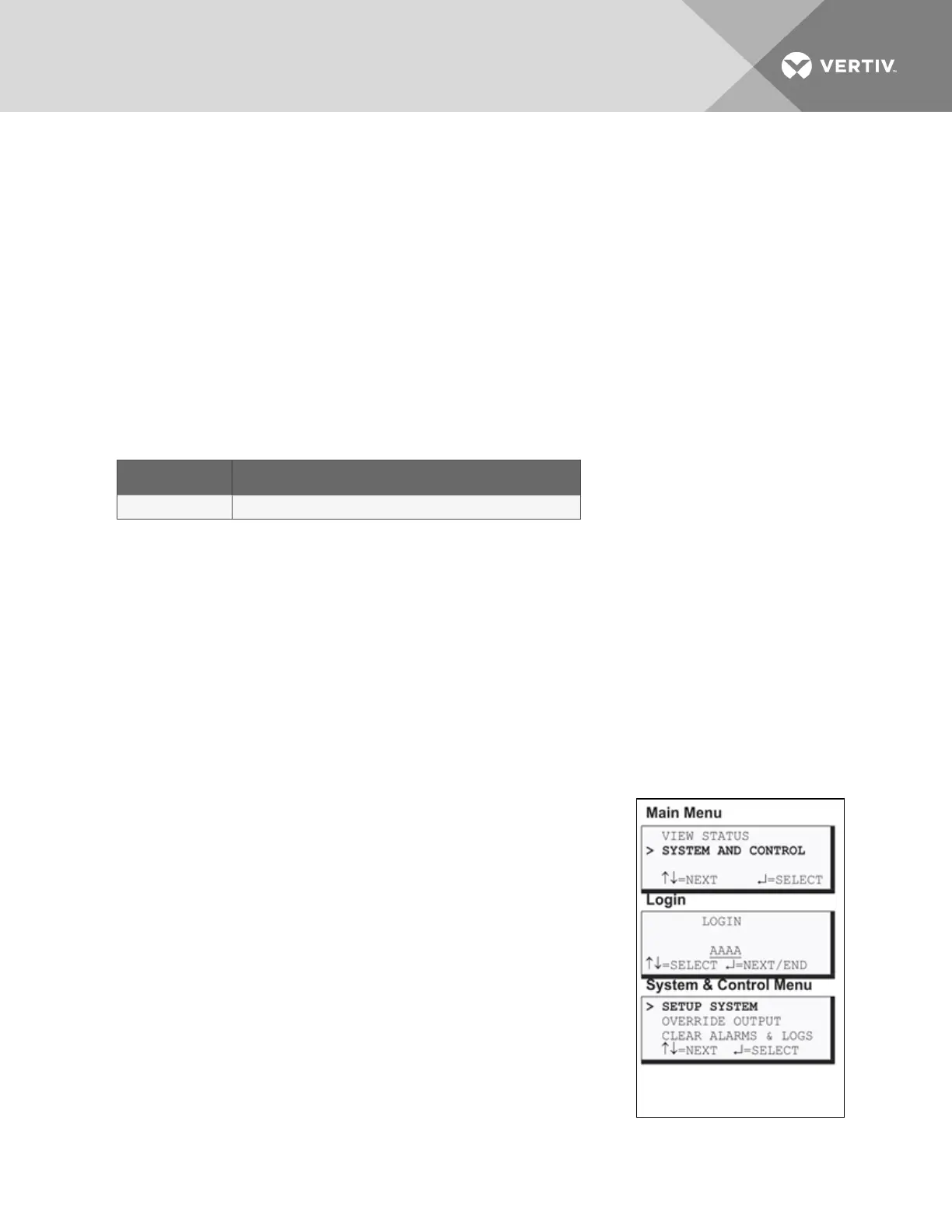
Users must enter a password to access any of the system and control
options. The password consists of four characters (see Table 7.1 above for
valid characters); the default password is AAAA. To set up or change the
password, see Change Password on page83.
To log in:
• From the Main Menu, use the arrows to choose System and
Control, then press Enter, as shown at right.
• Use the arrows to choose System and Control, and press Enter.
The Login menu appears.
• To enter your password (the default is AAAA):
• Use the arrows to choose a character.
• Press Enter to advance to the next character position.
• When finished, press Enter again.
The System and Control Menu appears next, with these options that are
described in the following sections:
Vertiv | Liebert® AC8 User Manual | 53



 To Next Page