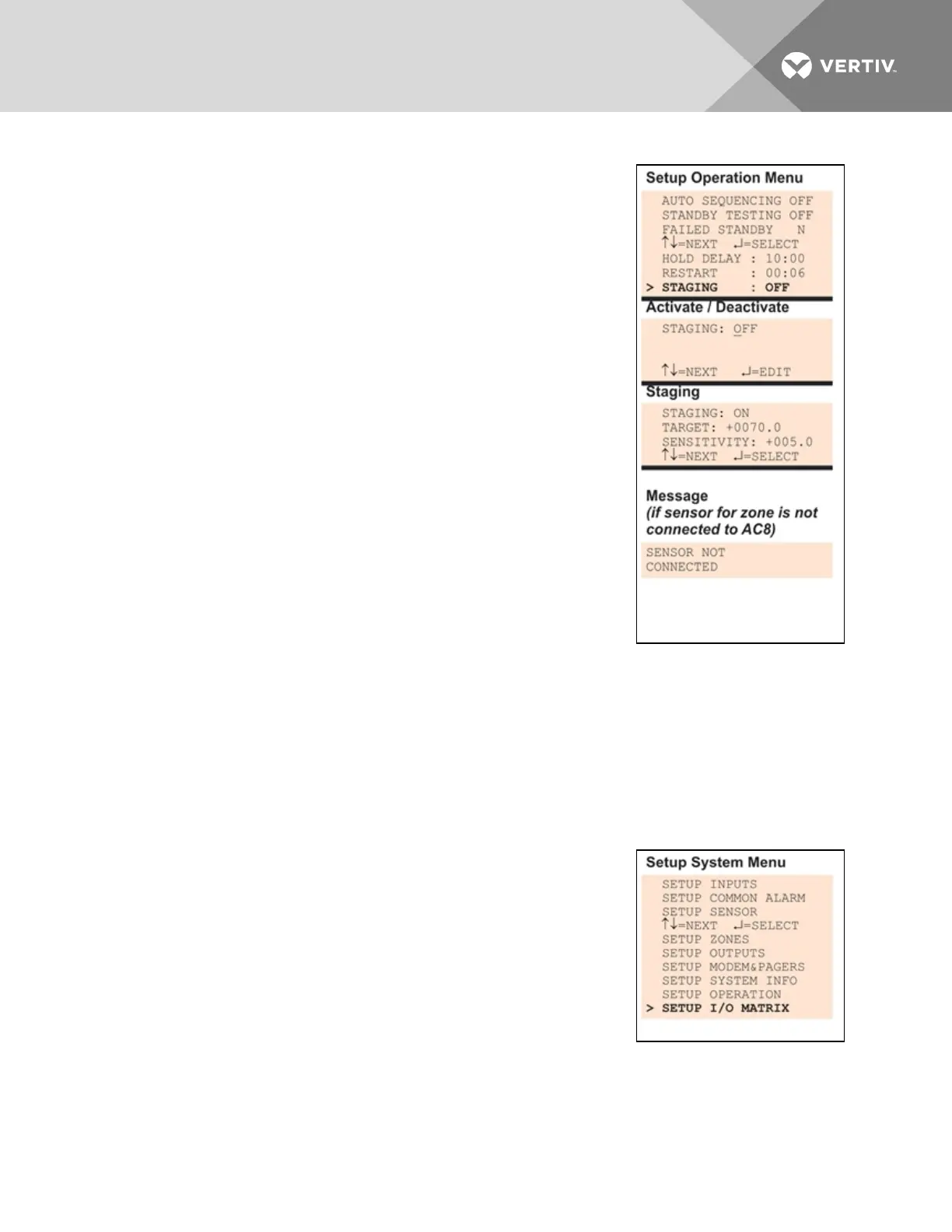
Staging is OFF by default.
To change the Staging settings:
• From the Setup Operation Menu, choose Staging, as shown at
right, and press Enter.
• In the Activate/Deactivate screen, use the arrows to choose ON
to activate or OFF to deactivate the feature, then press Enter.
NOTE: If the sensor for the zone is not connected, a SENSOR
NOT CONNECTED message is displayed, shown below right.
Press Escape to return to the previous screen.
The sensor in the zone must be set to CONNECTED to turn
staging on.
• Once the feature is activated (ON), set the following features in
the Staging screen:
• Use the arrow keys to set the Target sensor reading value
that will initiate the staging process.
• Press Enter to advance to Sensitivity.
• Use the arrow keys to set the Sensitivity that defines the
increment for the next change in the staging process.
The default value is 2.
• When finished, press Enter again.
7.11 Setup System - Setup I/O Matrix
The Setup I/O Matrix menu allows you to configure the Liebert AC8 digital and analog inputs to trigger
various actions in either or both of the two control relays. Each relay can be set up to respond to more
than one digital or analog input.
Almost any mapping combination can be used. For example, you may decide to trigger an action in
Control Relay1 when Device_1 goes into alarm, or you might want to generate an action in Control Relay2
when Sensor_1 High Setpoint goes into alarm.
To set up the mapping of inputs to relays:
Log In and Choose Setup System
• From the Main Menu, use the arrows to choose System and
Control, then press Enter (see Login on page53 for help).
• Enter your password at the Login screen.
• From the System and Control Menu, use the arrows to choose
Setup System, then press Enter.
Select Setup I/O Matrix
• From the Setup System Menu, shown at right, use the arrows to choose Setup I/O Matrix and
press Enter.
Vertiv | Liebert® AC8 User Manual | 101



 To Next Page