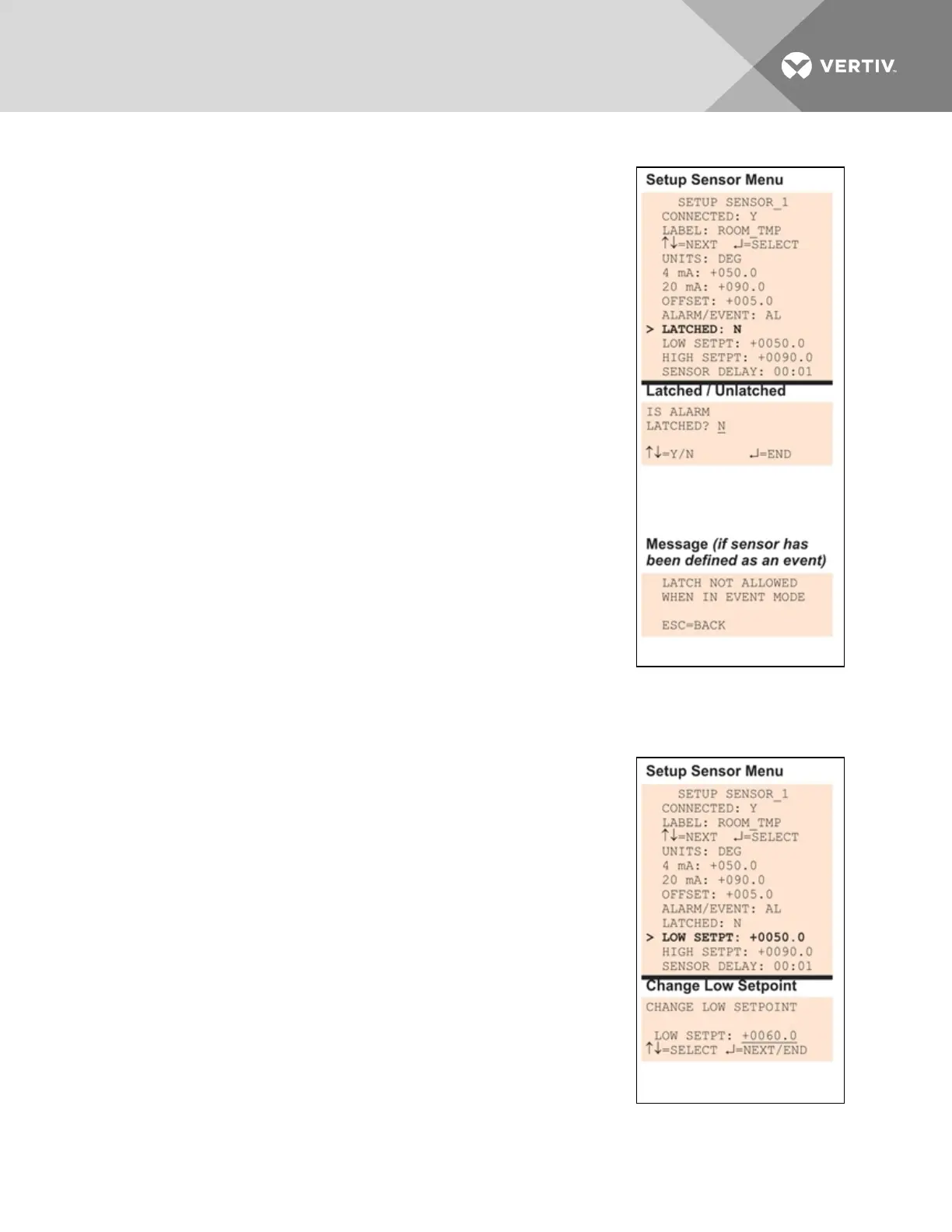
7.5.8 Set Up Alarmable Sensors in Latched or Unlatched Mode
Alarmable sensor points may be set up in Latched mode (Y), requiring the
user to clear the Liebert AC8 alarms after an alarm has occurred, or
Unlatched mode (N), meaning that alarms will automatically clear after a
return-to-normal state. The default setting for alarmable sensors is N
(Unlatched). Any sensor defined as an event is automatically Unlatched.
A sensor defined as Latched does not reset automatically after an alarm. It
will remain in the triggered position even after the monitored sensor
returns to normal. After an alarm, the user must manually reset Latched
sensors, as described in Clear Active Alarms on page105. This also means
that any digital outputs linked to a Latched sensor will remain triggered
until the sensor is manually reset.
A sensor defined as Unlatched will automatically track the status of the
monitored sensor. No action by the user is required.
• From the Setup Sensor Menu, choose Latched, as shown at right,
and press Enter.
• To change this feature, use the arrows to choose Y (Yes -
Latched) or N (No - Unlatched), then press Enter.
NOTE: Only alarmable sensors may be set up as Latched. If you attempt
to set up an event as Latched, the message shown at right appears.
Press the ESC key to return to the previous screen to continue
configuring the digital input.
The only way to reset latched alarms is by clearing active alarms. This step
is required to return latched points to their normal state. For details, see
Clear Active Alarms on page105.
7.5.9 Change Low Setpoint
When the sensor detects a condition below the Low Setpoint value, an
alarm or event will occur, depending on the sensor configuration.
The Low Setpoint value must not be set below the sensor’s 4mA value plus
the offset value. For example, if the 4mA value is 50°F and the Offset value
is 5°F, the Low Setpoint must be 55°F or higher.
The default Low Setpoint for each sensor is +0050.0. Values that can be
entered range from:
• the 4mA value + the Offset value (in the example, 50+5=55)
to
• the 20mA value + the Offset value (in the example, 90+5=95)
To view or change these values, see Change 4 mA Value on page64,
Change 20 mA Value on page64 and Change Offset Value on the previous
page.
To enter a new value:
Vertiv | Liebert® AC8 User Manual | 66



 To Next Page