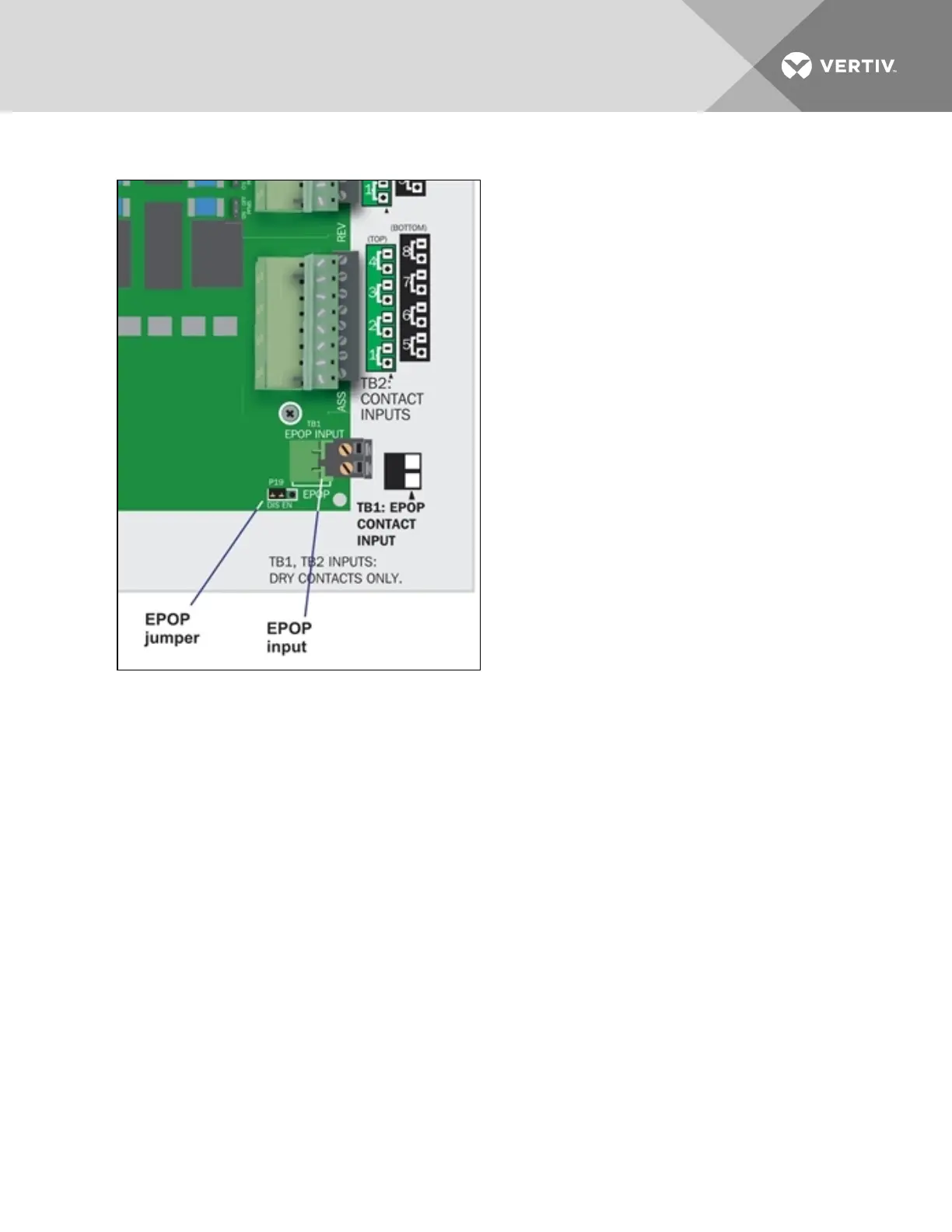
3.2.5 Connecting the Emergency Power Operation (EPOP) Input
The emergency power operation, or EPOP, input connector block (TB1) is at the bottom right corner of
the Liebert AC8 printed circuit board, just below the digital inputs.
To determine the proper wire size, see Wiring and Connections on page17.
To connect to the EPOP input:
1. Turn OFF electrical power to the Liebert AC8.
2. If necessary, remove a conduit knockout to permit wire entry into the Liebert AC8 enclosure.
3. Bring the wire into the Liebert AC8 enclosure through a conduit knockout or access slot.
4. Loosen each screw and slip the stripped end of the wire into the terminal block.
5. Tighten each screw until it holds the wire snugly.
3.2.6 Setting the EPOP Jumper
The EPOP contact input has an associated jumper to enable or disable emergency power operation
(EPOP).
The Liebert AC8 comes from the factory with the EPOP jumper in the Disabled position (DIS); it may be
changed to Enabled (EN).
To change the EPOP jumper setting:
Vertiv | Liebert® AC8 User Manual | 24



 To Next Page