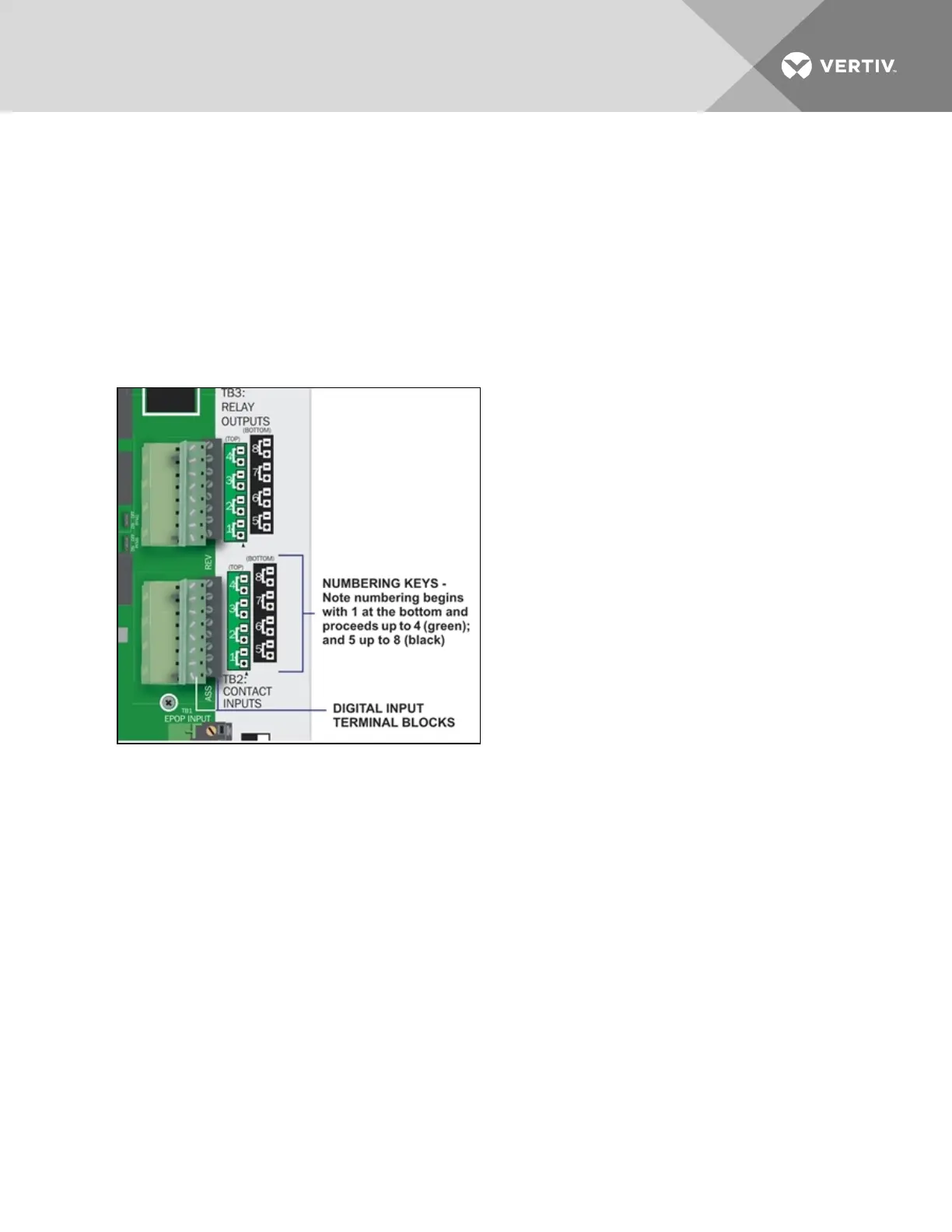
Connecting Liebert Environmental Units
For Liebert environmental units, follow these steps (be sure to connect the same device to inputs and
outputs with the same number—one device to Input 1 and Output 1, another to Input 2 and Output 2, and
so on):
• Connect a digital input from the Liebert AC8 to the Common Alarm Relay of the environmental
unit: terminals 75/76 or TB1-6, TB1-7.
• Connect a digital output (numbered the same as the input) from the Liebert AC8 to the
Remote Shutdown (Power Control) of the environmental unit: terminal 37/38 or TB1-4, TB1-5.
3.2.1 Connecting Digital Inputs
To connect a digital input:
1. Turn OFF electrical power to the Liebert AC8.
2. If necessary, remove a conduit knockout to permit wire entry into the Liebert AC8 enclosure.
3. Bring the wire(s) into the Liebert AC8 enclosure through a conduit knockout or access slot.
4. Loosen the appropriate screw and slip the stripped end of the wire into the terminal block.
5. Tighten the screw until it holds the wire snugly.
NOTE: Connect digital inputs to nonpowered (dry) contacts only.
Vertiv | Liebert® AC8 User Manual | 20



 To Next Page