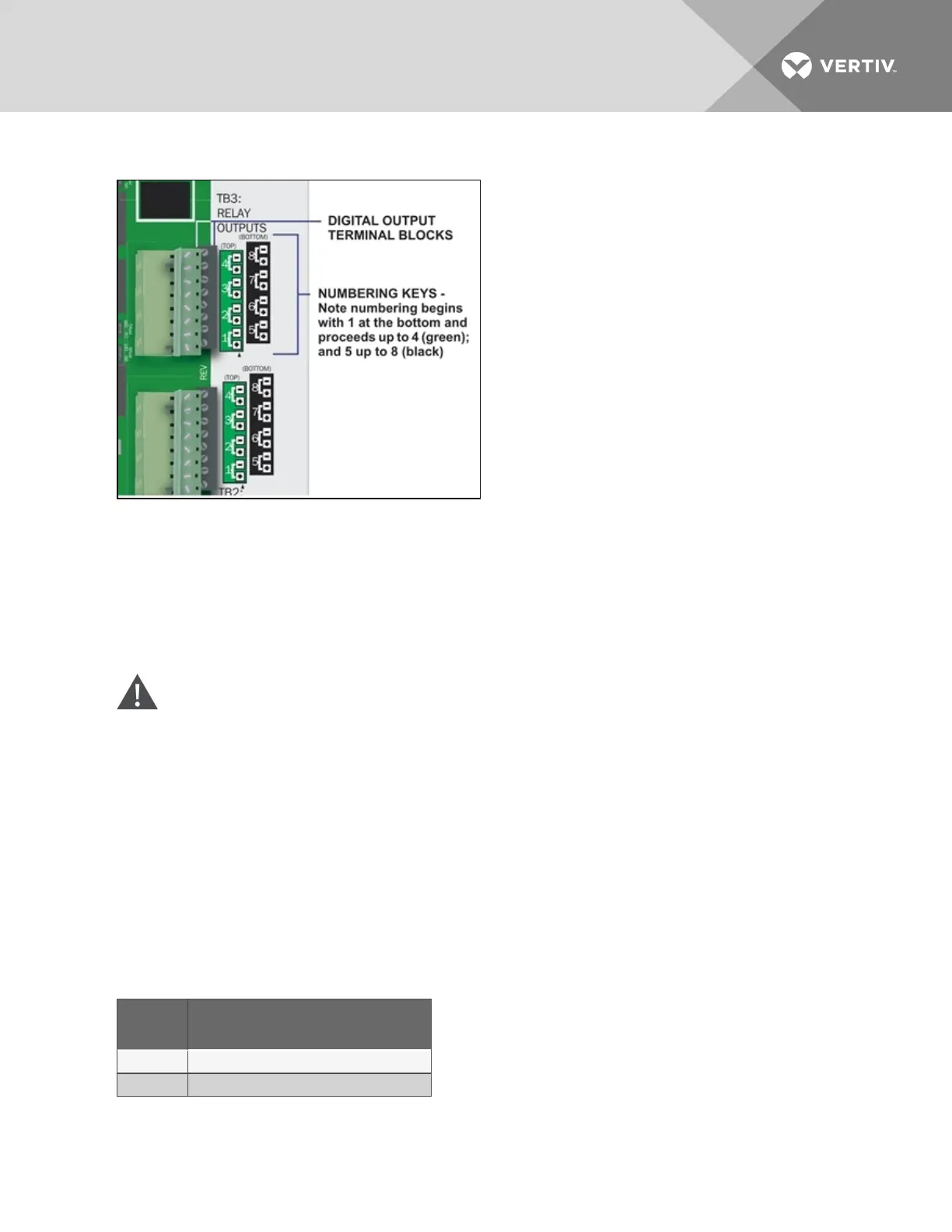
3.2.2 Connecting Digital Outputs
To connect a digital output:
1. Turn OFF electrical power to the Liebert AC8.
2. If necessary, remove a conduit knockout to permit wire entry into the Liebert AC8 enclosure.
3. Bring the wire(s) into the Liebert AC8 enclosure through a conduit knockout or access slot.
4. Loosen the appropriate screw and slip the stripped end of the wire into the terminal block.
5. Tighten the screw until it holds the wire snugly.
CAUTION: To reduce the risk of fire or electric shock, do not interconnect the outputs of
different Class2 circuits.
3.2.3 Setting the Digital Output Jumpers
Each digital output has an associated jumper to define its operation when power is interrupted and there
is no battery backup to the board. This puts the Liebert AC8 in a fail-safe mode and ensures proper
functioning when the board has no power or battery backup.
The Liebert AC8 comes from the factory with all digital output jumpers in the OFF position (Normally
Open). The jumper setting for each digital output can be changed to ON (Normally Closed). The settings
are shown in Table 3.2 below..
Setting
Output status
(power loss & no battery backup)
OFF Normally Open
ON Normally Closed
Table 3.2
Digital output jumper settings
Vertiv | Liebert® AC8 User Manual | 21



 To Next Page