3.3.1 Setting the 12VDC/24VDC Analog Power Jumper
The analog power jumper sets the common voltage that is applied to all of the analog input connections.
The jumper permits the user to modify the voltage supplied to the sensors, according to the power
requirements.
The factory default position is 24VDC; it may be changed to 12VDC.
To change the analog power jumper setting:
1. Find the black analog jumper on the circuit board, as shown at right. The jumper is at the
bottom of the board near the middle (see Controller Board Overview on page4).
2. Decide whether your configuration requires the jumper to be 24VDC or 12VDC.
3. Set the jumper as needed:
• To set the jumper to the 24VDC position, place the black jumper on the middle and right
pins.
• To set the jumper to the 12VDC position, place the black jumper on the middle and left
pins.
3.3.2 Connecting the Analog Ground
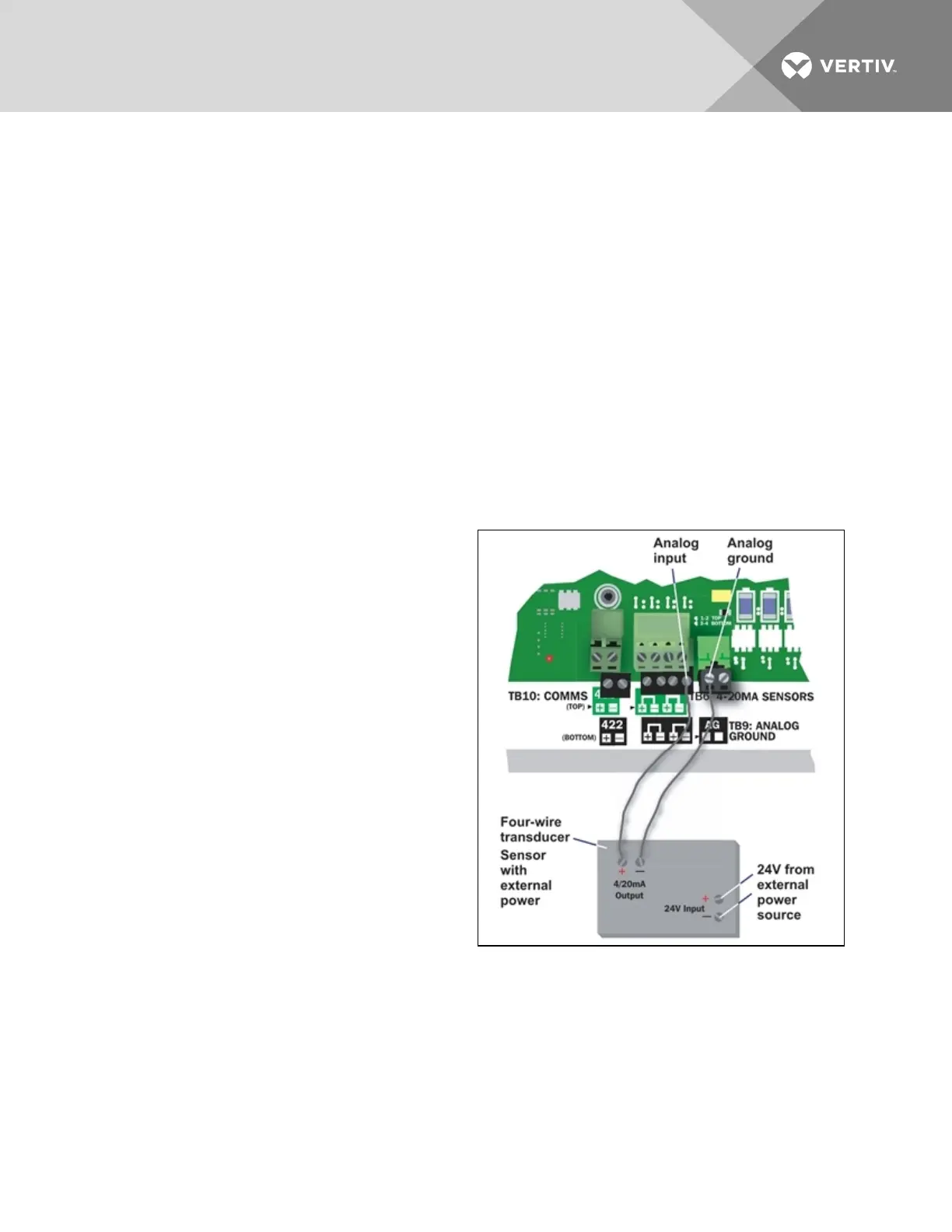
The Liebert AC8 features an analog ground
connection for four-wire sensors that have an
external power source. Such a four-wire sensor
requires a reference to ground because they get
power from an external power source.
A two-wire transducer, which does not have an
external power source, does not need to be
connected to the analog ground.
The analog ground connector has two terminals,
each of which can accommodate two wires. This is
adequate to connect four sensors that require a
reference to ground because they get power from
an external power source.
Connect the analog ground to an external four-wire
sensor, as shown in the illustration at right.
Vertiv | Liebert® AC8 User Manual | 26



 To Next Page