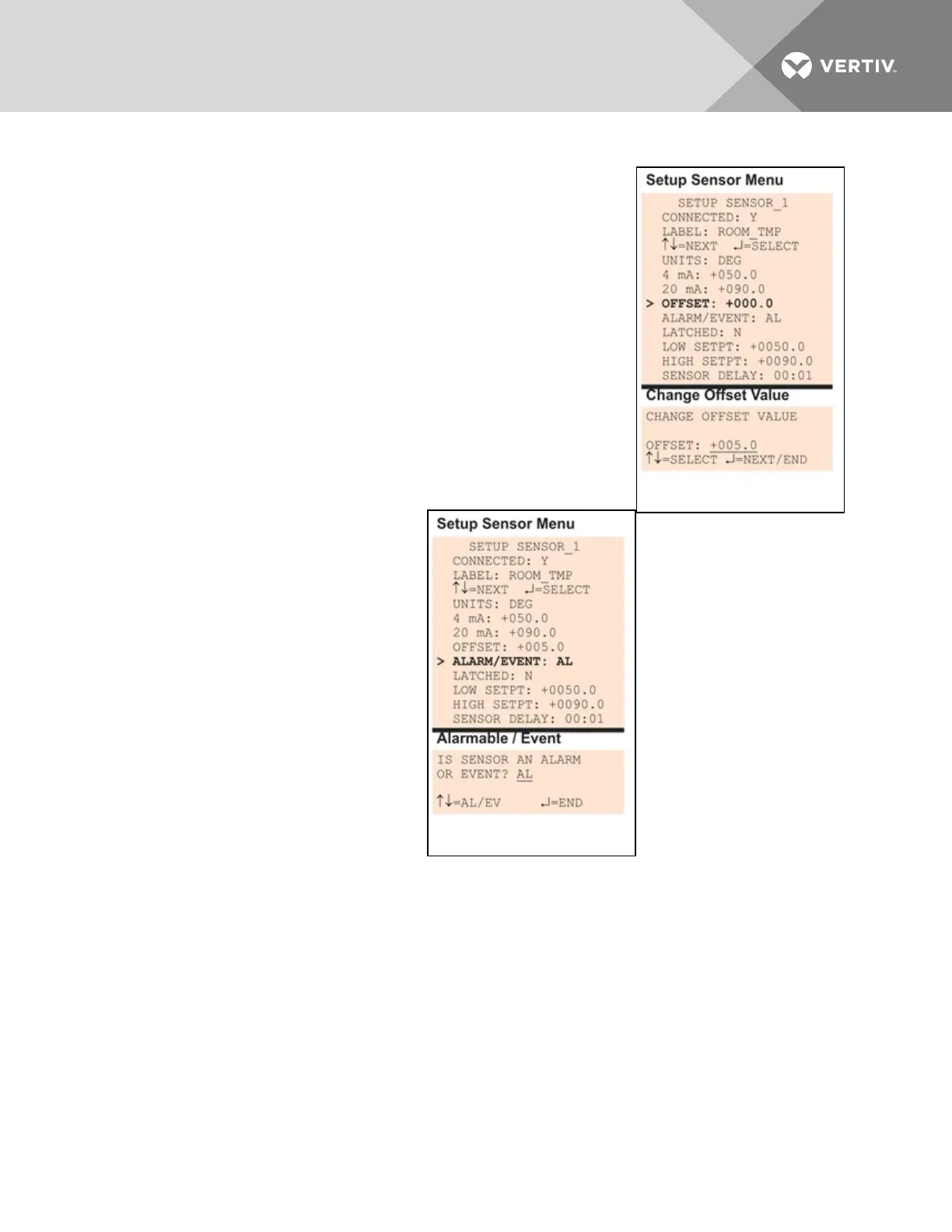
7.5.6 Change Offset Value
For the Offset value, enter an adjustment factor—for example, if the sensor
reading shows 70°F when the actual temperature is 75°F, the offset might
be 5°F.
The default Offset value for each sensor is +000.0. Values that can be
entered range from -999.9 to +999.9.
To enter a new value:
• From the Setup Sensor Menu, choose Offset for the selected
sensor and press Enter.
• To change the Offset value:
• Use the arrows to choose a character.
• Press Enter to advance to the next character position.
• When finished, press Enter again.
7.5.7 Define Sensor as Alarmable or Event
Each sensor may be defined as Alarmable
(AL) or as an Event (EV).
• For a sensor defined as alarmable,
the following alarm reactions
occur when the high-setpoint
threshold is crossed: the LCD
flashes, the audible horn sounds,
configured pager numbers will be
notified and a record is entered in
the Alarm Log.
• For a sensor defined as an event,
the high-setpoint occurrence is
recorded in the Event Log.
By default, all sensors are set up as AL
(Alarmable).
• From the Setup Sensor Menu,
choose Alarm/Event, as shown at right, and press Enter.
• To change the type of sensor, use the arrows to choose AL (Alarmable) or EV (Event), then
press Enter.
Vertiv | Liebert® AC8 User Manual | 65



 To Next Page