• When finished, press Enter again.
Reset Password to the Factory Default (“AAAA”)
To reset the password to the factory default of AAAA:
• Locate DIP switch 1 on the unit’s circuit board (see Controller Board Overview on page4) and
move all switches to the OFF position (down).
• Move the second switch to the ON position, then to the OFF position.
• Move the seventh switch to the ON position, then to the OFF position.
• Move the eighth switch to the ON position, then to the OFF position.
The password should now be AAAA.
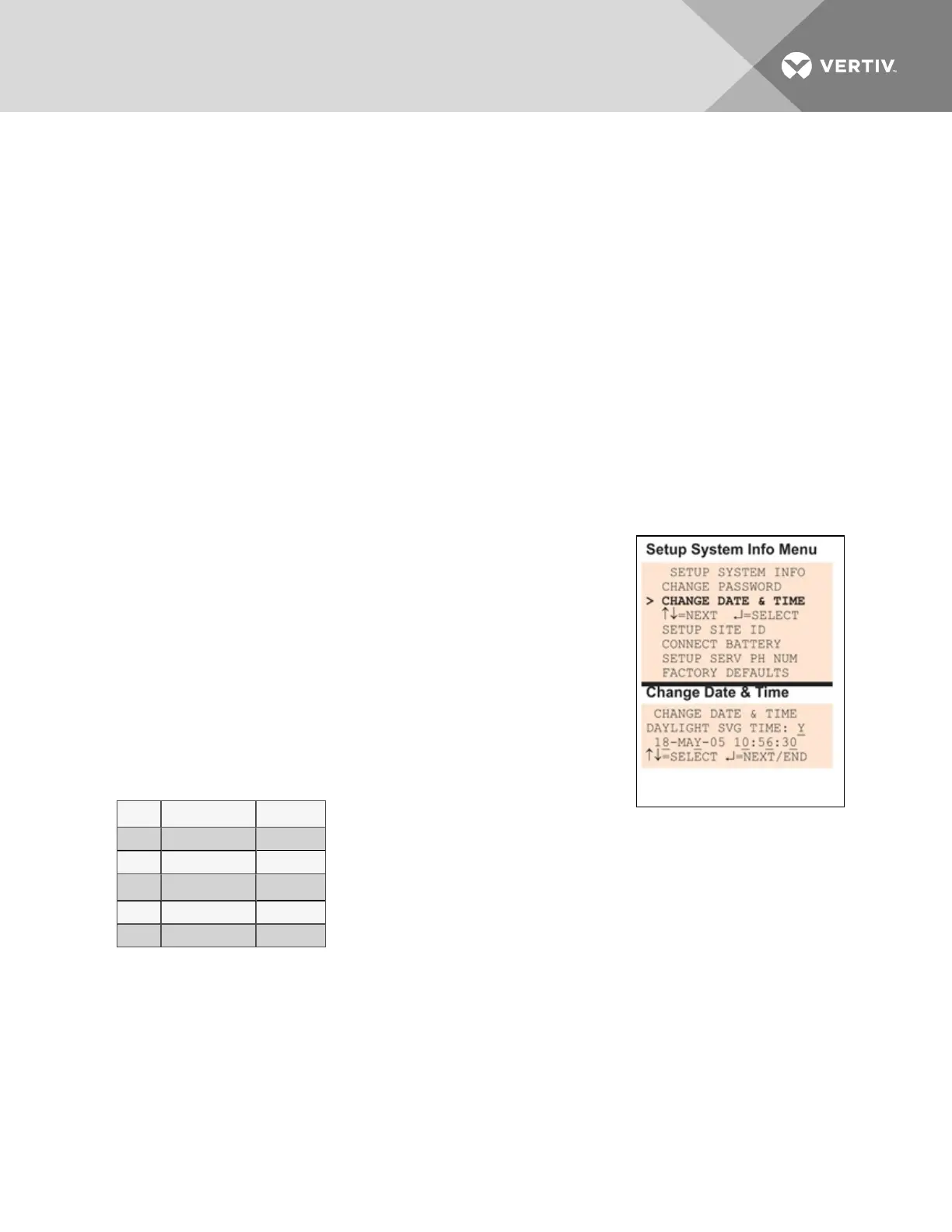
7.9.2 Change Date & Time/Automatic Daylight Saving Time
The Liebert AC8 has a built-in real-time clock that is backed up by an encapsulated lithium battery and
set up to adjust automatically for daylight saving time twice a year. The Setup System Info menu allows
you to change the date or time or automatic adjustment at any time.
To change the daylight saving time setting, date or time:
• From the Setup System Info Menu, use the arrows to choose
Change Date & Time, then press Enter.
• To change the daylight saving time setting:
• To the right of Daylight Svg Time? use the arrows to
choose Y (Yes - automatically adjust for daylight saving
time) or N (No), then press Enter.
• The format of the date and time is DD-MMM-YY HR:MM:SS. To
change the date or time:
• Press Enter to advance to the next character position you
want to change.
• Use the arrows to choose from available entries:
Date
Day (DD) 0-31
Month (MMM) JAN-DEC
Year (YY) 00-99
Time
Hour (HR) 00-23
Minutes (MM) 00-59
Seconds (SS) 00-59
• Press Enter to advance to the next character position.
• When finished, press Enter again.
Vertiv | Liebert® AC8 User Manual | 84



 To Next Page