Log In and Choose Setup System
• From the Main Menu, use the arrows to choose System and
Control, then press Enter (see Login on page53 for help).
• Enter your password at the Login screen.
• From the System and Control Menu, use the arrows to choose
Setup System, then press Enter.
Select Setup System
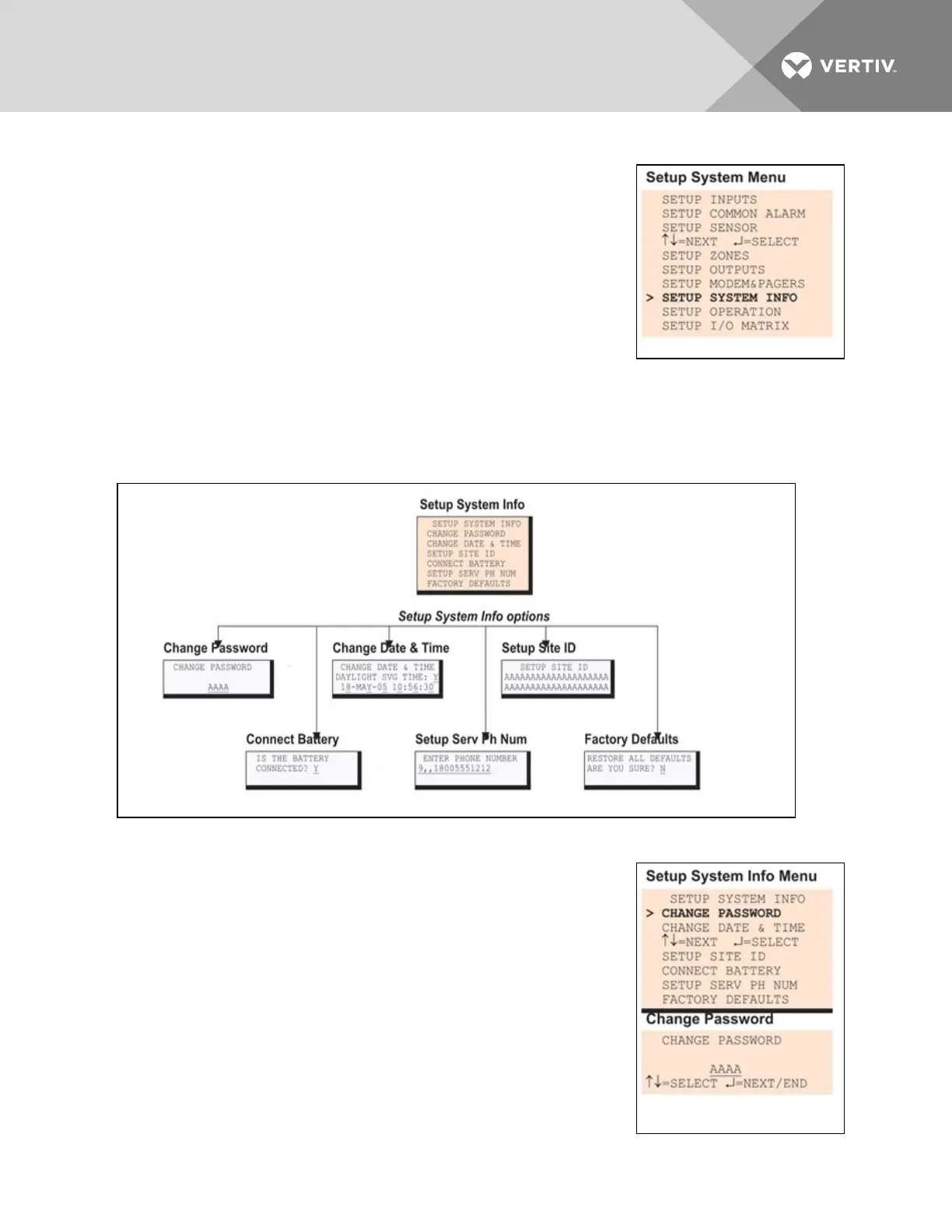
• From the Setup System Menu, shown at right, use the arrows to
choose Setup System Info and press Enter.
• Use the steps following Figure 7.2 below to access any of the Setup System Info options.
Figure 7.2 below offers a quick look at the Setup System Info screens available via the LCD interface.
Figure 7.2 Menu overview - Setup System Info menu
7.9.1 Change Password
A password is required to access the Liebert AC8 system and control
options, as described in Login on page53. The password consists of four
characters (see Table 7.1 on page53 for valid characters). The default
password is AAAA.
Change the Password
To change the password:
• From the Setup System Info Menu, use the arrows to choose
Change Password, then press Enter.
• To change your password:
• Use the arrows to choose a character.
• Press Enter to advance to the next character position.
Vertiv | Liebert® AC8 User Manual | 83



 To Next Page