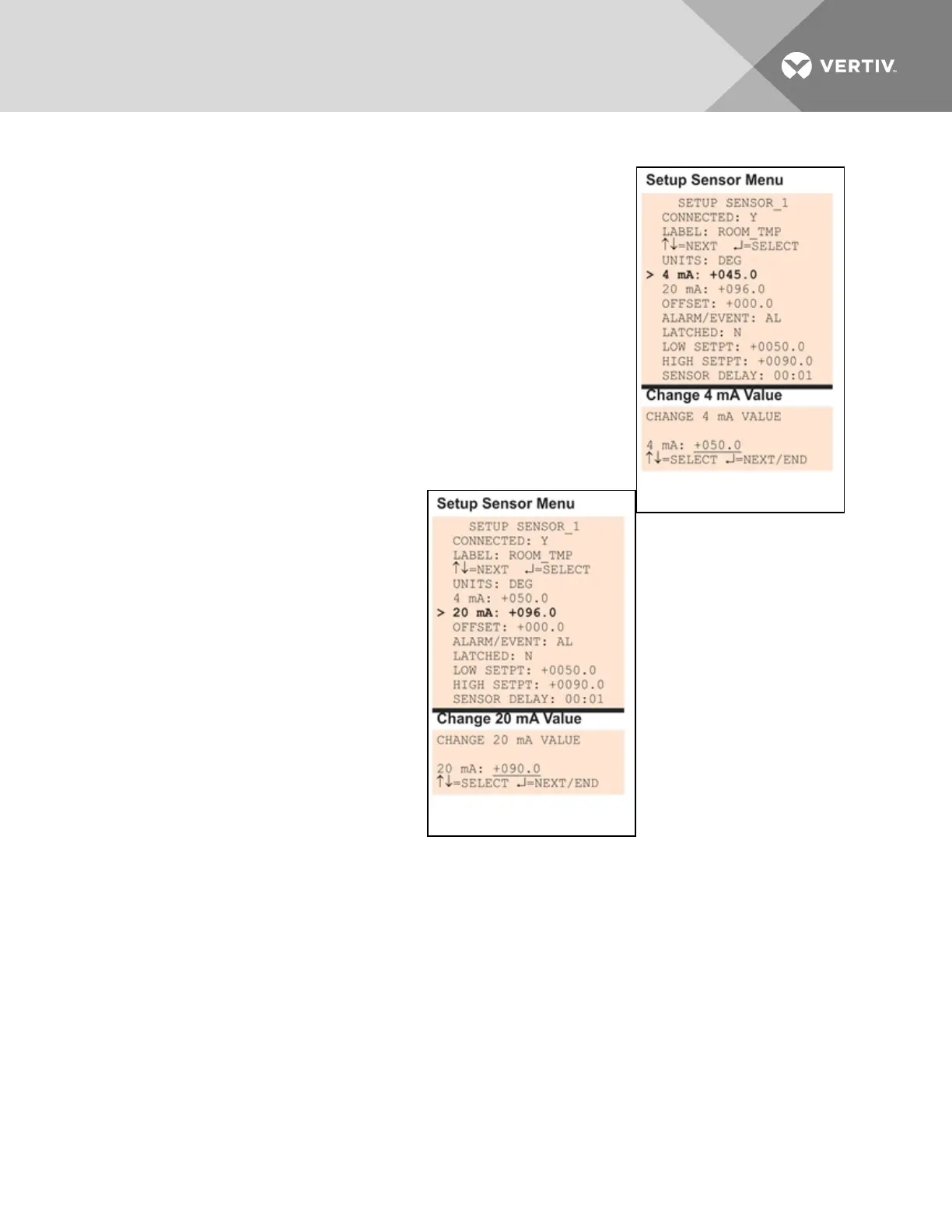
7.5.4 Change 4 mA Value
For the 4mA value, enter the smallest value for the range of the sensor—for
example, 50°F for a temperature sensor with a range of 50°F to 90°F.
The default value for each sensor is +045.0. Values that can be entered
range from -999.9 to +999.9.
To enter a new value:
• From the Setup Sensor Menu, choose 4mA for the selected
sensor and press Enter.
• To change the 4mA value:
• Use the arrows to choose a character.
• Press Enter to advance to the next character position.
• When finished, press Enter again.
7.5.5 Change 20 mA Value
For the 20mA value, enter the largest value
for the range of the sensor—for example,
90°F for a temperature sensor with a range
of 50°F to 90°F.
The default value for each sensor is +096.0.
Values that can be entered range from -
999.9 to +999.9.
To enter a new value:
• From the Setup Sensor Menu,
choose 20mA for the selected
sensor and press Enter.
• To change the 20mA value:
• Use the arrows to choose a
character.
• Press Enter to advance to
the next character position.
• When finished, press Enter again.
Vertiv | Liebert® AC8 User Manual | 64



 To Next Page