5.7 View Pager Numbers
The Liebert AC8 may be set up to dial pager numbers when an alarm is
detected. Up to four pagers may be configured, as described in Setup
System - Setup Modem & Pagers on page72.
The View Pager Numbers option allows you to view the pager numbers and
PINs for all configured pagers. Use the following steps to select a pager and
view its information.
5.7.1 Select a Pager
To select a pager:
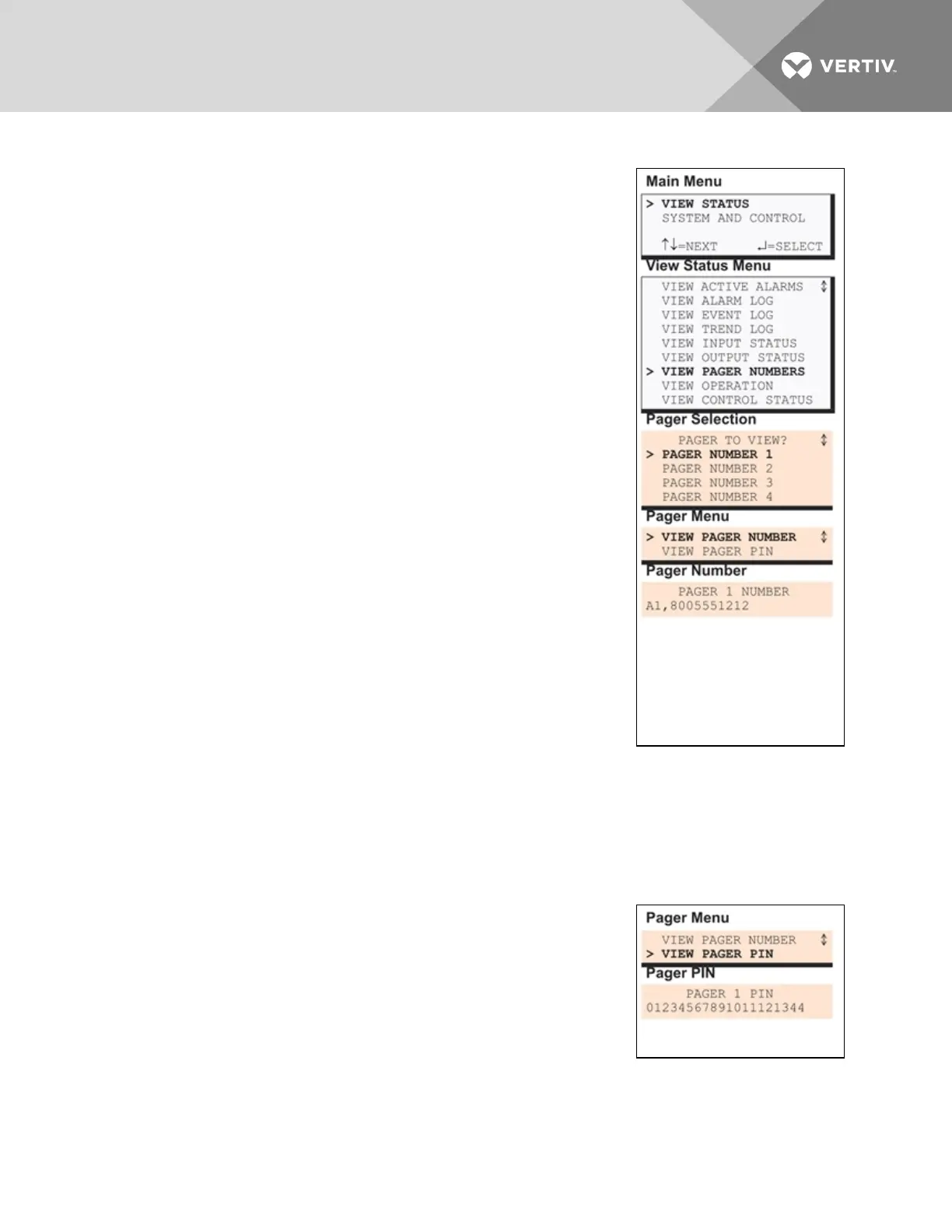
• From the Main Menu, use the arrows to choose View Status,
then press Enter.
• From the View Status Menu, use the arrows to choose View
Pager Numbers, then press Enter.
• From the Pager Selection screen, use the arrows to choose the
pager you want to view—Pager Number 1 in the example at
right—and press Enter.
• Use the following steps to view a pager number or PIN for the
selected pager.
5.7.2 View a Pager Number
To view a pager number:
1. Choose View Pager Number from the Pager Menu and press
Enter.
2. The Pager Number screen displays the number that is
configured for the selected pager. The telephone number is
preceded by A to dial an alphanumeric pager and includes a
comma (,) to pause two seconds after dialing “1” before proceeding to dial the area code and
number. To change this number, see Pager Setup - Pager Number and PIN on page78.
3. Press ESC to return to the Pager Menu.
5.7.3 View a Pager PIN
To view a pager PIN:
• Choose View Pager PIN from the Pager Menu and press Enter.
• The Pager PIN screen displays the PIN that is configured for the
selected pager. To change this number, see Setup System -
Setup Modem & Pagers on page72.
• Press ESC to return to the Pager Menu.
Vertiv | Liebert® AC8 User Manual | 45



 To Next Page