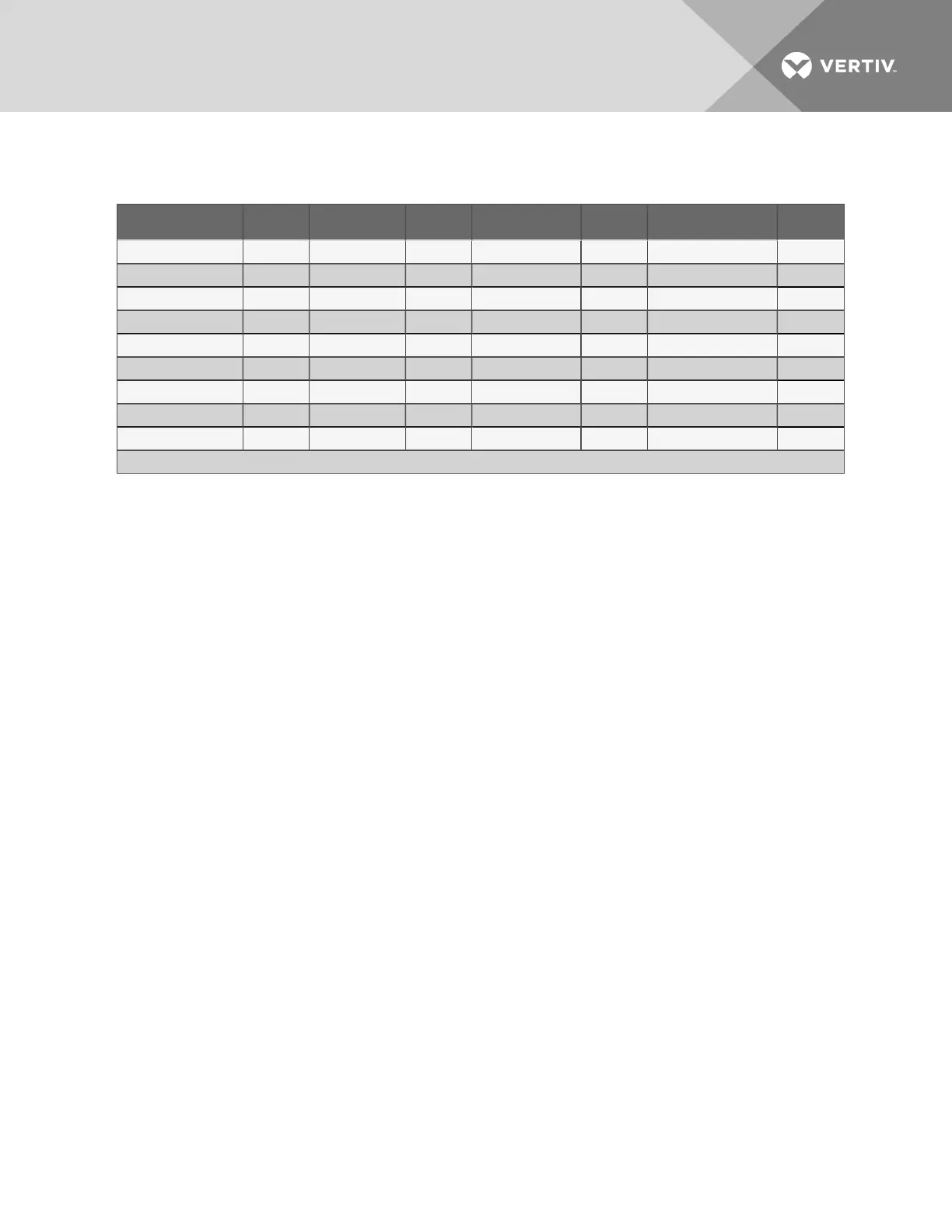
Country Code* Country Code* Country Code* Country Code*
Argentina 07 Finland FD Italy FD Philippines B5
Australia 09 France FD Japan 00 Portugal FD
Austria FD Germany FD Korea B5 Slovak Republic FD
Belgium FD Greece FD Liechtenstein FD Spain FD
Canada B5 Hong Kong 99 Luxembourg FD Sweden FD
China B5 Hungary FD Mexico B5 Switzerland FD
Cyprus FD Iceland FD Netherlands FD Taiwan FE
Czech Republic FD Indonesia 99 New Zealand 7E United Kingdom FD
Denmark FD Ireland FD Norway FD United States B5
* B5 is the default setting—initialization string +GCI=xx is not needed for these countries
Table 7.9
Country codes
Edit the Init String
1. To enter or edit the Init String:
• Use the arrows to choose a character.
• Press Enter to advance to the next character position.
• When finished, press Enter again.
7.8.2 Modem Setup - Additional Features
(Service Terminal Interface only)
The Service Terminal Interface offers four additional options for the modem that are not available through
the LCD interface:
• Enter Liebert AC8 phone number
• Enable modem diagnostic messages
• Change modem dial prefix
• Change modem hang up delay after a call
To access these options:
• Connect to the Liebert AC8 either from a remote computer or through the RS232 port (see
Connecting to the Service Terminal Interface on page111).
• At the Main Menu, enter 0 (zero—Setup System - Login Required).
• At the Login Menu, enter your password, then press the Enter key.
• At the Setup Menu, enter 6 (Setup Modem&Pagers).
• At the Setup Modem & Pagers menu, shown below, enter 5 to begin configuration.
Setup Modem & Pagers - Modem Setup
Vertiv | Liebert® AC8 User Manual | 75



 To Next Page