Feature Default Other Options
NORM OPEN/CLOSE NO (Normally Open) NC (Normally Closed)
MODE*
Outputs1-2:
Outputs3-4:
Outputs5-8:
OP (Operating)
ST (Standby)
NU (Not Used)
OP (Operating)
ST(Standby)
NU (Not Used)
IN ALARM E (Enable) D (Disable)
EMERG OP E (Enable) D (Disable)
* Outputs defined as Not Used should be kept in a separate zone that does not include any outputs
defined as Operating or Standby. The Auto Sequencing feature will not function properly in a zone with
outputs defined as Not Used. See Turn Automatic Sequencing On or Off on page96 for more
information.
Table 7.6
Default settings - digital outputs
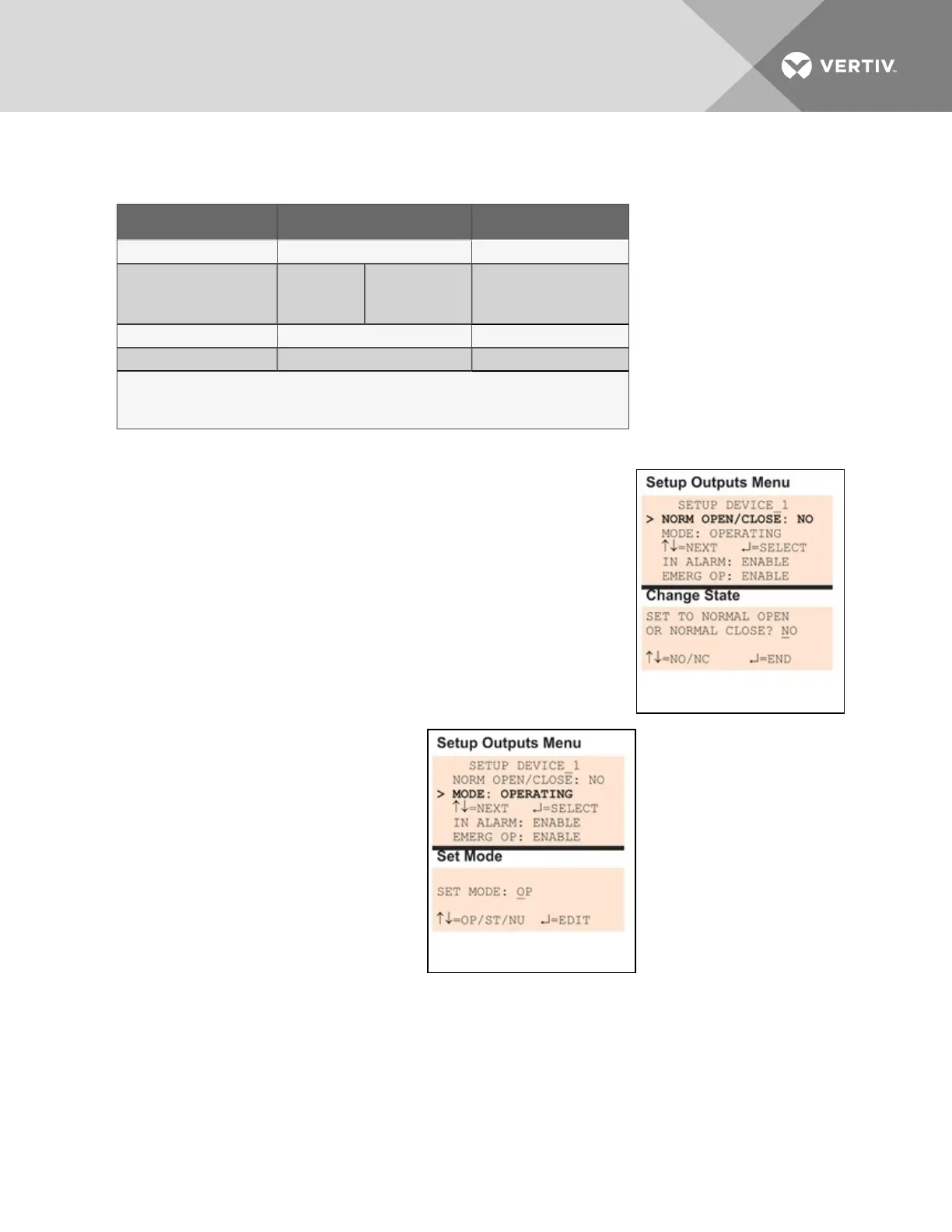
7.7.1 Define Output as Normally Open or Normally Closed
Each output may be set up as Normally Open (NO) or Normally Closed
(NC). The default setting for all output points is NO (Normally Open).
• From the Setup Outputs Menu, shown at right, use the arrows to
choose Norm Open/Close and press Enter.
• To change the normal state for this output, use the arrows to
choose the state:
• NO (Normally Open)
• NC (Normally Closed)
• Press Enter.
7.7.2 Define Operating or Standby Mode
Each output may be defined as Operating
(OP), Standby (ST), or Not Used (NU). This
setting takes precedence over any setting in
the override menu (see Override Output on
page103). The default settings are:
• Outputs1 and 2 are in Operating
(OP) mode
• Outputs 3 and 4 are in Standby
(ST) mode
• Outputs 5 through 8 are in Not
Used (NU)
To change the mode:
• From the Setup Outputs Menu, shown at right, use the arrows to choose Mode for the selected
output and press Enter.
• To change the output’s mode, use the arrows to choose one of these options:
• OP (Operating)
• ST (Standby)
Vertiv | Liebert® AC8 User Manual | 71



 To Next Page