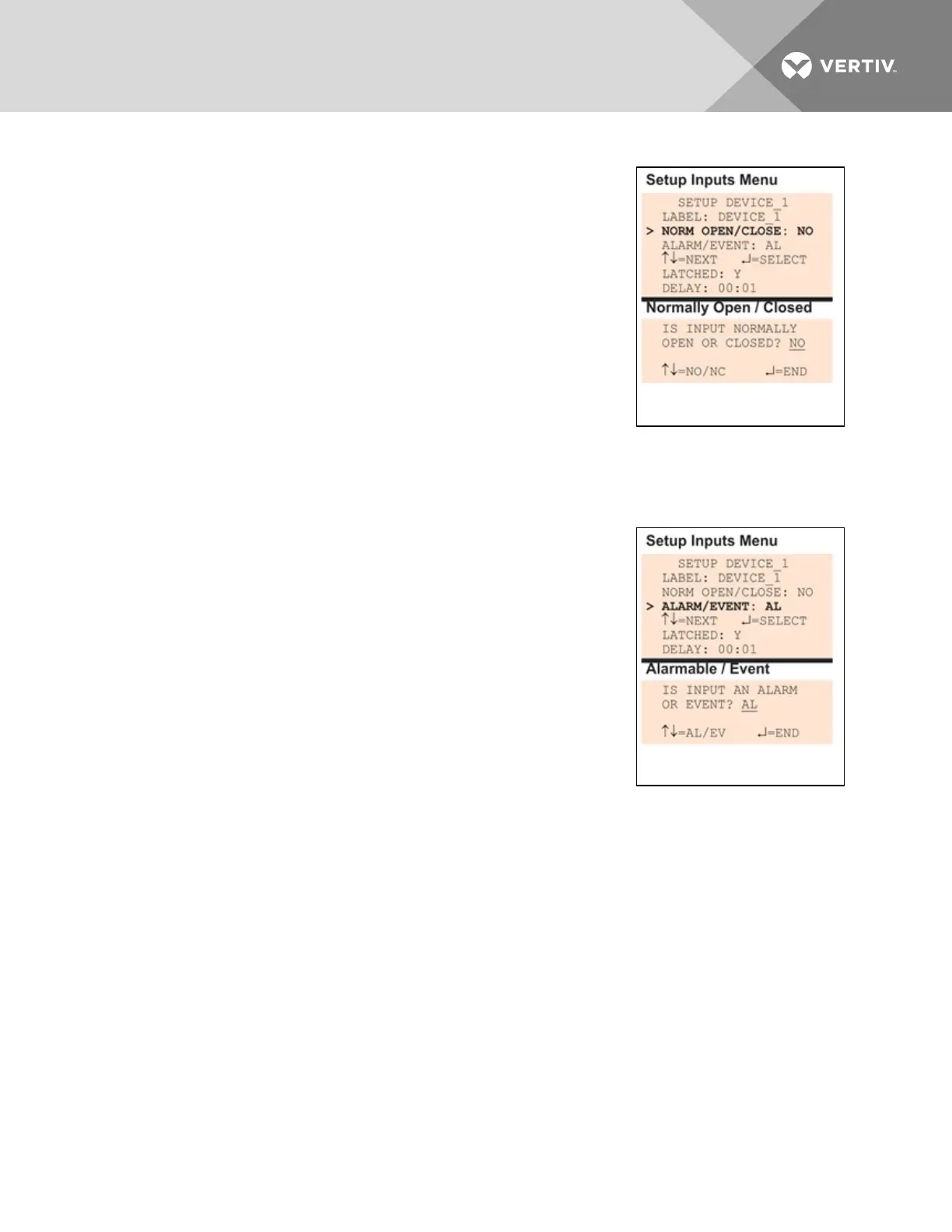
7.3.2 Define Input as Normally Open or Normally Closed
Each input may be set up as Normally Open (NO) or Normally Closed (NC).
The default setting for all input points is NO (Normally Open).
If you require an input to be a supervised point, define the input as
Normally Closed (NC).
• From the Setup Inputs Menu, choose Norm Open/Close, as
shown at right, and press Enter.
• To change the normal state for this input, use the arrows to
choose NO (Normally Open) or NC (Normally Closed), then press
Enter.
7.3.3 Define Input as Alarmable or Event
Each digital input may be defined as Alarmable (AL) or as an Event(EV).
• For a digital input defined as alarmable, the following alarm reactions occur when the status of
the monitored input device changes: the LCD flashes, the audible horn sounds, configured
pager numbers will be notified and a record is entered in the Alarm Log.
• For a digital input defined as an event, the status change is
recorded in the Event Log.
For both types (alarmable and event), user setup determines output
control—whether the device that changed status is disabled or kept in
operating mode and whether a standby device is set to operate.
By default, all digital inputs are set up as AL (Alarmable).
• From the Setup Inputs Menu, choose Alarm/Event, as shown at
right, and press Enter.
• To change the type of digital input, use the arrows to choose AL
(Alarmable) or EV (Event), then press Enter.
Vertiv | Liebert® AC8 User Manual | 58



 To Next Page