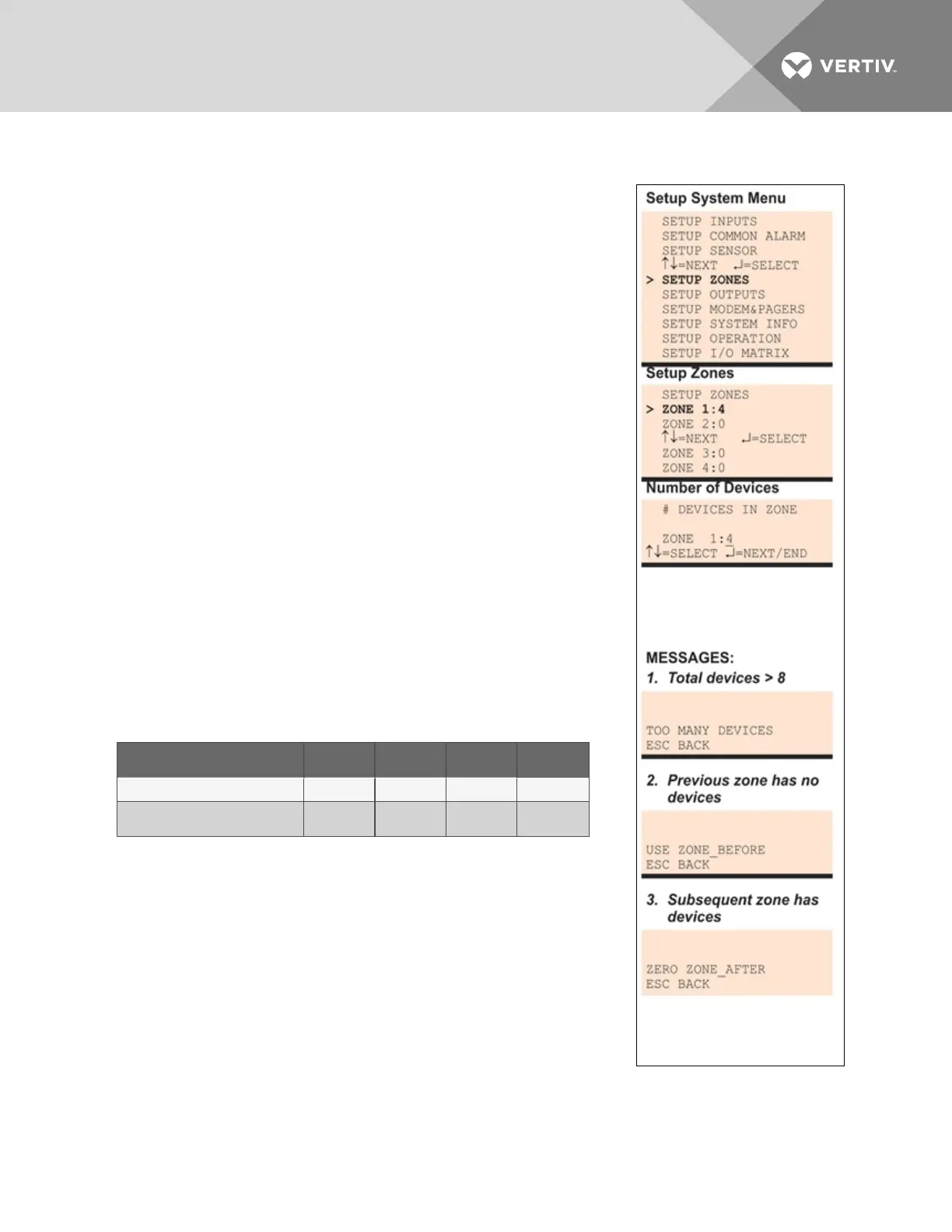
A single zone may have one to eight outputs associated with it. The minimum number of outputs per zone
is one, and the maximum for all zones combined is eight.
By default, the Liebert AC8 is configured to have one zone with four
outputs: Zone1 has four associated outputs and Zones 2-4 have none.
To set up zones:
Log In and Choose Setup System
• From the Main Menu, use the arrows to choose System and
Control, then press Enter (see Login on page53 for help).
• Enter your password at the Login screen.
• From the System and Control Menu, use the arrows to choose
Setup System, then press Enter.
Select Setup Zones
• From the Setup System Menu, shown at right, use the arrows to
choose Setup Zones and press Enter.
7.6.1 Set Up a Zone
• From the Setup Zones Menu, choose a zone—for example,
Zone1—and press Enter.
• In the Number of Devices screen, use the arrows to select the
number of outputs for this zone, then press Enter. The example
at right shows four outputs in Zone1.
Guidelines for Setting Up Zones
• The Liebert AC8 assigns outputs to zones in numerical order,
based on entries in the Number of Devices screen. For example:
Example Zone 1 Zone 2 Zone 3 Zone 4
If the Number of Devices is: 4 2 2 (none)
The Liebert AC8 assigns these
outputs to this zone:
Outputs
1-4
Outputs
5-6
Outputs
7-8
(none)
• The total number of outputs for all zones cannot exceed 8.
If you try to enter more than 8 devices in total, Message1
appears (shown at right). Press Escape to return to the Setup
Zones menu.
• Zones must be set up in order, starting with Zone 1.
If you try to enter devices for Zone 2 before Zone 1 has any
outputs, Message2 appears (shown at right). Press Escape and
set up Zone1 before attempting to set up Zone 2.
• Remove outputs in descending order, ending with Zone 1.
If you try to remove all devices from Zone 1 before Zone 2, Message3 appears (shown at right).
Press Escape and remove devices from Zone 2 before removing devices from Zone 1.
Table 7.5 on the next page shows the default number of outputs for each zone.
Vertiv | Liebert® AC8 User Manual | 69



 To Next Page