7.5.2 Change Sensor Label (Name)
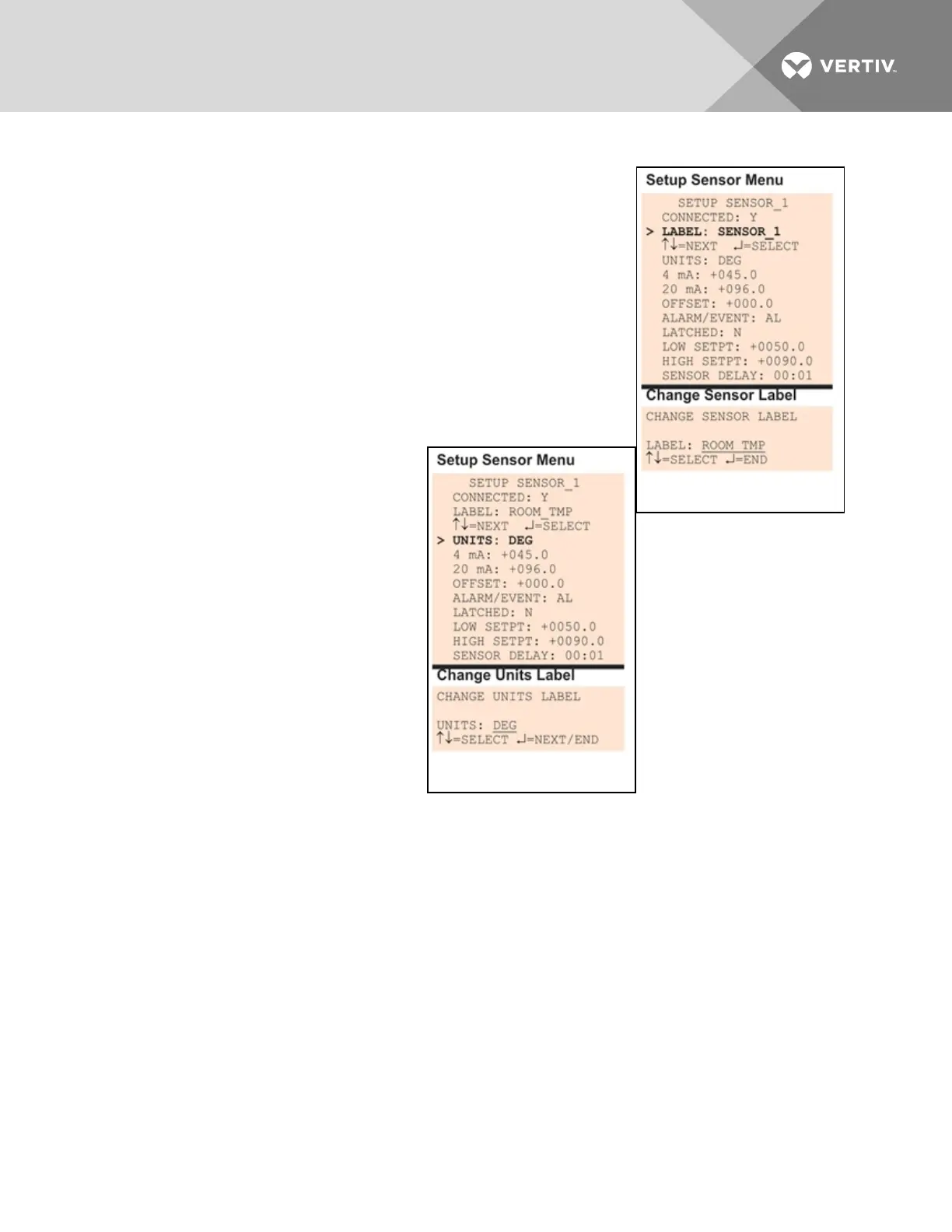
Each sensor has a default label (Sensor_1, Sensor_2, etc.) that you may
change to a more descriptive name. The label may consist of up to eight
characters (see Table 7.1 on page53 for valid characters).
• From the Setup Sensor Menu, choose Label for the selected
sensor—Label: Sensor_1 in the example—and press Enter.
• To change the sensor’s label, which may consist of up to eight
characters:
• Use the arrows to choose a character.
• Press Enter to advance to the next character position.
• When finished, press Enter again.
7.5.3 Change Units Label
For each sensor, you may use a three-
character label to specify measurement
units, such as DEG (see Table 7.1 on page53
for valid characters).
• From the Setup Sensor Menu,
choose Units for the selected
sensor and press Enter.
• To enter the units label, which
may consist of up to three
characters:
• Use the arrows to choose a
character.
• Press Enter to advance to
the next character position.
• When finished, press Enter
again.
Vertiv | Liebert® AC8 User Manual | 63



 To Next Page