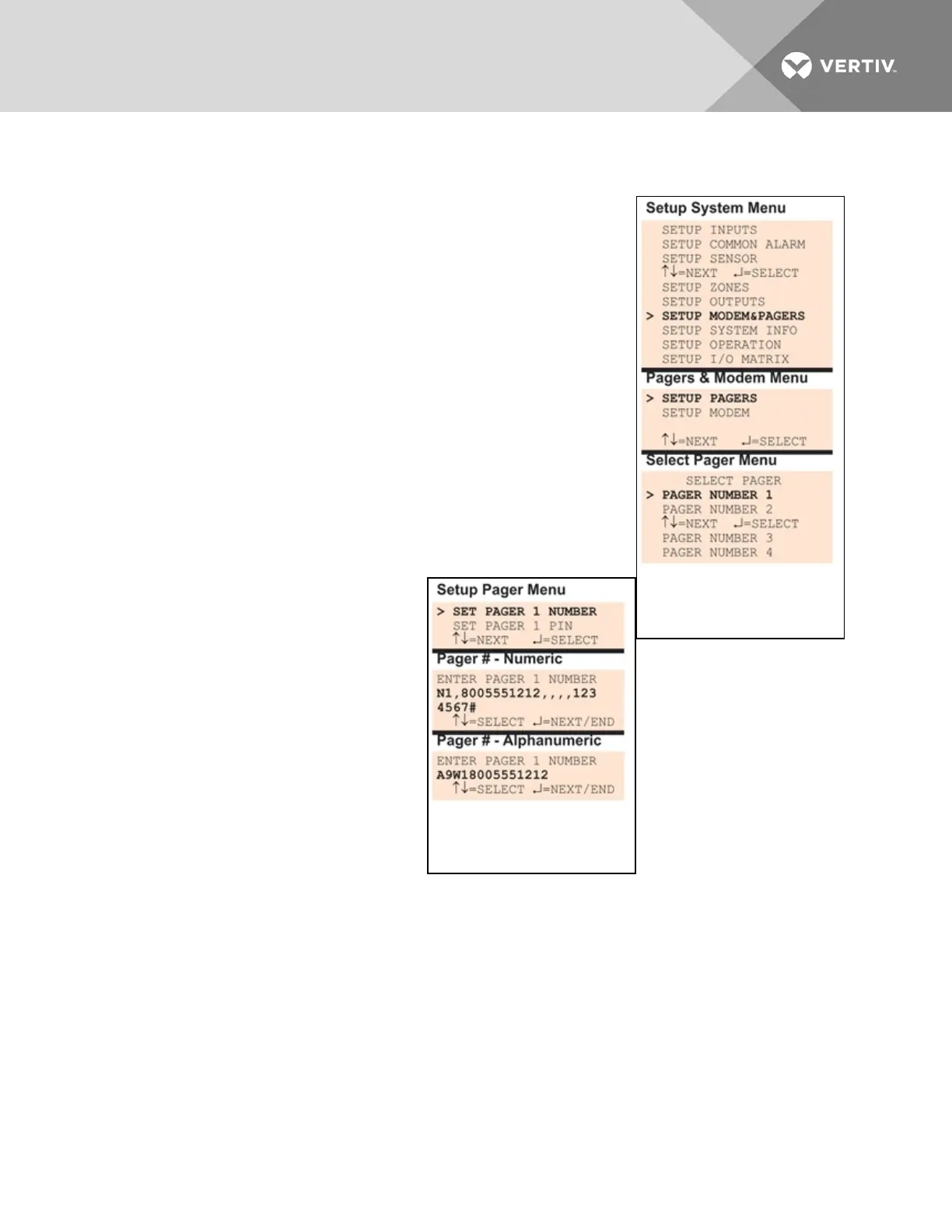
To configure a pager:
Log In and Choose Setup System
• From the Main Menu, use the arrows to choose System and
Control, then press Enter (see Login on page53 for help).
• Enter your password at the Login screen.
• From the System and Control Menu, use the arrows to choose
Setup System, then press Enter.
Select a Pager to Configure
• From the Setup System Menu, shown at right, use the arrows to
choose Setup Modem&Pagers and press Enter.
• Use the arrows to choose Setup Pagers from the Pagers &
Modem Menu, and press Enter.
• From the Select Pager Menu, choose the pager number you
want—for example, Pager Number 1—and press Enter.
Enter a Pager Number
• From the Setup Pager Menu,
choose Setup Pager Number for
the selected pager—Setup Pager
1 Number in the example at
right—and press Enter.
• See Table 7.11 on the next page
for guidelines on entering the
pager number, which may consist
of up to 40 characters. To enter
the pager number:
• Use the arrows to choose a
character.
• Press Enter to advance to
the next character position.
• When finished, press Enter again.
Vertiv | Liebert® AC8 User Manual | 79



 To Next Page