PERFORM FIRMWARE UPDATE
This command will update the existing firmware
1=PERFORM FIRMWARE UPDATE
2=RETURN TO SETUP SYSTEM INFO MENU
3=RETURN TO SETUP MENU
4=RETURN TO MAIN MENU
SELECT A NUMBER:1
To perform the update:
1. At the Perform Firmware Update prompt, enter Y (Yes - begin) or N (No - cancel). The current
setting appears in brackets—[N] in the following example.
>PERFORM FIRMWARE UPDATE-YES(Y) OR NO(N)?
>[N]
>[
NOTE: The following instructions refer to the Microsoft Windows HyperTerminal program. These
steps may vary for other communications programs.
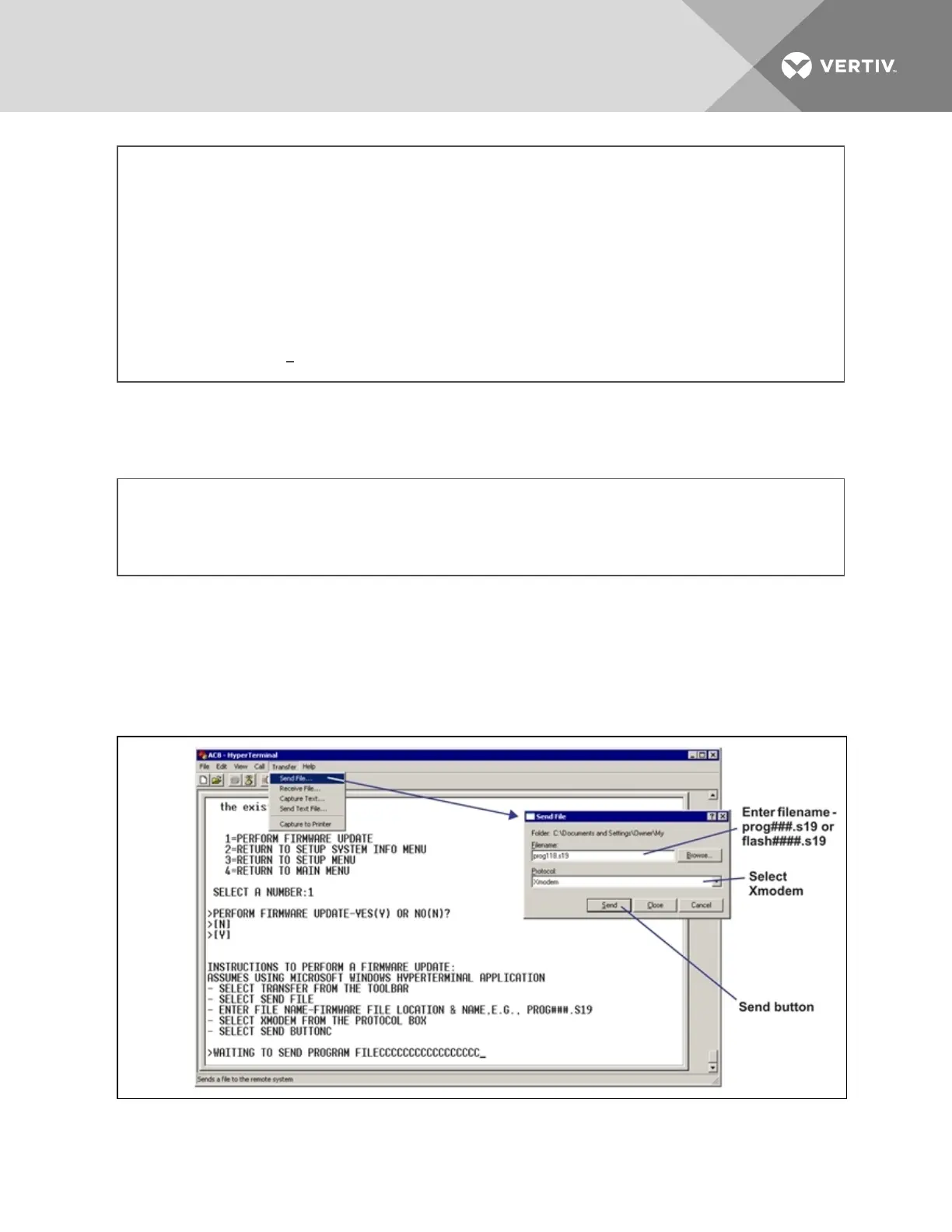
2. The firmware update is a two-step process—this step describes how to upload the file
prog###.s19 (where ### is a number—for example, prog118.s19) to the Liebert AC8:
a. At the top of the HyperTerminal window, shown below, click on Transfer, then on Send
File.
b. In the Send File window, as shown above:
Vertiv | Liebert® AC8 User Manual | 92



 To Next Page