EtherNet/IP gateway
Wieland Electric GmbH | BA000970 | 11/2016 (Rev. F)
NET (Network Status)
The SP-COP2-ENI module possesses a two-color (red/green) LED with the designation
.
This is the
.
The Network Status Indicator is
dark
if no power supply is connected or a power supply is
connected but no IP address is configured (interface configuration attribute of the TCP/IP inter-
face object). It
flashes green
if EtherNet/IP is activated and an IP address has been configured
but no CIP connection is available an an “Exclusive Owner” connection has not yet shown a
time-out. It
turns green
if an IP address has been configured, there is at least one CIP connec-
tion (of any transport class) and an “Exclusive Owner” connection has not yet shown a time-
out. It
flashes green/red
if the device is performing a switch-on test.
The Network Status Indicator
flashes red
if EtherNet/IP is activated, an IP address has been
configured and an “Exclusive Owner” connection, for which the device is the target device,
has shown a time-out. The Network Status Indicator only turns green again when all the ex-
pired “Exclusive Owner” connections have been restored. The Network Status Indicator swit-
ches from flashing red to being lit in green if all the connections of the previously expired O->T
connection points have been restored. Time-outs in other connections than the "Exclusive Ow-
ner” connections do not result in the indicator flashing red. The “flashing red” state only ap-
plies to connections with the target device. PLCs and CIP routers do not instigate a transition
to this state if a created or routed connection shows a time-out.
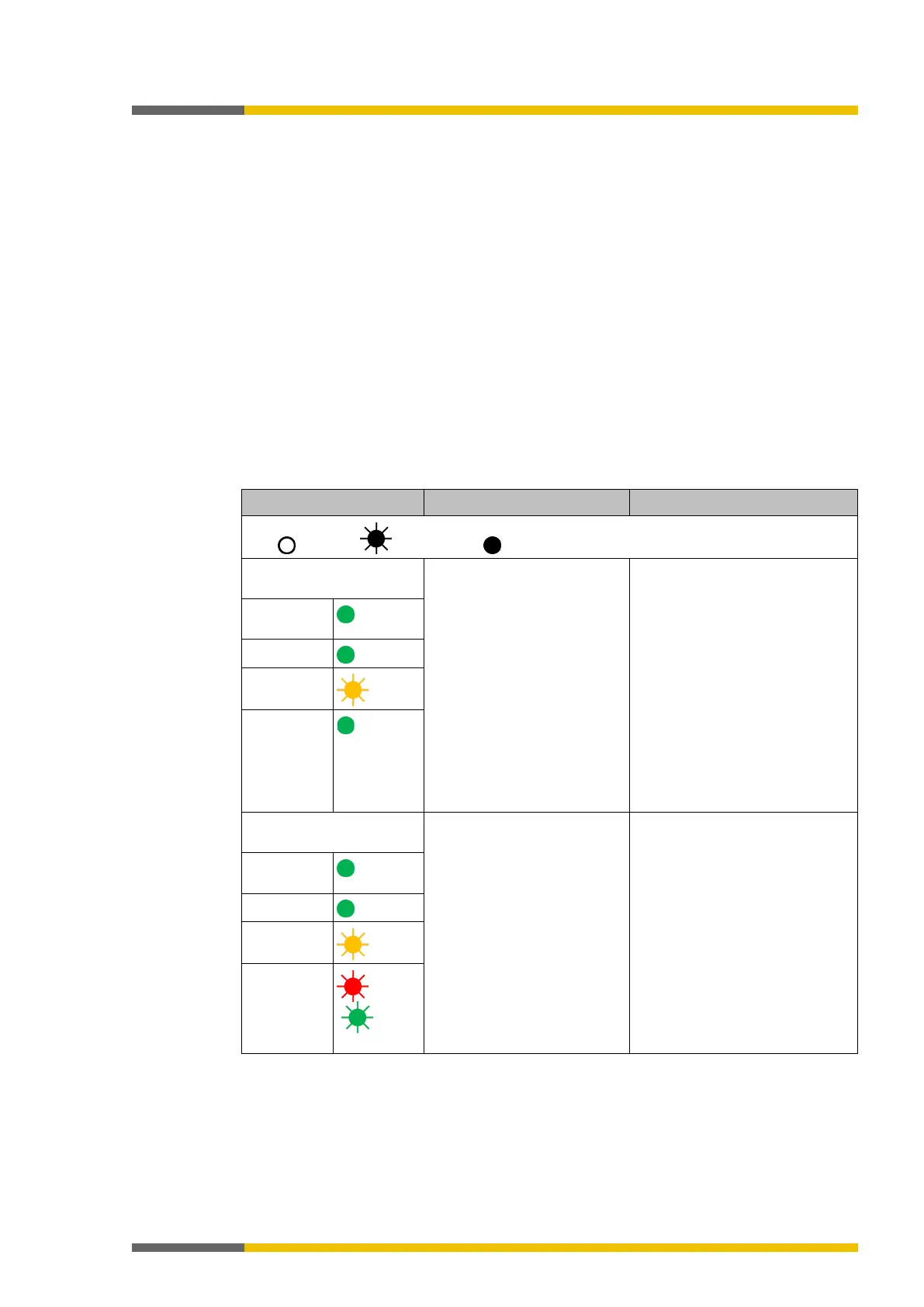
Table 64: Troubleshooting on the SP-COP2-ENI module (use as EtherNet/IP gateway)
Key: LED off / LED flashes / LED lights up
The SP-COP2-ENI module
does not provide any data.
• The SP-COP2-ENI has
been configured for data
transmission to the PLC,
but no Ethernet commu-
nication has been estab-
lished or the communica-
tion is faulty.
• Duplicate IP address de-
tected. Another network
device has the same IP
address.
• Incorrectly formatted
PROFINET device name
• PROFINET IO must be acti-
vated in the project file. At
least one Ethernet link must
be established. Check the
Ethernet wiring, check the
Ethernet settings in the PLC
and in samosPLAN5+.
• Correct the IP address and
switch the system off and on
again.
• Compare the device name
between the PROFINET mas-
ter and the SP-COP2-ENI
LED
Green
LED LINK
LED /ACT
MS LED
Green
The SP-COP2-ENI module
does not provide any data.
• Configuration required.
• The configuration has not
yet been fully transmitted.
• The module version does
not support any PROFI-
NET IO.
• Configure the SP-COP2-ENI
with a project file in which
PROFINET IO is activated and
transfer the configuration to
SP-COP2-ENI module.
• Use an SP-COP2-ENI device
starting with construction
state B-xx.
LED
Green
LED LINK
LED /ACT
MS LED
/ Red/gr



 To Next Page