PROFINET IO-Gateway
Wieland Electric GmbH | BA000970 | 11/2016 (Rev. F)
Diagnostics and troubleshooting
1031289099
Information on the diagnosis of the samosPRO system can be found in the software manual,
Section "List of all error messages".
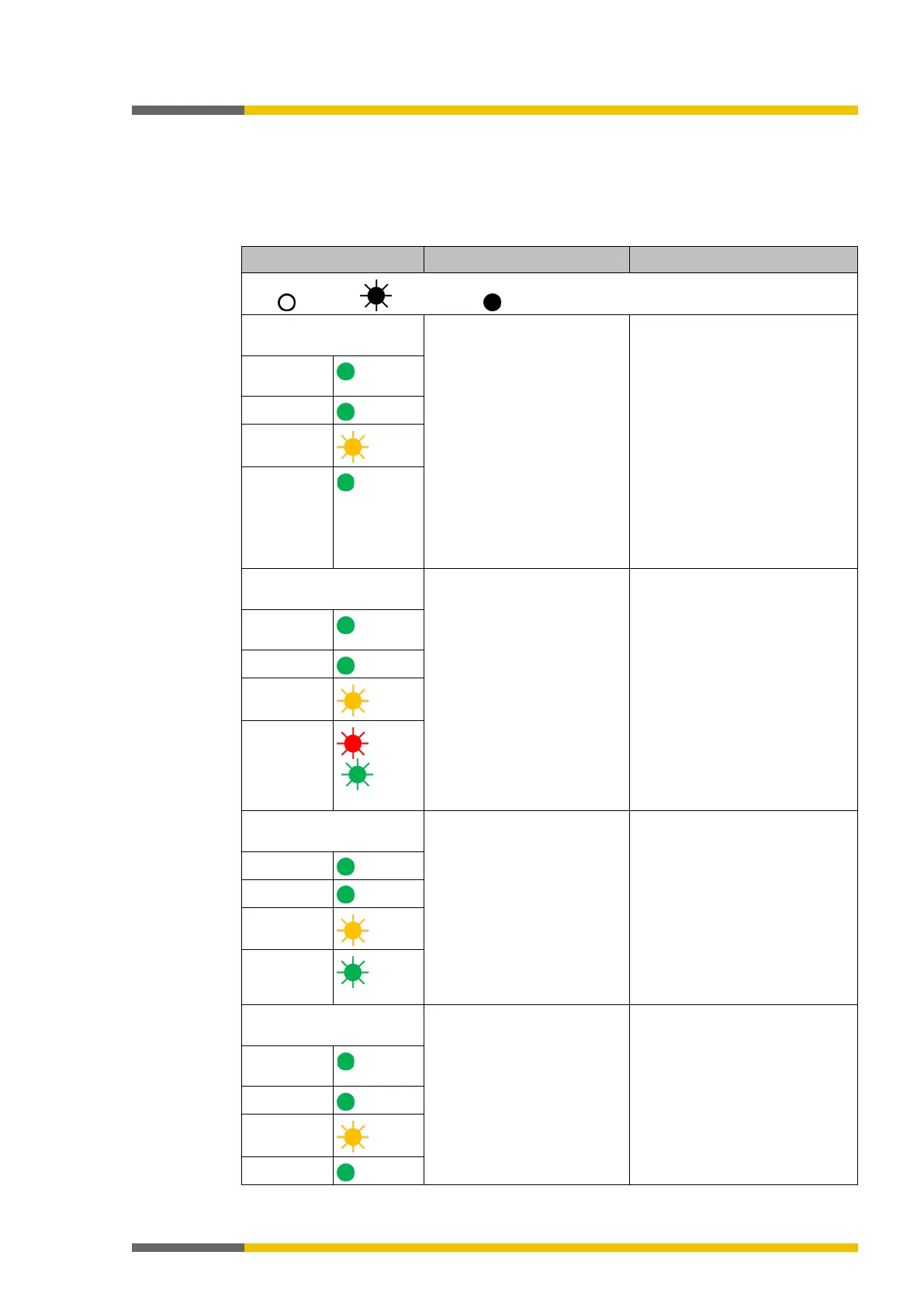
Table 32: Troubleshooting on the SP-COP2-ENI module
Key: LED off / LED flashes / LED lights up
The SP-COP2-ENI module
does not provide any data.
• The SP-COP2-ENI has
been configured for data
transmission to the PLC,
but no Ethernet commu-
nication has been estab-
lished or the communica-
tion is faulty.
• Duplicate IP address de-
tected. Another network
device has the same IP
address.
• Incorrectly formatted
PROFINET device name
• PROFINET IO must be acti-
vated in the project file. At
least one Ethernet link must
be established. Check the
Ethernet wiring, check the
Ethernet settings in the PLC
and in samosPLAN5+.
• Correct the IP address and
switch the system off and on
again.
• Compare the device name
between the PROFINET mas-
ter and the SP-COP2-ENI
LED
Green
LED LINK
LED /ACT
MS LED
Green
The SP-COP2-ENI module
does not provide any data.
• Configuration required.
• The configuration has not
yet been fully transmitted.
• The module version does
not support any PROFI-
NET IO.
• Configure the SP-COP2-ENI
module with a project file in
which PROFINET IO is acti-
vated and transfer the confi-
guration to SP-COP2-ENI
module.
• Use an SP-COP2-ENI device
starting with module version
B-xx.
LED
Green
LED LINK
LED /ACT
MS LED
/ Red/gr
The SP-COP2-ENI module
does not provide any data.
• The samosPRO system is
in the stop state.
• Start the controller module
(switch to Run mode).
LED PWR
LED LINK
LED /ACT
MS LED
The SP-COP2-ENI module
does not provide any data.
• The IP address for the SP-
COP2-ENI module is as-
signed by a DHCP server.
Following a restart of the
SP-COP2-ENI module or
the DHCP server, another
address was allocated to
the SP-COP2-ENI module,
which is unknown to the
PLC.
• Either assign the SP-COP2-
ENI module a permanent IP
address or reserve a perma-
nent IP address for the SP-
COP2-ENI module in the
DHCP server (manual as-
signment using the MAC
address of the SP-COP2-ENI
module).
LED
Green
LED LINK
LED /ACT
MS LED



 To Next Page