PROFIBUS DP gateway
Wieland Electric GmbH | BA000970 | 11/2016 (Rev. F)
Diagnosis and troubleshooting
910812811
You can find information on diagnosis of the samosPRO system in the software manual.
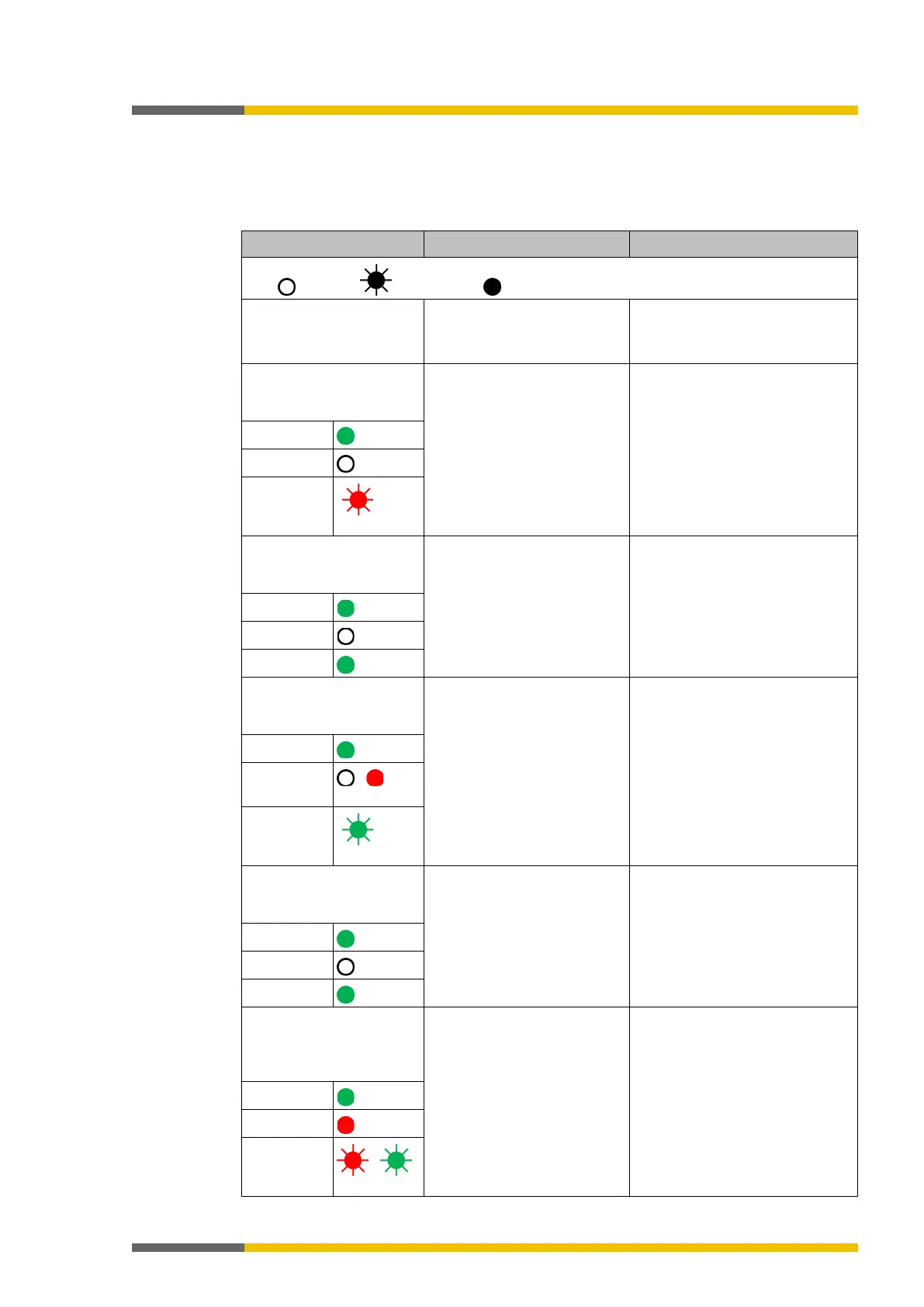
Table 76: Troubleshooting on the SP-PROFIBUS-DP module
Key: LED off / LED flashes / LED lights up
samosPLAN5+ cannot set
up a connection to the
samosPRO gateway
The SP-PROFIBUS-DP
has no power supply
• Switch on the power supply.
• Check the communication
The SP-PROFIBUS-DP
module does not provide
• Configuration required.
• The configuration has not
yet been fully transmitted.
• Configure the SP-PROFIBUS-
DP module and transfer the
configuration to the system.
• Wait until the configuration
has been fully transferred.
LED PWR
LED BF
MS LED
-
The SP-PROFIBUS-DP
module does not provide
No data set was activated. Activate at least one data set.
LED PWR
LED BF
Off
MS LED
The SP-PROFIBUS-DP
module does not provide
The SP-PROFIBUS-DP
is in the Stop state.
• The controller modu-
le/application is stopped.
• Start the controller module
(switch to Run mode).
LED PWR
LED BF
/
MS LED
-
The SP-PROFIBUS-DP
module does not provide
PROFIBUS-Master is in stop
mode
Set the PROFIBUS-Master to Run
mode
LED PWR
LED BF
MS LED
The SP-PROFIBUS-DP
functioned correctly after
configuration but sudden-
ly provides no more data.
• The PROFIBUS hardware
address of the SP-
PROFIBUS-DP module
was changed.
• The PROFIBUS line has
been interrupted.
•
Check the PROFIBUS address
settings on the hardware.
• Check the PROFIBUS cab-
ling.
• Check the PROFIBUS master.
LED PWR
LED BF
MS LED
/



 To Next Page