Operation4002−2/A1
Winterthur Gas & Diesel Ltd.
8/ 37
3.4 Control Locations
2
6
3 4
5
10
1
8
9
7
WCH03165
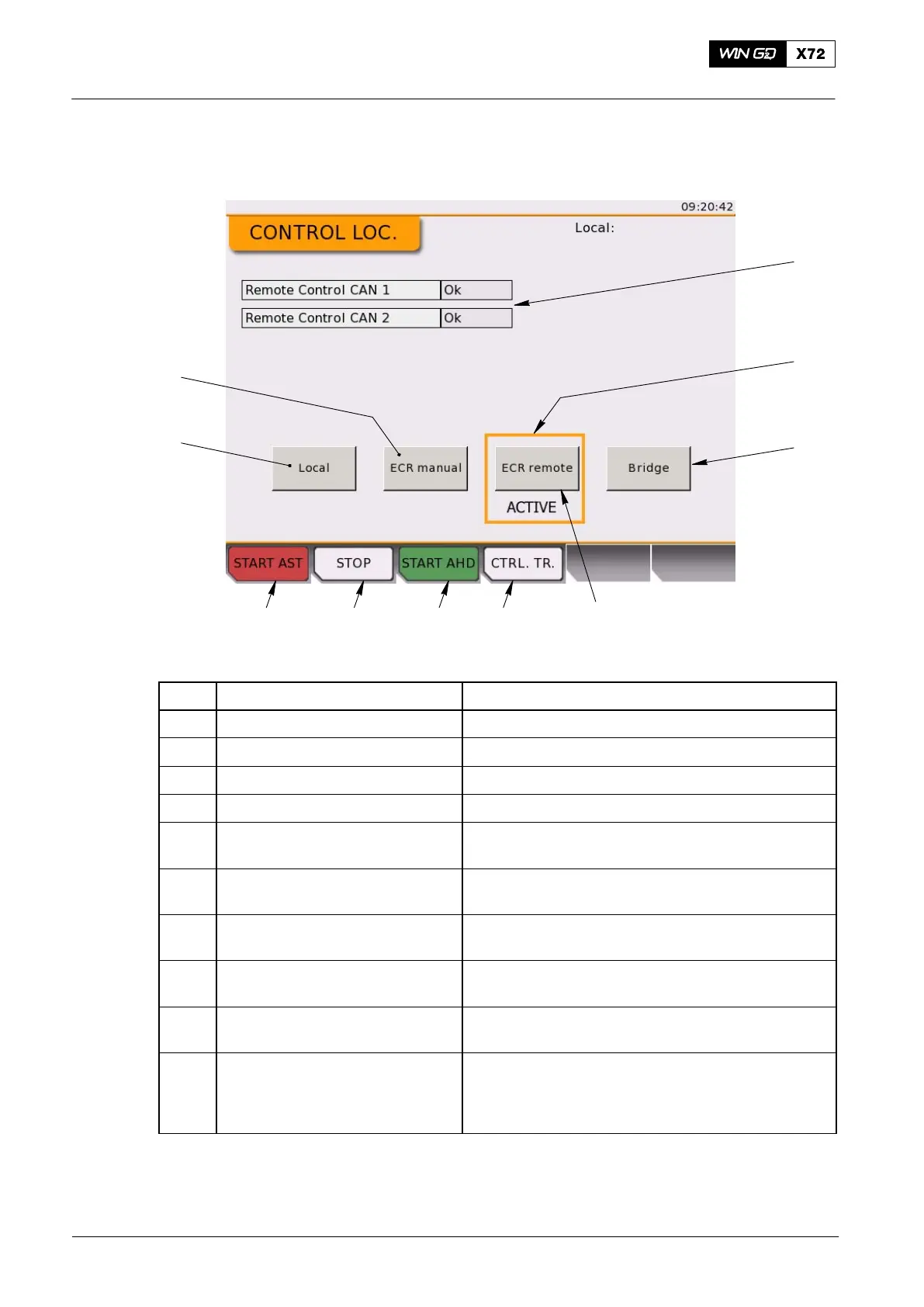
Fig. 6: Control Locations Page
Item Function Effect / Procedure
1 START AST button Start the engine in astern direction
2 STOP button Stop the engine
3 START AHD button Start the engine in ahead direction
4 CTRL. TR. button Request control to this LDU
5 Local on-screen button Request/Accept a control transfer
to/from the LDU on the engine
6 ECR manual button Request/Accept a control transfer
to/from the LDU in the ECR
7 ECR remote button Request/ Accept a control transfer
to/from the remote control system in the ECR
8 Bridge button Request/Accept a control transfer
to/from the remote control system on the bridge
9 ACTIVE frame Indicates which of the four possible locations is in
control of the engine
10 CAN 1/ 2 status Shows the status of the two redundant CANBus
lines
between the ECS and the remote control system.
Shows OK, or ERROR
Local Control Panel / Local Display Unit (LDU−20)
2015-12



 To Next Page