Operation
4002−2/A1
Winterthur Gas & Diesel Ltd.
31/ 37
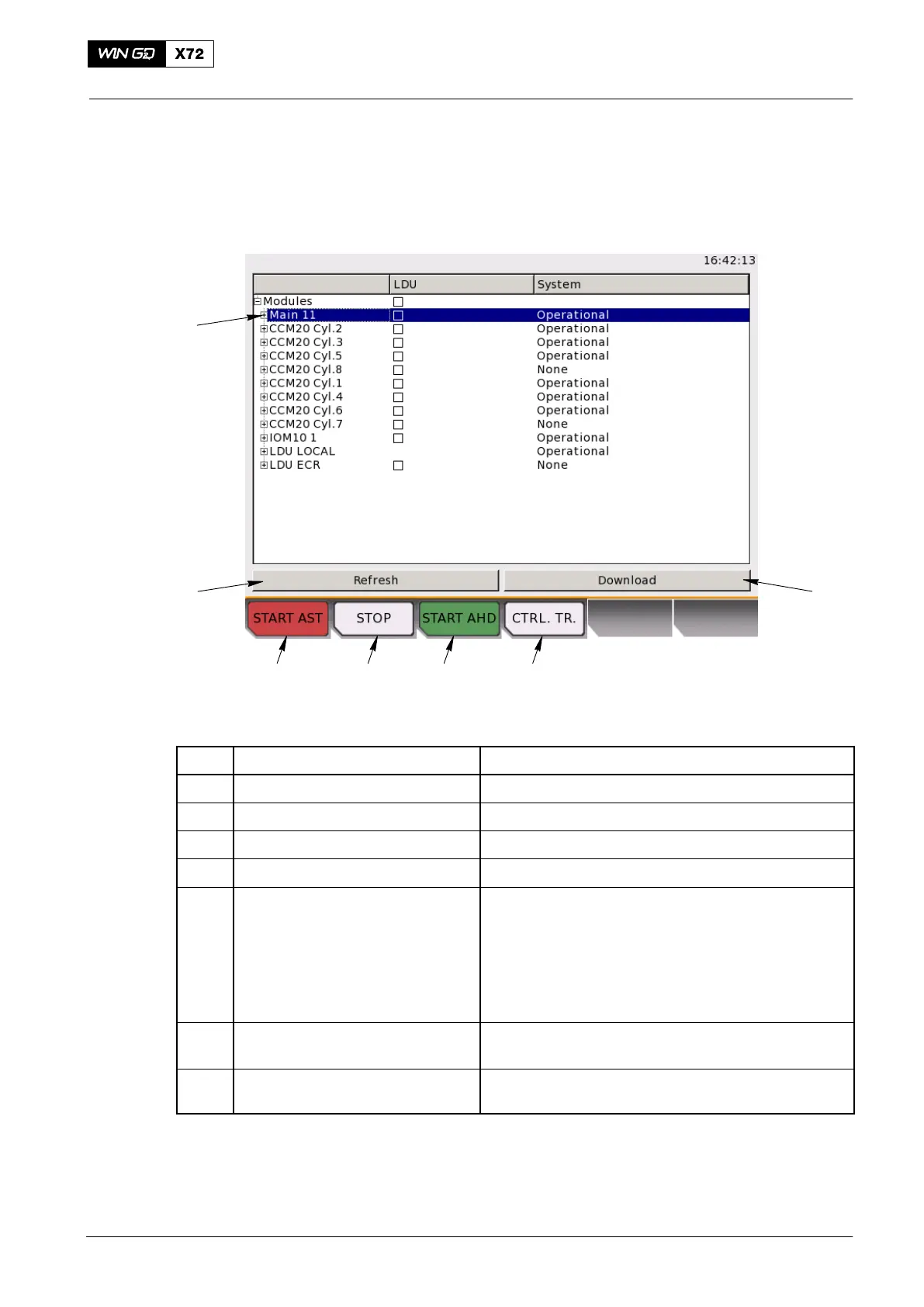
3.16 System Status
The LDU-20 have a full backup of all application and configuration files for all modules
in the system (5, Fig. 17). When a module starts, all files are compared to the backup
files in the LDU-20. Different versions found are highlighted with red in the status list.
2 3 41
5
7
6
Fig. 19: System Status
Item Function Effect / Procedure
1 START AST button Start the engine in astern direction
2 STOP button Stop the engine
3 START AHD button Start the engine in ahead direction
4 CTRL. TR. button Request a control transfer to this LDU
5 Status indications for each
module
Possible states are:
Application running: Module operates normally
No still alive: Module is set to off or
disconnected from the CAN bus
Difference found: Different version of application/
configuration/DSP is found
SW download is necessary to synchronize the
module with the rest of the system
6 Refresh button Use the rotary button to select. Updates the module
status list
7 Download button Use the rotary button to select.
Does a SW download on the selected modules
Local Control Panel / Local Display Unit (LDU−20)
2015-03



 To Next Page