Operation4002−2/A1
Winterthur Gas & Diesel Ltd.
30/ 37
31
4
7
6
5
2
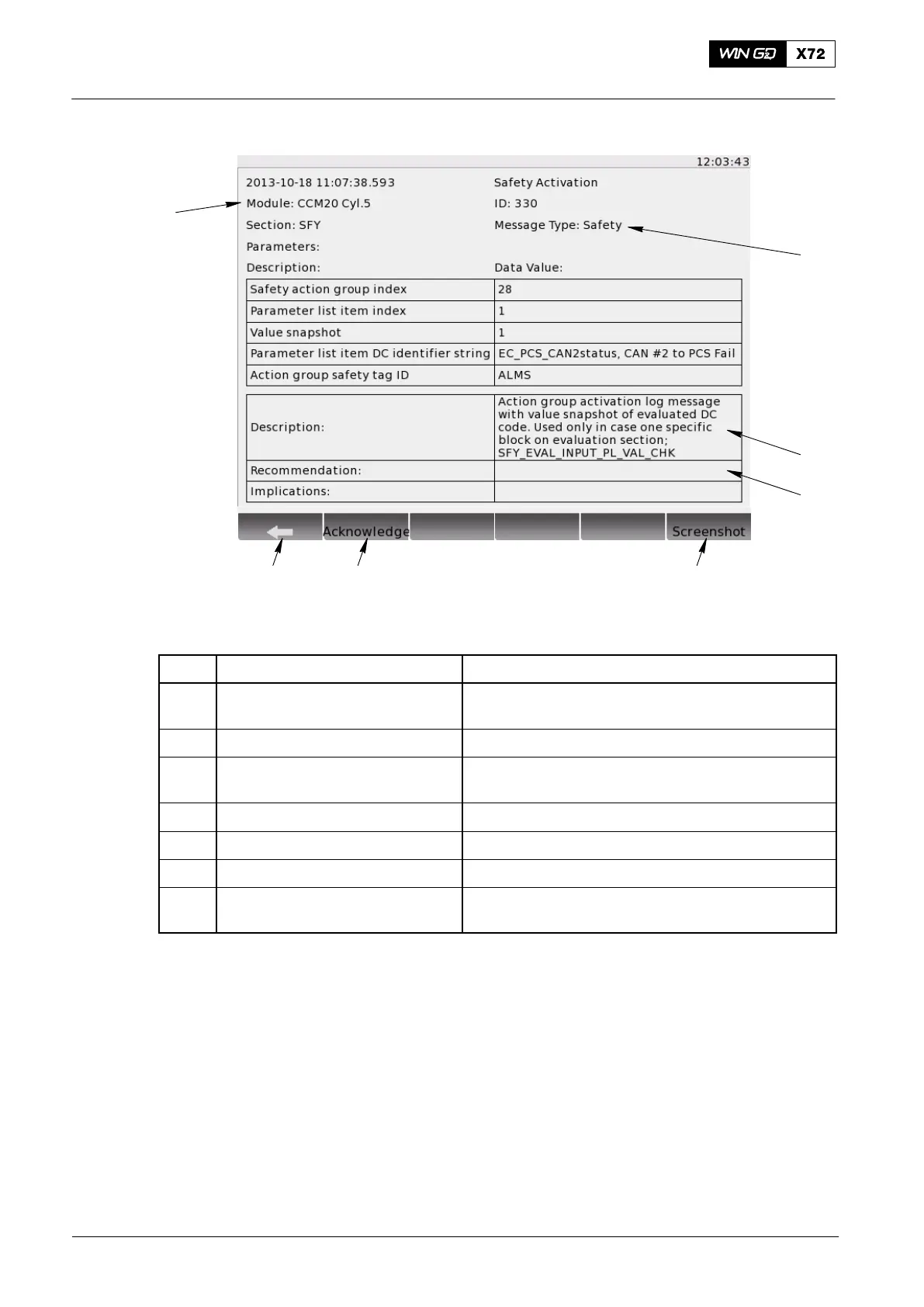
Fig. 18: Log Entry Data
Item Function Effect / Procedure
1 BACK button When selected, the screen goes back to the
message list
2 Acknowledge button No function
3 Screenshot button Saves a picture (in .png format) of this screen
to a USB drive (if connected)
4 Module identifier Shows the source module that sent this log entry
5 Message type Info/Error/Event/Safety
6 Description General data about the log entry
7 Recommended action Recommended action that the operator can do to
solve the problem
Note: Some data on this screen are only applicable to WinGD SW developers,
i.e. the ID and status flag numbers.
3.15.1 Procedure − Export a Screenshot of the Log Entry Page
1) If a serious problem occurs, do step a) to step d):
a) Take a screenshot of this page.
b) Connect a USB drive to the USB port on the rear of the LDU.
c) Save the screenshot to the USB drive.
d) Send the saved .png file to WinGD.
Local Control Panel / Local Display Unit (LDU−20)
2015-03



 To Next Page