January 2010
2-77
Phaser 7760 Color Laser Printer
007-272
Status Indicator RAP’s
Revised
007-272 Tray 4 Paper Size Sensor Broken (3TM)
An abnormal A/D value was detected by the Tray 4 Paper Size Sensor.
Initial Actions
• Check that the paper size setting is correct.
• Check the Tray 4 Paper Size Sensor for damage, or incorrect mounting. Repair or replace
as required.
• Check the switch actuators on Tray 4 for wear or damage.
Procedure
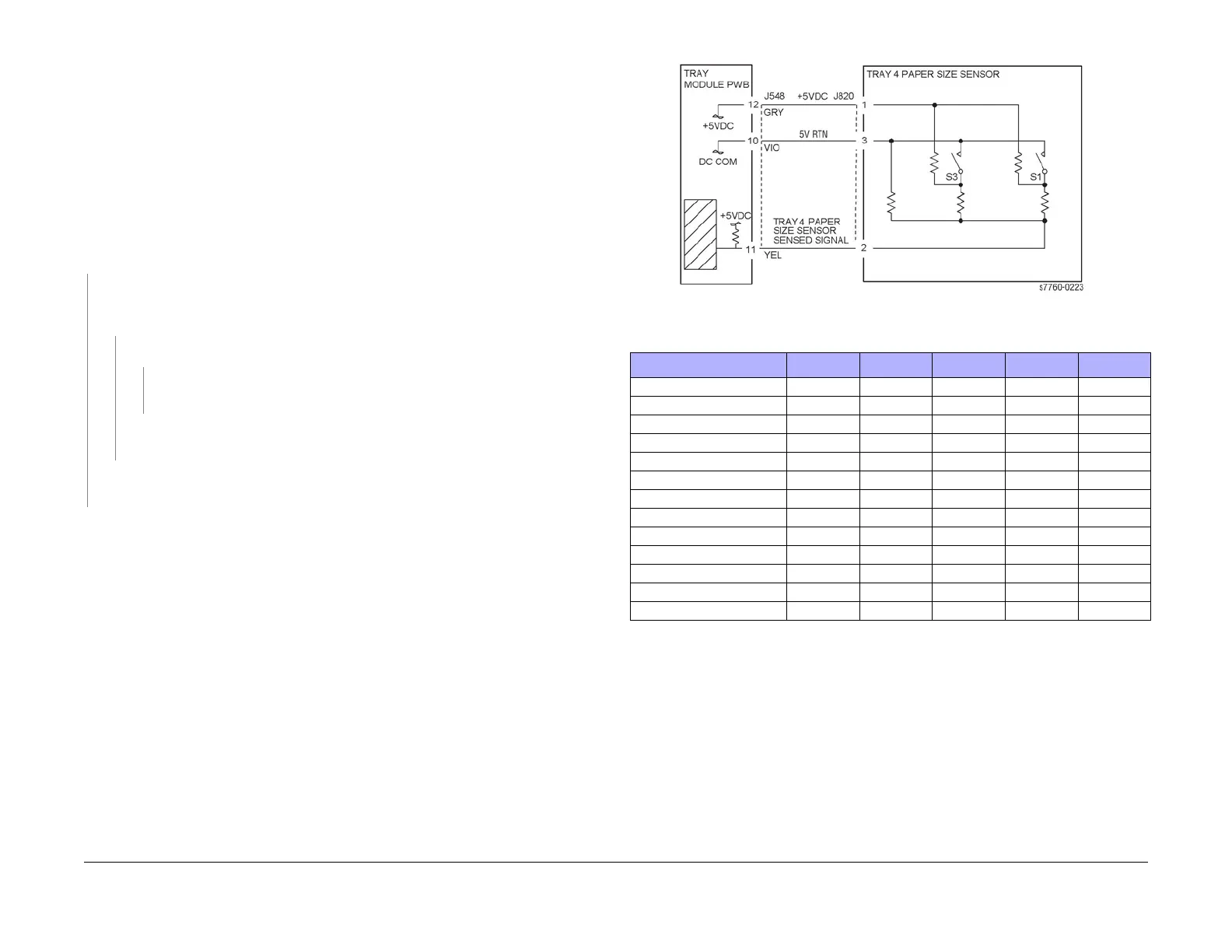
Ensure Tray 4 is properly closed. Measure the voltage at P/J548-11 on the Tray Module PWB
(PL 15.9). The voltage measured corresponds with the paper size in Table 1.
YN
There is +5 VDC between P/J820-1 and 3 (refer to Section 7, TT Module (Tray 2,3,4,
Paper Size Switch) - Plug/Jack Locations - Figure 23) on the Paper Size Sensor (PL
16.1).
YN
There is +5 VDC between P/J548-12 and 10 on the Tray Module PWB.
YN
Go to the +5 VDC Wirenets (Section 7, +5 VDC Wirenet - Figure 4) to trouble-
shoot the power circuit.
Check the wires from P/J548 to P/J820 (Figure 1) for damage. Repair or replace as
required.
Check the wire from P/J548-11 to P/J820-2 for damage. Repair or replace as required. If
the wire check out OK, replace the Tray 4 Paper Size Sensor (PL 16.1).
• Ensure that the connectors shown in the circuit diagram (Figure 1) are securely con-
nected and that the wires are not damaged.
• Replace the Tray 4 Paper Size Sensor (PL 16.1).
• If the problem persists, replace the Tray Module PWB (PL 15.9).
Figure 1 007-272 Tray 4 Paper Size Sensor
Table 1 Tray 4 Paper Size Sensor Values
Paper Size S1 S2 S3 S4 Voltage
No Tray OFF OFF OFF OFF 4.78
A3SEF OFF OFF OFF ON 4.45
11x17SEF OFF OFF ON OFF 4.12
8.5x13SEF OFF OFF ON ON 3.81
B5 or 16K LEF OFF ON OFF ON 3.18
B5 or 8 x 10 SEF OFF ON ON OFF 2.87
8.5x11SEF OFFONONON2.57
B4 or 8K SEF ON OFF OFF ON 1.98
A4SEF ON OFF ON OFF 1.67
8.5x14SEF ON OFF ON ON 1.37
A4LEF ON ON OFF ON 0.77
8.5x11LEF ON ON ON OFF 0.47
A5 or 5.5x8.5SEF ON ON ON ON 0.17





 To Next Page