January 2010
2-318
Phaser 7760 Color Laser Printer
012-922
Revised
Status Indicator RAP’s
012-922 Paper at Gate Sensor (Buffer Path Job)
Control logic reports paper at the Gate Sensor.
Initial Actions
• Check for obstructions in the paper path.
• Check the Finisher Drive Motor Gears and Drive rolls for wear or damage.
Procedure
Enter Service Diagnostics Menu: Printer Menu > Troubleshooting > Service Tools > Printer
Status Page > hold the Up and Down buttons simultaneously > Run Service Diagnostics >
OK. Actuate the Gate Sensor (PL 21.11). The display changes.
YN
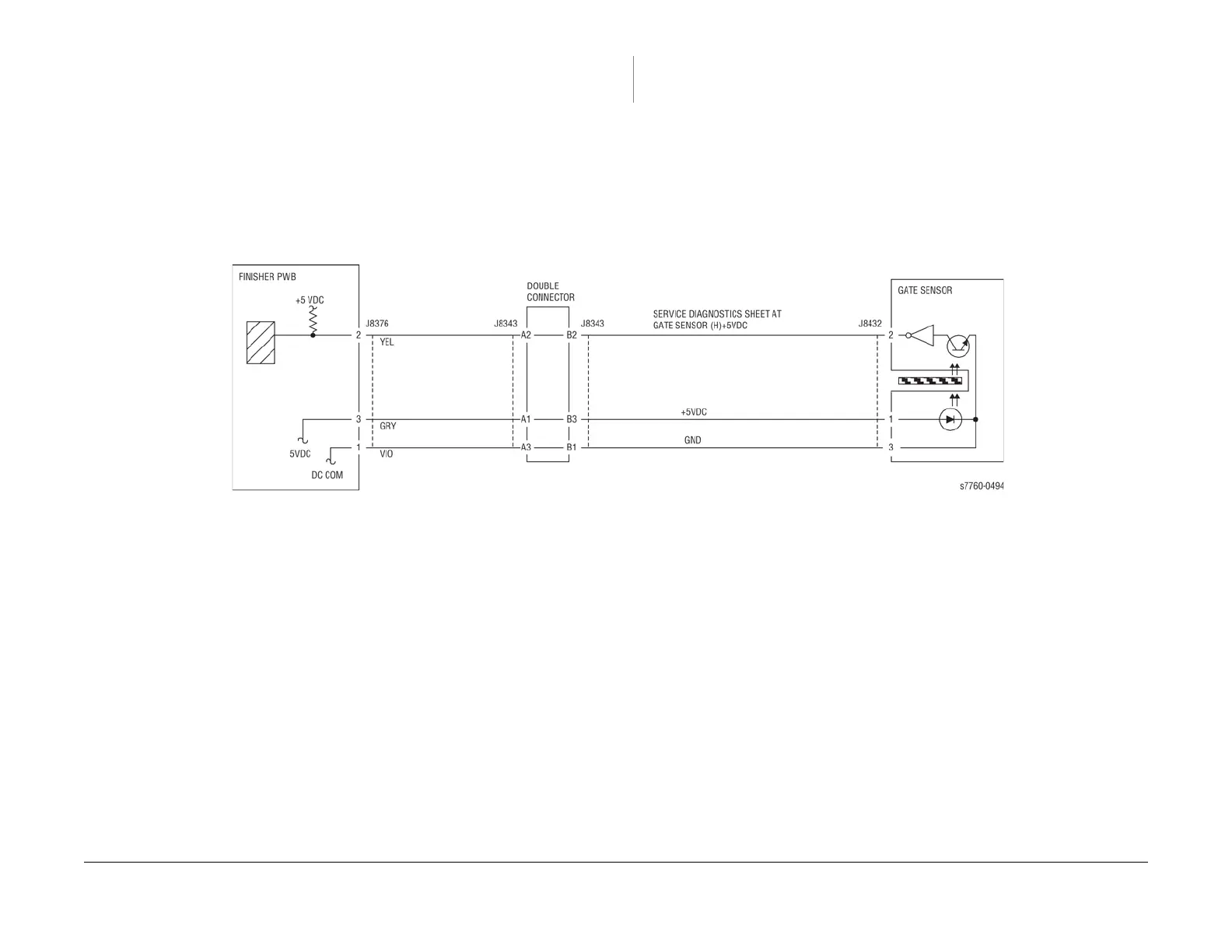
Check the circuit of the Gate Sensor. (Figure 1). Refer to Section 6, Transmissive Sensor
Procedure for troubleshooting procedure.
Check the following:
• Ensure that the connectors shown in the circuit diagrams are securely connected and that
the wires are not damaged
• Check the Finisher is docked properly
• Check the Finisher Transport Motor and its associated gears and belts for damage, con-
tamination or misalignment
If the above checks are OK, then replace the Gate Sensor (PL 21.11). If the problem persists,
replace the Finisher PWB (PL 21.12).
Figure 1 012-922 Gate Sensor

















 To Next Page