January 2010
2-320
Phaser 7760 Color Laser Printer
012-935
Revised
Status Indicator RAP’s
012-935 Paper at Xport Entrance Sensor
Control logic reports paper at the Xport Entrance Sensor.
Initial Actions
• Check for obstructions in the paper path
• Check that the Finisher is dock correctly to ensure proper Transport Gate operation
Procedure
Enter Service Diagnostics Menu: Printer Menu > Troubleshooting > Service Tools > Printer
Status Page > hold the Up and Down buttons simultaneously > Run Service Diagnostics >
OK. Actuate the Transport Entrance Sensor (PL 21.10). The display changes.
YN
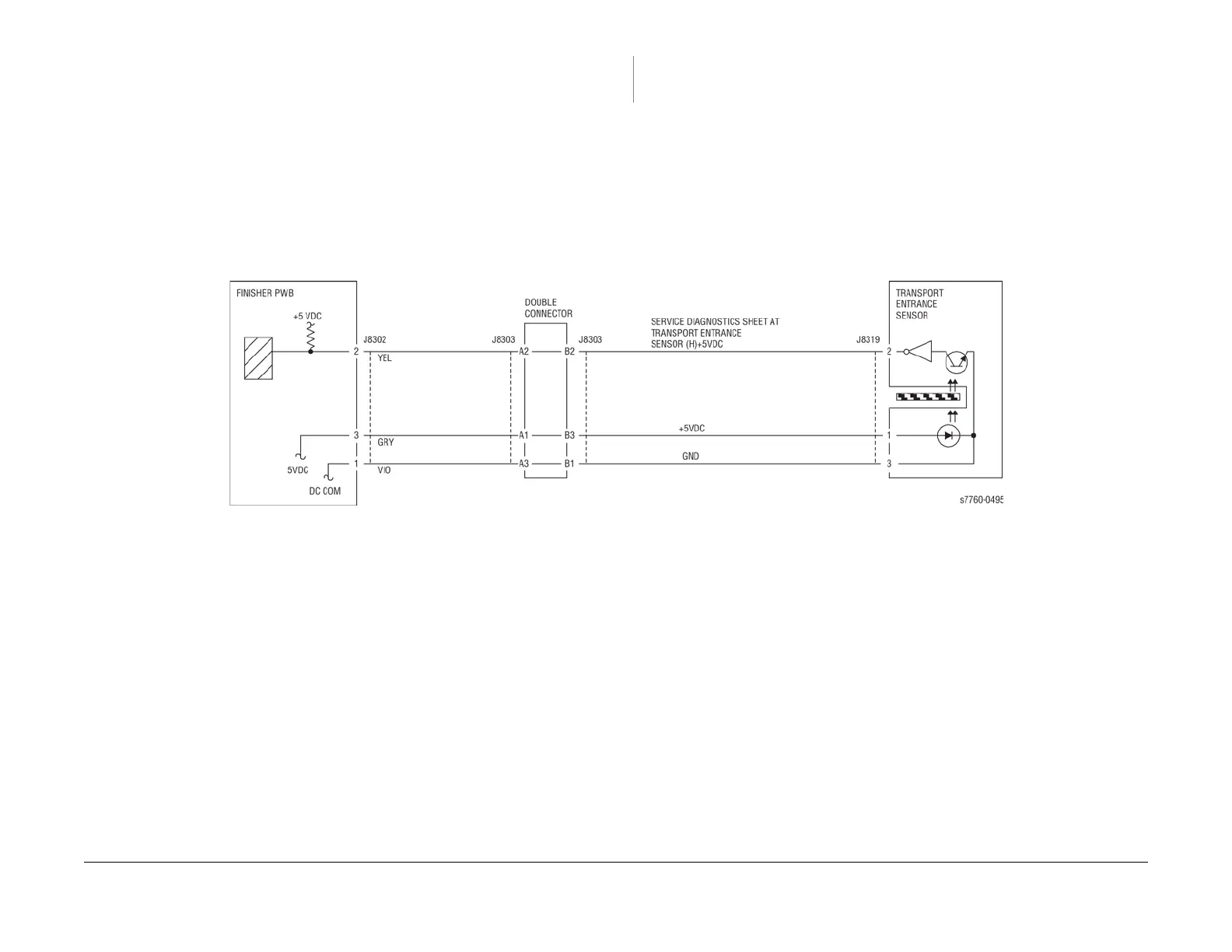
Check the circuit of the Transport Entrance Sensor. (Figure 1). Refer to Section 6, Trans-
missive Sensor Procedure for troubleshooting procedure.
Check the following:
• Ensure that the connectors shown in the circuit diagrams are securely connected and that
the wires are not damaged
• Check the H-Transport Motor and its associated gears and belts for damage, contamina-
tion or alignment
• Check the Finisher Transport Motor and its associated gears and belts for damage, con-
tamination or alignment
If the above checks are OK, then replace the Transport Entrance Sensor (PL 21.25). If the
problem persists, replace the Finisher PWB (PL 21.12).
Figure 1 012-935 Transport Entrance Sensor

















 To Next Page