January 2010
2-24
Phaser 7760 Color Laser Printer
003-953, 003-954
Revised
Status Indicator RAP’s
003-953 Tray 5 No Paper Sensor
Tray 5 No Paper Sensor failure.
Procedure
Remove Tray 5. Enter Service Diagnostics Menu: Printer Menu > Troubleshooting > Service
Tools > Printer Status Page > hold the Up and Down buttons simultaneously > Run Service
Diagnostics > OK. Actuate the Tray 5 No Paper Sensor (TTM or - 3TM). The display
changes.
YN
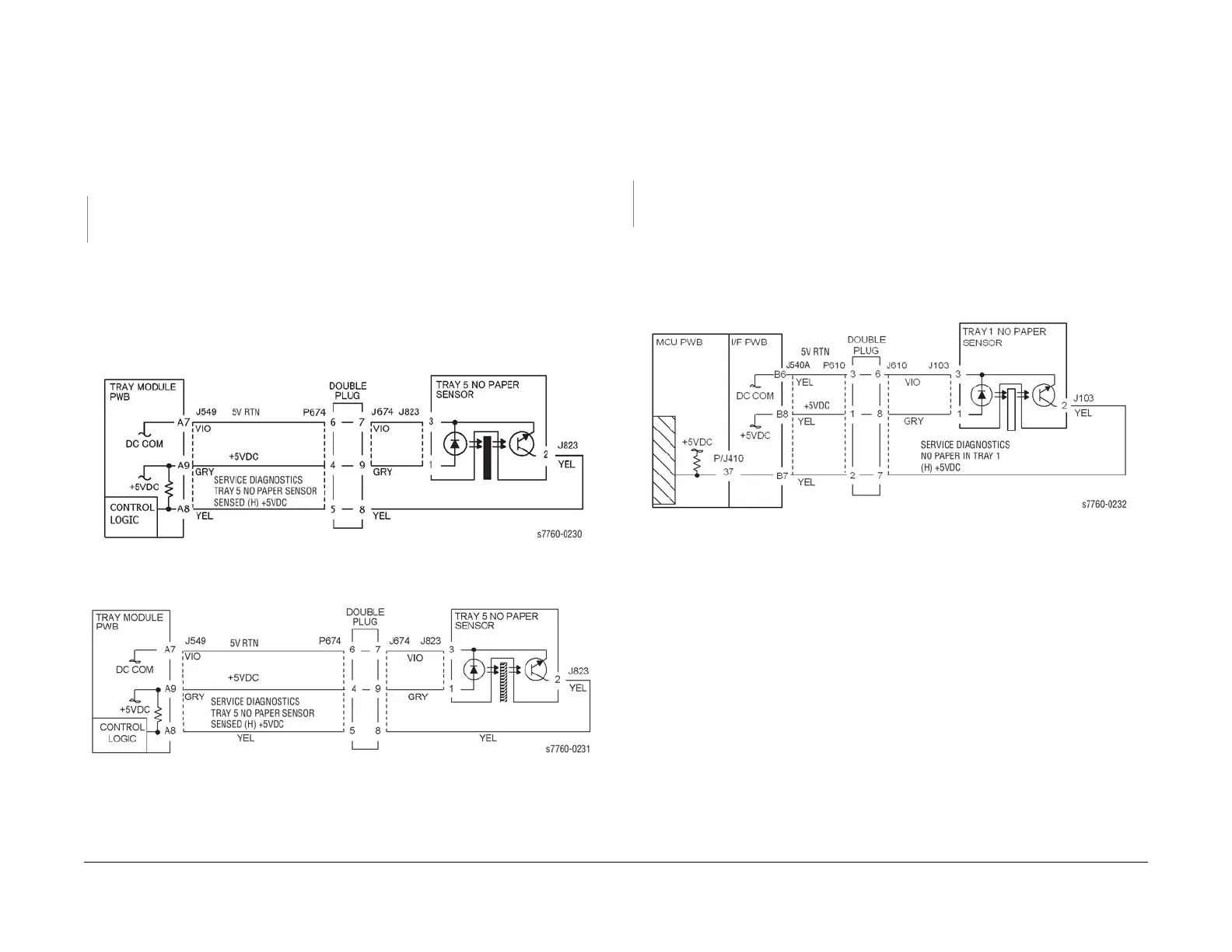
Check the circuit of the Tray 5 No Paper Sensor (Figure 1 - TTM or Figure 2 - 3TM). Refer
to Section 6, Transmissive Sensor Procedure for troubleshooting procedure.
• Go to the 007-281 RAP (Tray Lift Failure) and check the circuit of the Tray 5 No Paper
Sensor (PL 2.4).
• Ensure that the connectors shown in the circuit diagram (Figure 1 - TTM or Figure 2 -
3TM) are securely connected and that the wires are not damaged.
• Replace the Tray 5 No Paper Sensor (PL 2.4).
• If the problem persists, replace the Tray Module PWB (PL 16.15 - TTM or PL 15.9 - 3TM).
Figure 1 003-953 Tray 5 No Paper Sensor (TTM)
Figure 2 003-953 Tray 5 No Paper Sensor (3TM)
003-954 Tray 1 (MPT) No Paper Sensor
Tray 1 (Bypass) no paper.
Procedure
Enter Service Diagnostics Menu: Printer Menu > Troubleshooting > Service Tools > Printer
Status Page > hold the Up and Down buttons simultaneously > Run Service Diagnostics >
OK. Actuate the Tray 1 (MPT) No Paper Sensor (PL 2.12). The display changes.
YN
Check the circuit of the Tray 1 (MPT) No Paper Sensor (Figure 1). Refer to Section 6,
Transmissive Sensor Procedure for troubleshooting procedure.
• Ensure that the connectors shown in the circuit diagram (Figure 1) are securely con-
nected and that the wires are not damaged.
• Replace the Tray 1 No Paper Sensor (PL 2.12).
• If the problem persists, replace the Engine Control Board (MCU PWB) (PL 13.1).
Figure 1 003-954 Tray 1 (MPT) No Paper Sensor

















 To Next Page