January 2010
2-35
Phaser 7760 Color Laser Printer
004-341
Status Indicator RAP’s
Revised
004-341 Controller Logic Fail or Flash ROM Read Write Fail
Engine Control Board (MCU PWB) cannot detect INTLK +5 VDC or Flash ROM operation
failed.
Troubleshooting References
Troubleshooting Procedure
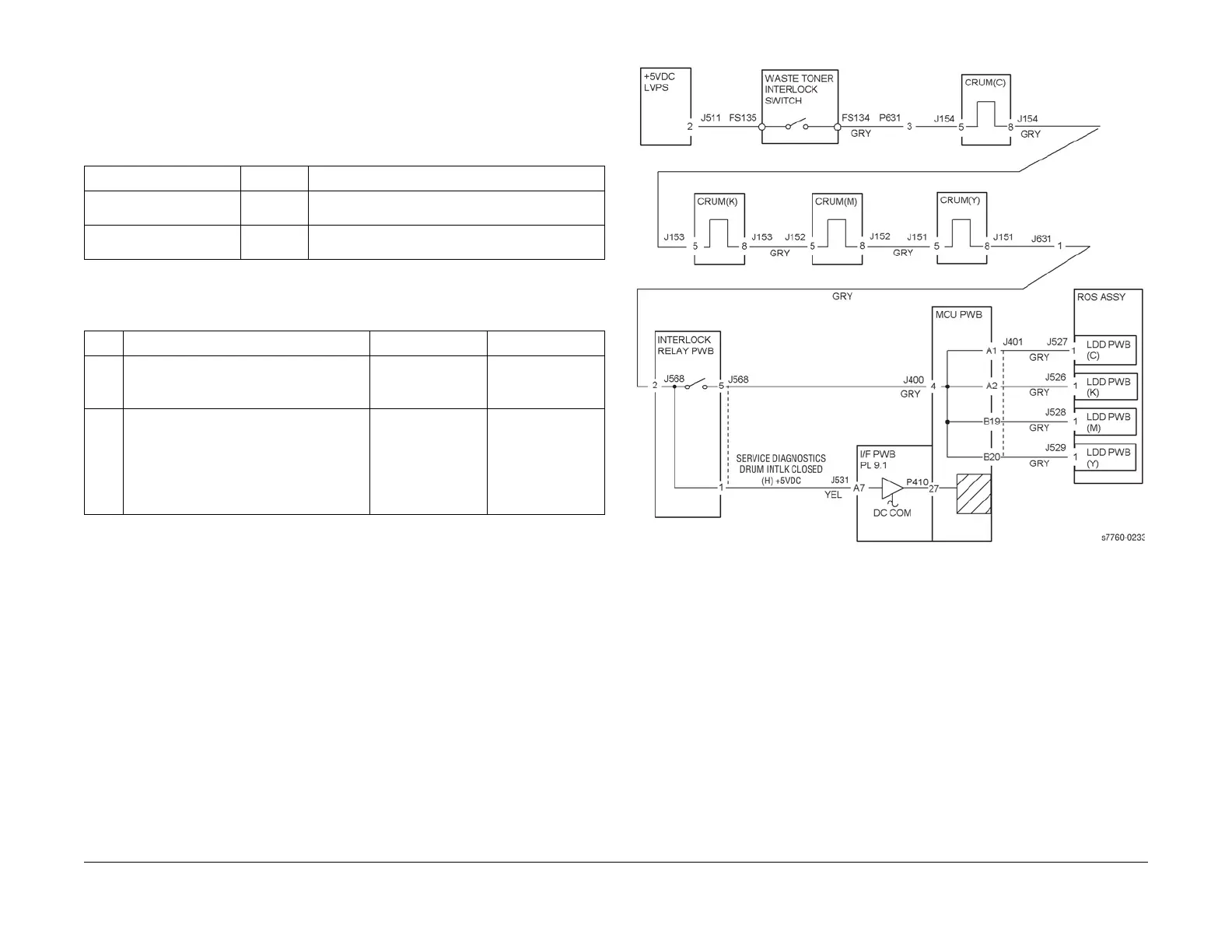
Figure 1 004-341 Printer Logic Failure
Table 1 References
Applicable Parts Parts List Wiring and Plug/Jack References
Engine Control Board
(MCU PWB)
PL 13.1 Section 7, Engine Control Board (MCU PWB) Plug/
Jack Locations - Figure 15
Image Processor Board PL 13.1 Section 7 - Translator/Bridge PWB’s Plug/Jack Loca-
tions - Figure 14
Table 2 Procedure
Step Actions and Questions Yes No
1 1. Cycle power to the printer to clear the
error.
2. Did the error clear?
Complete. Go to step 2.
2 1. Reconnect all the wiring harness con-
nectors for the Engine Control Board
and the Image Processor Board.
2. Check the Interlock voltage.
3. Is the voltage +5VDC?
Reset NVRAM
(refer to Resetting
NVRAM).
Replace the Engine
Control Board
(MCU PWB) (REP
1.2) or the Image
Processor Board
(REP 1.12).

















 To Next Page