January 2010
2-60
Phaser 7760 Color Laser Printer
006-380
Revised
Status Indicator RAP’s
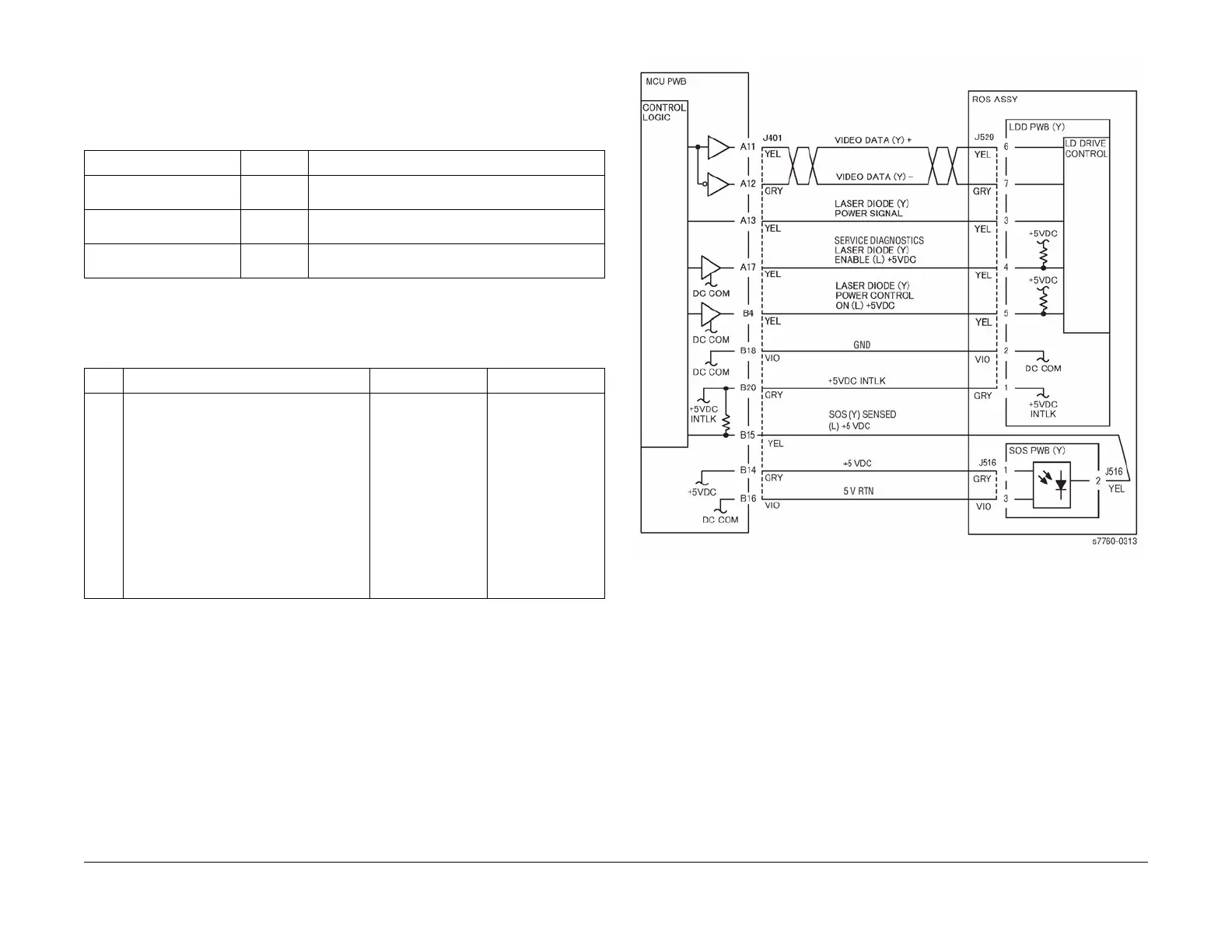
006-380 ROS SOS Y, M, C, K Length Fail
ROS SOS Length Failure for Y, M, C, and K.
Troubleshooting References
Troubleshooting Procedure
Figure 1 006-380 ROS SOS Y
Table 1 References
Applicable Parts Parts List Wiring and Plug/Jack References
Engine Control Board
(MCU PWB)
PL 13.1 Section 7, Engine Control Board (MCU PWB) Plug/
Jack Locations - Figure 15
Laser Assembly PL 3.1 Section 7, ROS Assembly Plug/Jack Locations - Fig-
ure 10
Section 7, Xerographic Plug/Jack Locations - Figure
1
Table 2 Procedure
Step Actions and Questions Yes No
1 1. Remove the Rear Cover.
2. Disconnect P401 and P402 from the
Engine Control Board.
3. Carefully reinsert the plugs into their
join socket and firmly seat them.
4. Did this fix the problem?
Complete. Replace the Laser
Unit (REP 6.1).
(You must perform
the RegiCon Adjust-
ment ADJ 9.10
(Section 4) after
replacing the Laser
Unit.)
If the problem per-
sists, replace the
Engine Control
Board (MCU PWB)
(REP 1.2).





 To Next Page