Configuration Guide
Stratus OCT User Manual PN 2660021134133 A
B-18
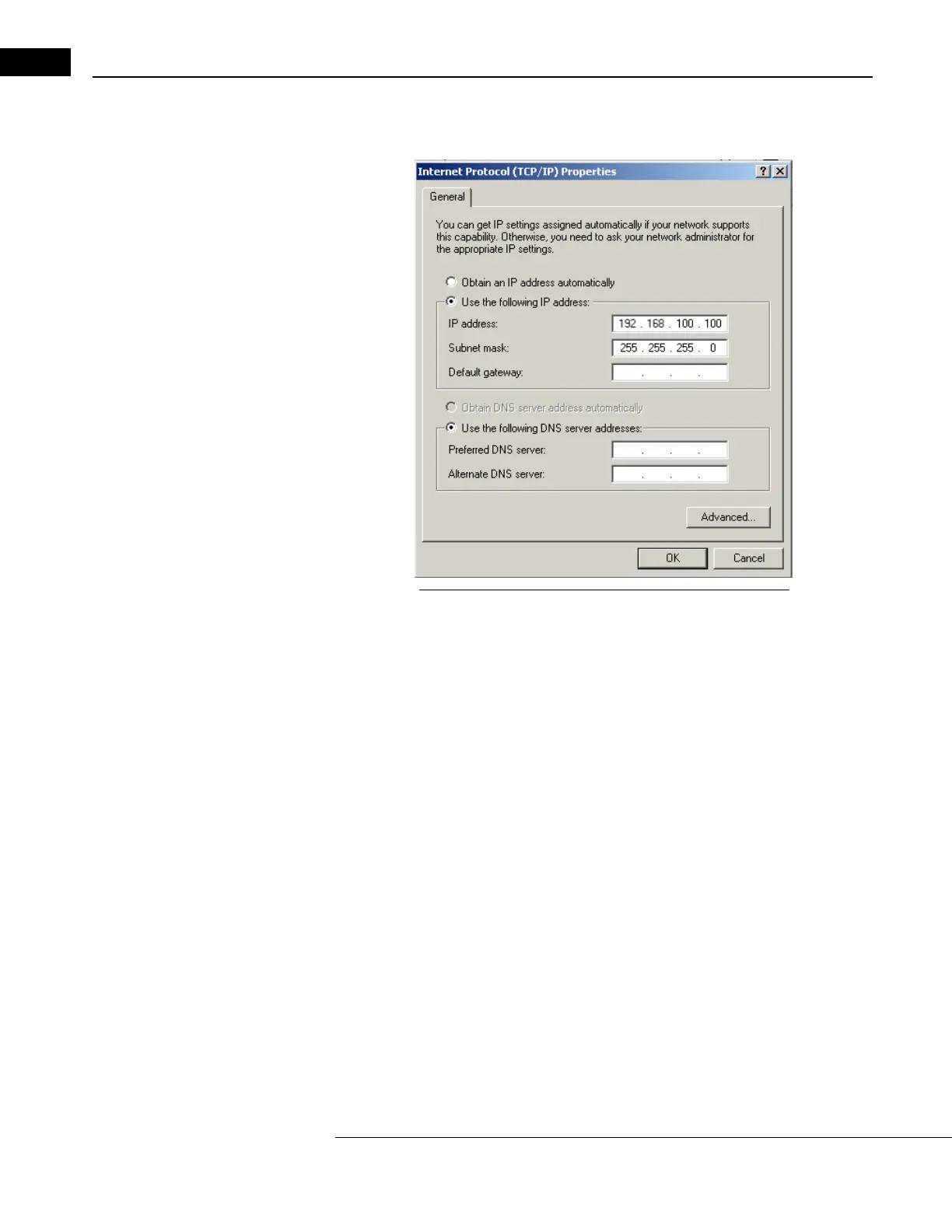
3. Double-click Internet Protocol (TCP/IP) in the component list. The Internet Protocol
(TCP/IP) Properties dialog appears (Figure B-19).
Figure B-19 Internet Protocol (TCP/IP) Properties Dialog
4. Select the Use the following IP address radio button, and then type in the IP address.
Note: The first three parts of the Stratus OCT IP address must match what is used on
the review station PC. The fourth part must be a number between 2 and 255 that is
unique to this system among all devices on the same network. In the example in
Figure B-19, the IP address is 1
92.168.100.100. A compatible IP address on the
review station PC would be 1
92.168.100.101.
5. Configure the Subnet mask as in Figure B-19. It should read 25
5.255.255.0. It must
be the same as on the review station PC.
6. Click OK to save yo
ur changes and close the Internet Protocol (TCP/IP) Properties
dialog. Click OK again to save changes and close the Local Area Connection
Properties dialog.
Note: The system may prompt you that the computer must be restarted for the
changes to take effect. Restart the computer if so prompted.



 To Next Page