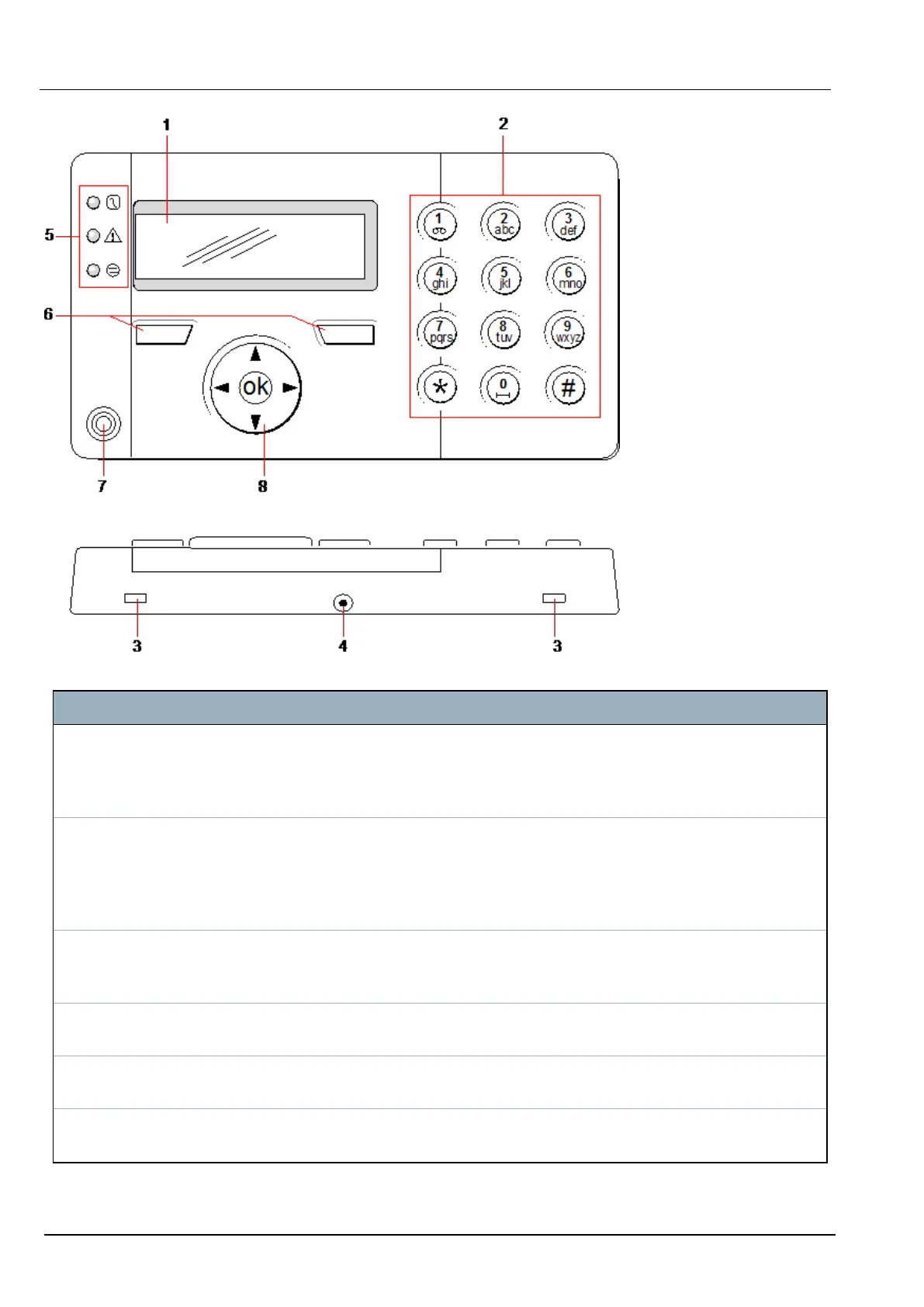
LCD keypad
Number Name Description
1 LCD display The keypad display (2 lines x 16 characters) shows all alert and warning
messages and provides a visual interface for programming the system (engineer
programming only). The display can be adjusted for contrast and under which
conditions the backlight comes on.
2 Alphanumeric
keys
Alphanumeric keypad allow for both text and numeric data entry during
programming. Alphabetic characters are selected by applying the appropriate
number of key presses. To switch between upper and lower case characters,
press the hash (#) key. To enter a numeric digit, hold down the appropriate key
for 2 seconds.
3 Leverage
access tabs
The leverage access tabs provide access to the keypad back assembly clips.
Users can unhinge these clips from the front assembly by inserting a 5mm
screwdriver into the recesses and pushing gently.
4 Back assembly
securing screw
This screw secures the front and back assemblies on the keypad. This screw
must be removed to open the keypad.
5 LED status
indicators
The LED status indicators provide information on the current status of the system
as detailed in the table below.
6 Soft function
keys
The left and right soft function keys are context sensitive keys to navigate through
menus/programming.
SPC42/52/53/63 – Installation & Configuration Manual Keypad user interface
© Vanderbilt 2023 53 I-200572
08.12.2023



 To Next Page