Enrol a WPAN personal alarm button
To enrol the WPAN and assign it to a User(n):
1. Select USERS > EDIT > USER(n) > RF FOB > ENABLED.
The keypad displays the ADD screen with a flashing ENROL DEVICE message.
2. On the WPAN, press and hold the button.
The LEDs on the fob light in the following pattern: Red lights for 3 seconds, then no LED, then
Red lights for 1 second, and then Green lights for 1 second. The WPAN is assigned to User
(n).
Disable a WPAN personal alarm button
To disable the WPAN:
Select USERS > EDIT > USER(n) > RF FOB > DISABLED.
A message appears on-screen saying UPDATED.
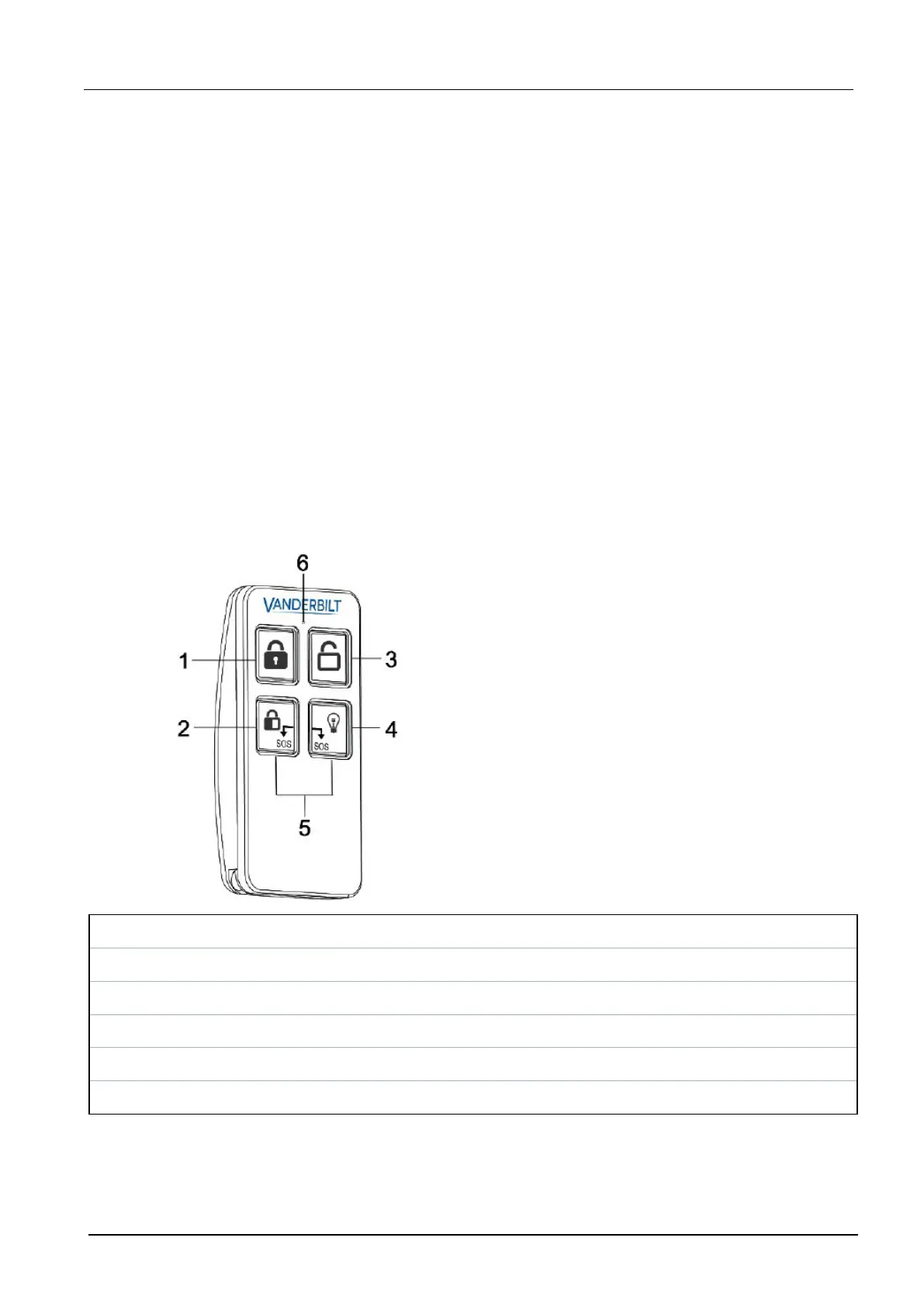
14.9.2.6 WRMT remote control
The WRMT 4-button Remote is a device which allows a user to remotely operate the SPC system.
The device supports UNSET, FULLSET, and PARTSET (A only) functionality, as well as the
operation of defined outputs and an SOS feature.
1 Fullset
2 Partset (A only)
3 Unset
4 Output
5 Panic/SOS
6 LED
SPC42/52/53/63 – Installation & Configuration Manual Engineer programming via the keypad
© Vanderbilt 2023 98 I-200572
08.12.2023



 To Next Page