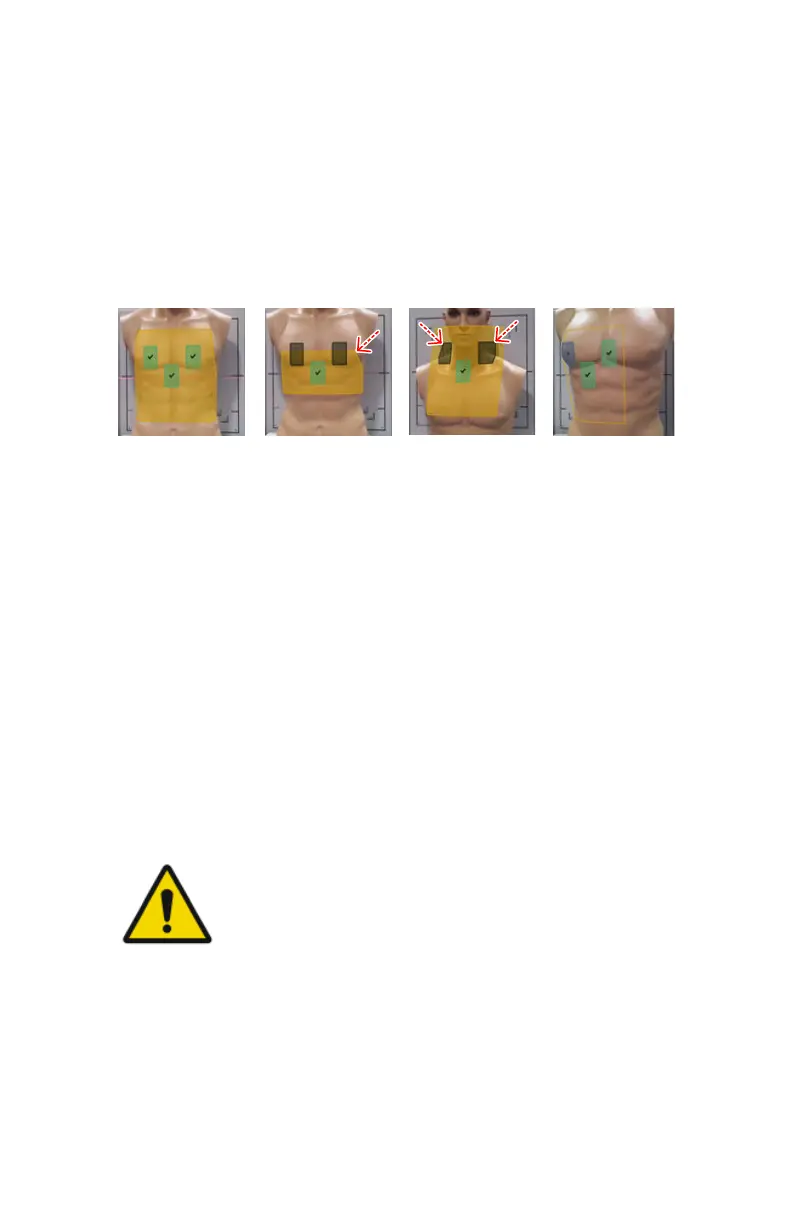
Previewing the position of the collimation area and the AEC
fields
The collimation area is visualized on the live camera image on the NX
workstation as a semi-transparant yellow area that is virtually projected on
the surface of the patient's body.
The active AEC fields are visualized on the live camera image on the NX
workstation as semi-transparant green rectangles, indicating the position of
the AEC fields.
1.
All AEC fields are colored green.
2.
The yellow collimation area is blinking.
One or more of the active AEC fields are colored gray instead of green.
The gray AEC fields are outside of the collimation area.
3.
One or more of the active AEC fields are blinking and colored gray instead
of green.
The gray AEC fields are not fully covered by a body part.
4.
The collimation area is visualized as an outline without the yellow
shading.
One or more of the AEC fields are visualized with a question mark over
them.
The 3D depth sensing camera fails to get a consistent reading in this area.
Figure 52: Preview of collimation area and AEC fields
WARNING:
An uncovered AEC cell may not be detected if the patient is lying
on a matrass.
Related Links
Collimator camera on page 37
DR 600 | Software Console and Tube Head Display | 129
3261K EN 20210708 0808



 To Next Page