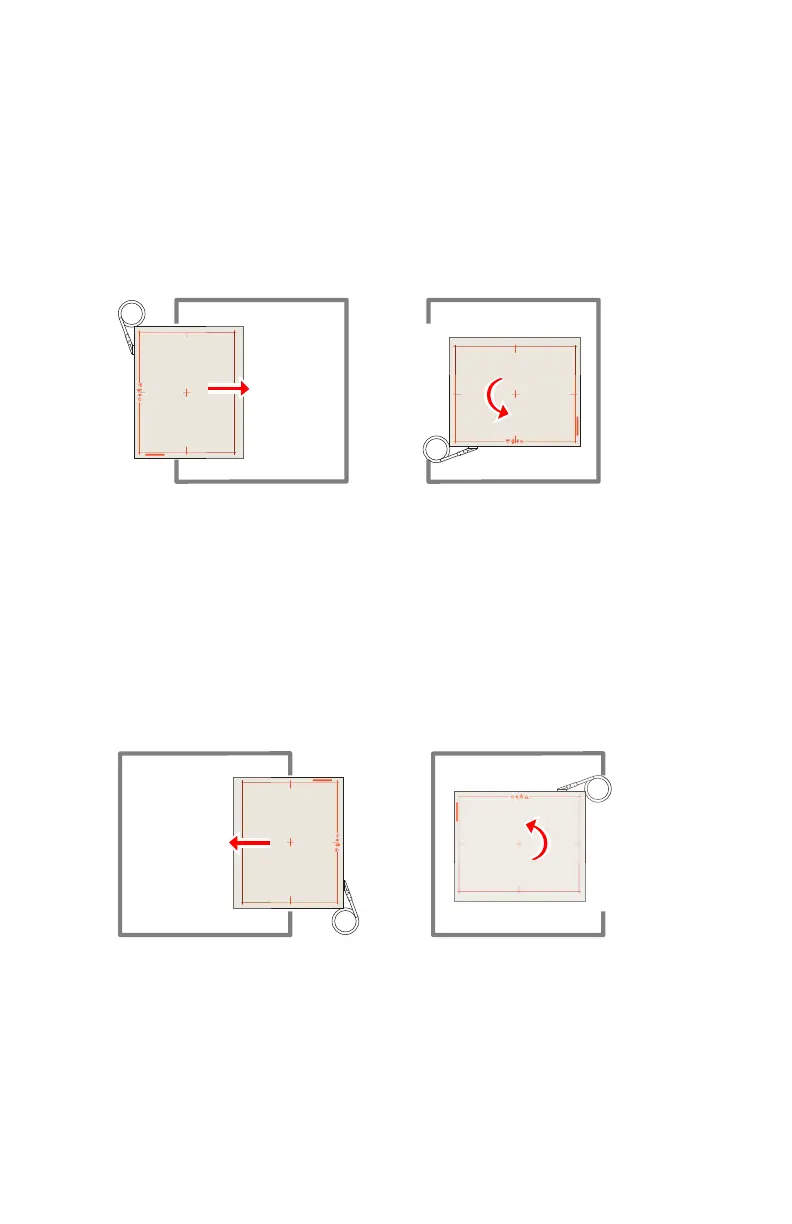
Orientation in the radiographic wall stand left loading
• To use the detector in portrait orientation, insert the detector in portrait
mode with the cable at upper left hand side.
• To use the detector in landscape orientation:
1. Insert the detector in portrait mode with the cable at upper left hand
side.
2. Rotate the detector in the bucky.
Figure 112: Landscape orientation in the radiographic wall stand left loading
Orientation in the radiographic wall stand right loading
• To use the detector portrait orientation, insert the detector in portrait
mode with the cable at bottom right hand side.
• To use the detector in landscape orientation:
1. Insert the detector in portrait mode with the cable at bottom right
hand side.
2. Rotate the detector in the bucky.
Figure 113: Landscape orientation in the radiographic wall stand right loading
Using DX-D 45C, DX-D 45G, XD 10, XD⁺10 only outside the
bucky
Use the DX-D 45C, DX-D 45G, XD 10 and XD⁺10 detector only for free
exposures. Do not put the detector inside the bucky of the radiographic table
or the radiographic wall stand.
DR 600 | Bucky | 237
3261K EN 20210708 0808



 To Next Page