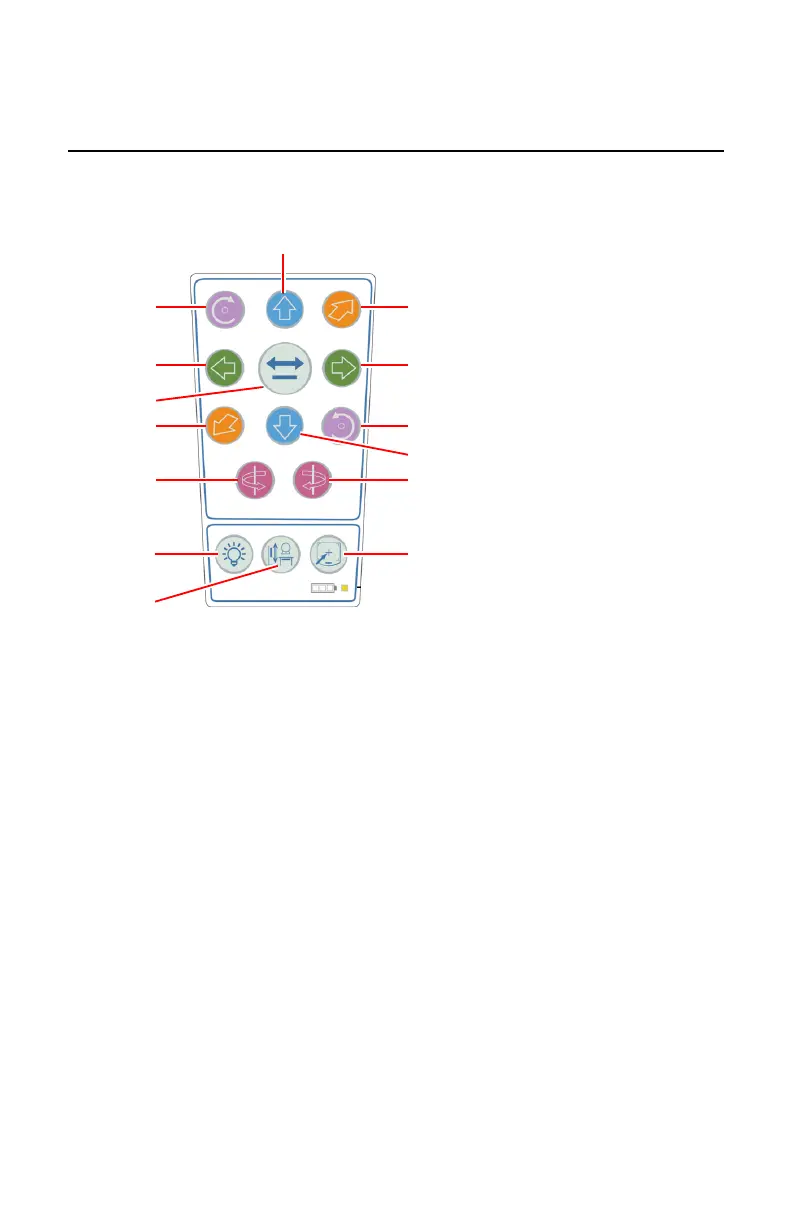
Positioning the X-Ray Tube using the Remote Control
To activate a movement, press and hold the button on the remote control.
To stop the movement and activate the brake, release the button.
1.
X-ray tube angle (alpha), right
2.
X-ray tube angle (alpha), left
3.
X-ray tube rotation (beta), right
4.
X-ray tube rotation (beta), left
5.
Vertical axis movement, up
6.
Vertical axis movement, down
7.
Longitudinal axis movement, right
8.
Longitudinal axis movement, left
9.
Transversal axis movement, front
10.
Transversal axis movement, back
11.
Automatic positioning button
12.
Switch on the collimator light
13.
Activate tracking
Deactivate tracking
14.
Activate automatic centering
Deactivate automatic centering
Figure 80: Remote Control for positioning, tracking and automatic centering
186 | DR 600 | Ceiling Suspension
3261K EN 20210708 0808



 To Next Page