Chapter 2 System Overview
Part Number: 0160-6411, Rev A, 02/2019 Page 45 of 314
Software Release: cOS 5.00
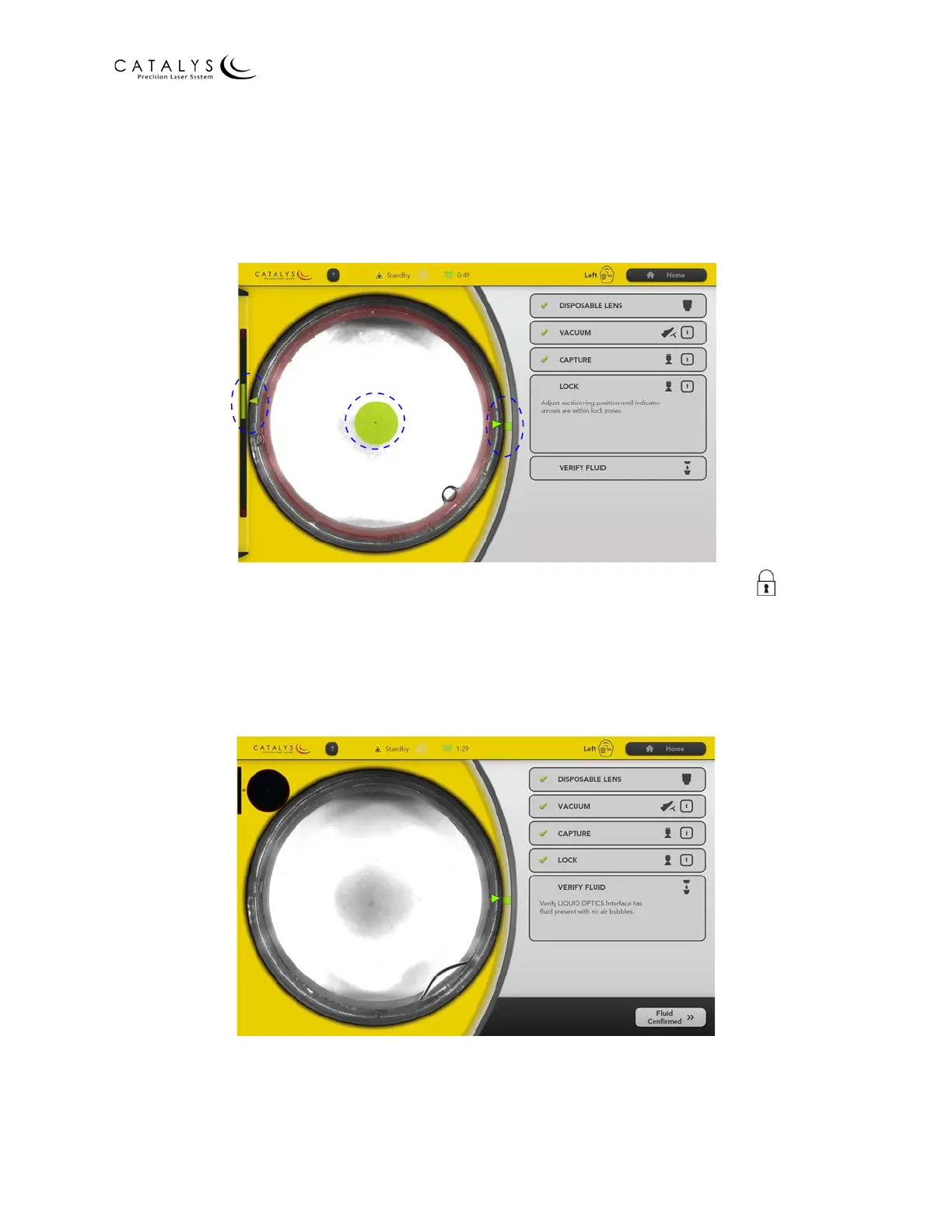
8. When the system detects that the suction ring has been captured, the Lock panel opens.
As instructed in the Lock panel, adjust the position of the suction ring until all three
indicators (i.e., the vertical green bar on the left; the circular green area over the video;
and the vertical green bar on the right) are within their respective Lock Zones, as shown
in the following figure.
Figure 2.17 Lock Panel
9. When the three indicators are within their respective Lock Zones, press the (Lock)
I
(on) button on the docking keypad.
10. When the system detects that the lock has been secured, the Verify Fluid panel opens.
As instructed in the Verify Fluid panel, verify that the LIQUID OPTICS™ Interface is
completely filled with fluid and that no air bubbles are present.
Figure 2.18 Verify Fluid Panel
11. After verifying the fluid, press the FLUID CONFIRMED button to go to the Verify Scan
Screen and initiate INTEGRAL GUIDANCE System imaging.



 To Next Page