4-6 TD-SCDMA/HSPA+ Pass/Fail Measurements TD-SCDMA/HSPA+ Signal Analyzer
4-12 PN: 10580-00234 Rev. T 3GPP MG
4-6 TD-SCDMA/HSPA+ Pass/Fail Measurements
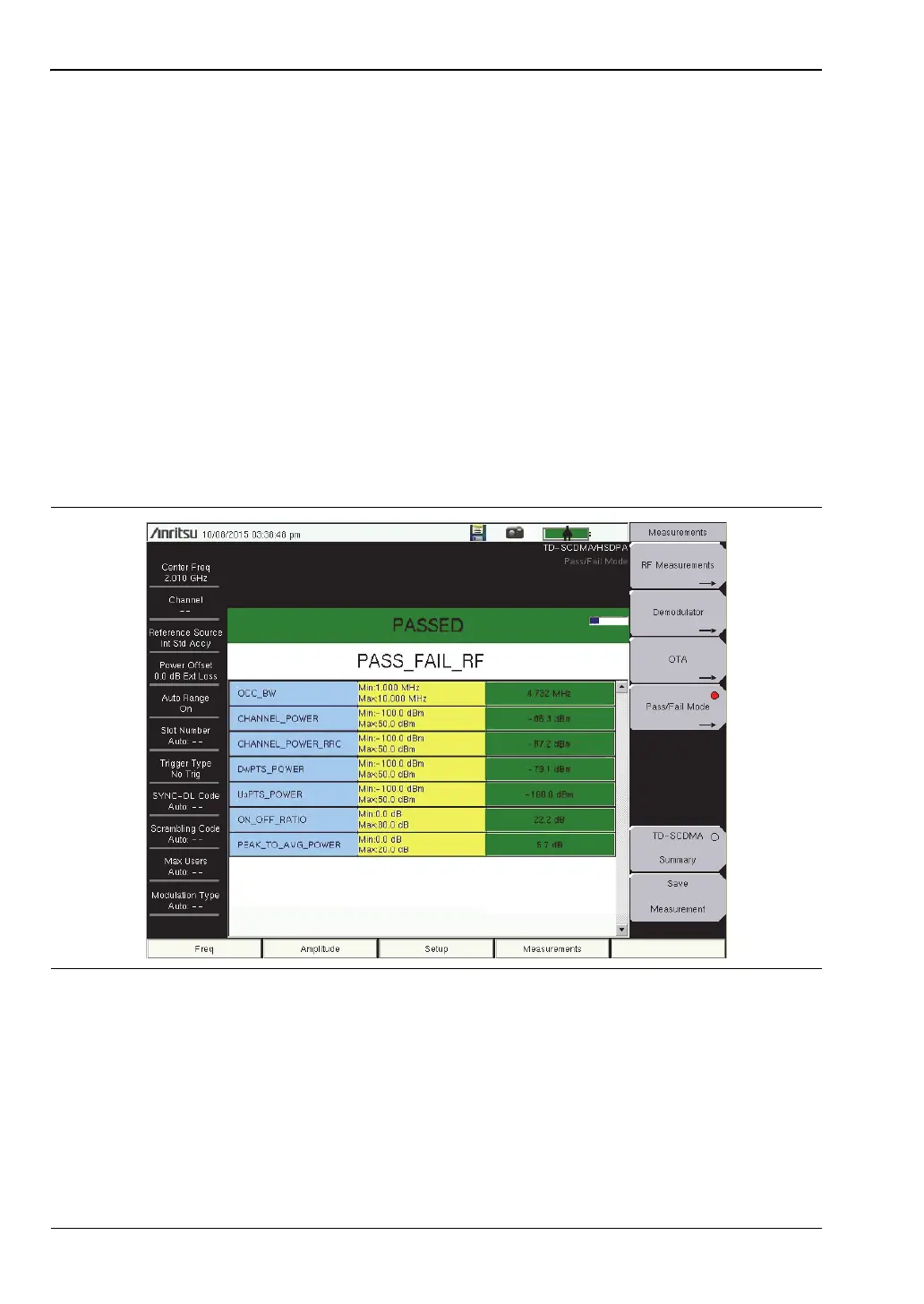
The following is an example of a Pass/Fail measurement.
Measurement Setup
Refer to the User Guide for selecting the TD-SCDMA/HSPA+ Signal Analyzer mode.
1. Press the Measurements main menu key.
2. Press the Pass/Fail submenu key to activate the test.
3. Press the Pass/Fail submenu key again to display the Pass/Fail menu.
4. Press the Select Pass/Fail Test submenu key. Use the arrow keys or the rotary knob to
highlight the desired test mode, then press the Select Test submenu key or the Enter
key.
5. Press the Reset submenu key to begin a new pass/fail test measurement (see
Figure 4-7).
6. Press the Back submenu key to return to the Measurements menu.
Figure 4-7. TD-SCDMA/HSPA+ Pass/Fail Measurements














 To Next Page