CPS100 SERIES OPERATION MANUAL
SECTION 6:
Front Panel Operation
Entire Contents Copyright 2018 by Adaptive Power Systems, Inc. (APS) • All Rights Reserved • No reproduction without written authorization from APS.
APS CPS100 Series Power Source Operation Manual Page 146 of 231
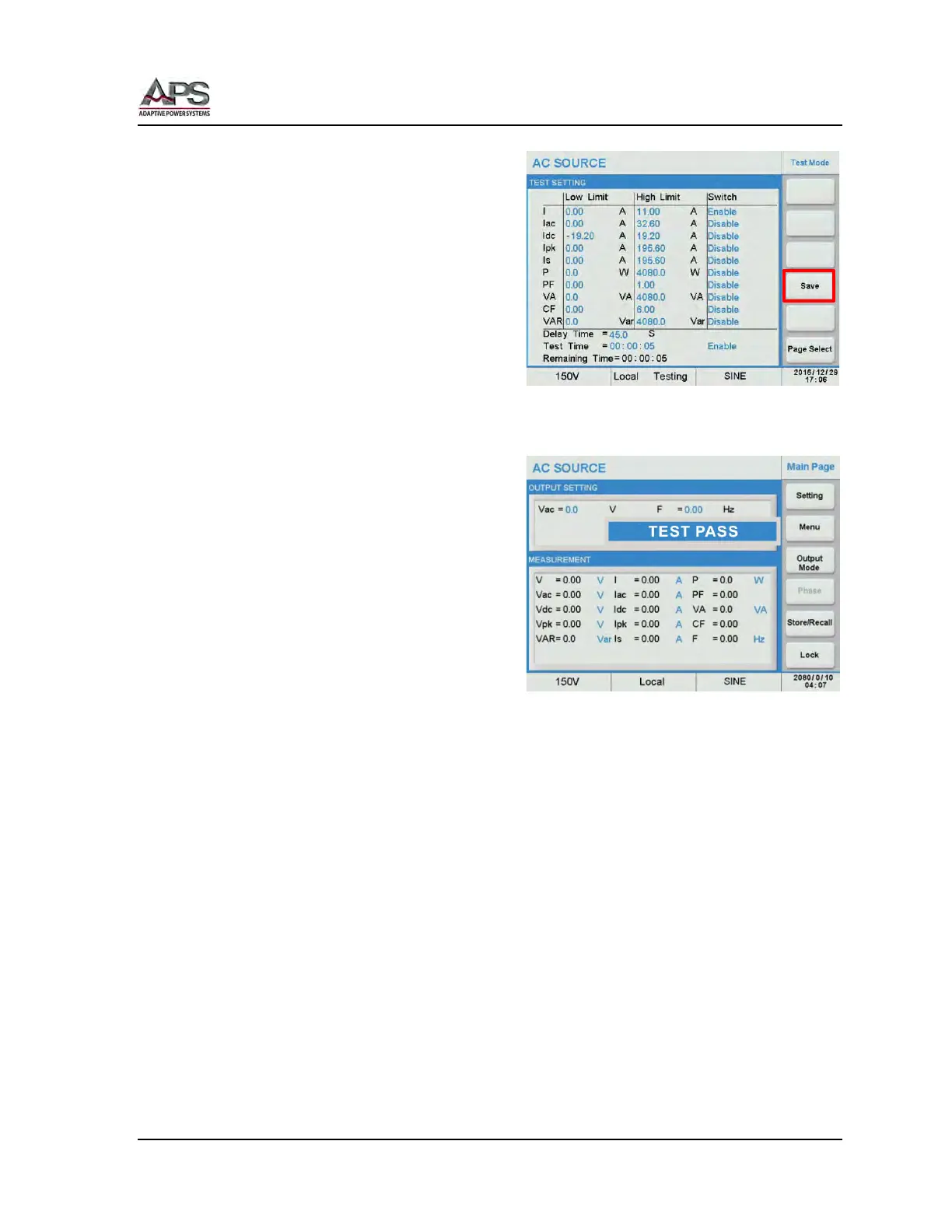
When done, press the Save soft key to save
the transient settings to non-volatile
memory.
Note: If the setting is not saved, it will be
lost when the power source is turned
off.
6.9.5.2 Running Limit Tests
Return to the Test Mode menu by pressing
the [Esc] key.
To run a limit test, return the MAIN screen
and set the output voltage and frequency as
needed. Once the output is turned on, the
measurements will start and compare
against the limits set for the period of time
programmed. A PASS or FAIL Result will be
displayed when the total time period is over.
Note: If the optional Remote I/O & Parallel Multiphase Link (option AUX I/O) is installed,
the result of the limit test and the output relay state (ON/OFF) can be detected from
relay 1 ~ 3.



 To Next Page